
AWS security basics means protecting your account, identities, and data using the layered controls AWS provides, starting with three actions: lock down the root user with MFA, enable CloudTrail and GuardDuty for visibility, and create a scoped admin identity instead of operating as root. Everything else in your security program builds on this foundation. Security is never a one-time setup; it’s an ongoing, layered practice you refine as your environment grows.
TL;DR:
- Lock down the root user with MFA and disable root access keys before implementing IAM policies or network controls.
- Use roles and federation for human access, and enforce MFA on all privileged identities to minimize the risk of credential compromise.
- Keep security group rules tight, avoid exposing resources openly, and layer perimeter protections like AWS WAF, Shield, and Network Firewall for public-facing services.
- Encrypt data at rest and in transit with KMS or S3 default encryption, and restrict public access and versioning to prevent accidental data leaks.
- Enable CloudTrail, GuardDuty, and VPC Flow Logs across all regions early, and establish an incident response plan to automate detection, containment, and recovery.
Table of Contents
- Understanding AWS Security Basics: The Shared Responsibility Model
- How Do You Secure Your AWS Account First?
- What Does Least Privilege Actually Look Like in IAM?
- Which Network Controls Protect Your AWS Resources?
- Data Protection: Encryption, KMS, and S3 Hardening
- Detection and Monitoring: Your Minimum Viable Security Stack
- Building an Incident Response Plan and Security Maturity Roadmap
- Your 30 to 90 Day AWS Security Roadmap
- Learning AWS Security Hands-On
- Turn AWS Security Basics Into a Cybersecurity Career
- Sources
Understanding AWS Security Basics: The Shared Responsibility Model
AWS operates on a division of labor known as the Shared Responsibility Model: AWS secures “the cloud” (the physical data centers, hardware, and core infrastructure), while you secure what’s “in the cloud” (your data, configurations, and access controls). That boundary isn’t fixed. It shifts depending on the service you use. With AWS Lambda, for example, AWS manages the runtime and execution environment entirely, but you’re still on the hook for your function code and how you configure permissions around it. Run a traditional EC2 instance instead, and your responsibility expands to include the operating system, patching, and network configuration.
AWS organizes the practical work of “in the cloud” security into seven core areas: security foundations, identity and access management, detection, infrastructure protection, data protection, incident response, and application security. Each area maps to a distinct set of decisions and tools, and beginners often try to master all seven simultaneously. Don’t. Learning them as separate domains, in roughly the order listed, makes the material far more digestible.
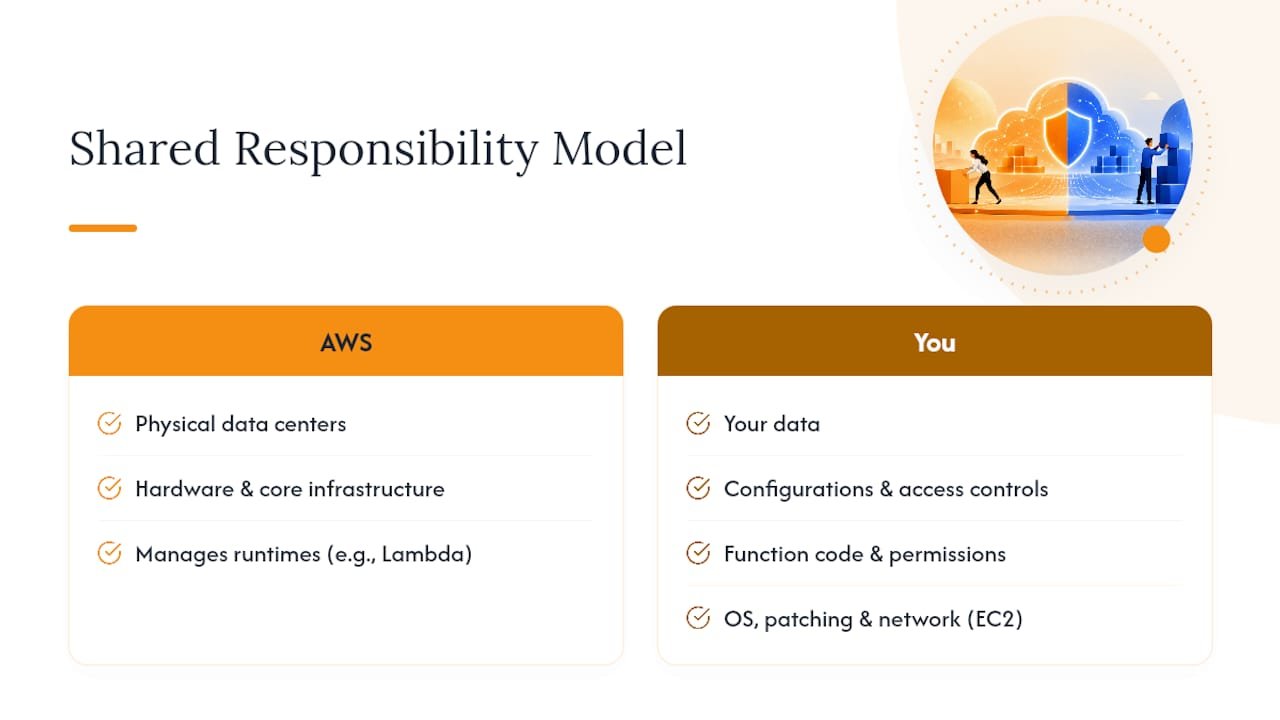
Here’s why this framing matters day to day: when something goes wrong, the first question is always “whose job was this?” If a misconfigured S3 bucket exposes data, that’s on you, not AWS. If a hardware failure causes downtime, that’s on AWS. Knowing where that line falls changes how you design systems, whom you contact during an incident, and which controls you actually need to configure yourself.
How Do You Secure Your AWS Account First?
Before touching IAM policies or network diagrams, lock down the account itself. The root user has unrestricted access to everything, including billing, and it should never be used for daily work.
- Enable MFA on the root user immediately. A hardware security key or authenticator app both work; avoid SMS-based MFA where possible since it’s more vulnerable to interception.
- Delete or deactivate root access keys. AWS recommends reserving root exclusively for emergency tasks like closing the account, never for programmatic access.
- Create an IAM admin user or IAM Identity Center identity for everyday administrative work, and store root credentials and a written emergency access procedure somewhere secure and offline.
- Set security contacts in your account settings so AWS can reach you directly about abuse reports or compromised credentials, and configure billing alarms to flag unusual spending, which is often the first sign of a compromised account.
- Consider AWS Organizations once you’re managing more than one workload. Separating management, logging, and production into distinct accounts limits the blast radius of any single mistake, and Control Tower can bootstrap that structure with logging and guardrails already built in.
- Restrict unused Regions if your workloads only run in one or two. Fewer active Regions means fewer places an attacker can quietly spin up resources.
Pro Tip: Test your root recovery procedure once, in a low-stakes moment, before you actually need it. Discovering your MFA device is unreachable during a real emergency is a bad time to learn that lesson.
What Does Least Privilege Actually Look Like in IAM?
Identity and access management is the backbone of everyday AWS security. IAM users, groups, and roles determine who can do what, and getting the permission model right prevents far more incidents than any firewall rule.

Roles matter more than most beginners realize. A role is a temporary identity that services or people can assume, and it’s the preferred way to grant access because the credentials expire automatically instead of sitting around indefinitely like a static access key. Identity has effectively become the new security perimeter in cloud environments, which is why getting this piece right pays off disproportionately.
A practical way to build permissions without getting stuck:
- Start with AWS managed policies to get something working quickly.
- Narrow those policies into scoped, custom versions once you understand what access is actually being used.
- Use roles, not long-lived access keys, for anything a service or application needs to do.
- Adopt IAM Identity Center or federation for human users instead of creating individual IAM users for every person.
- Run a credential report periodically to catch unused access keys, stale passwords, and accounts missing MFA.
- Enforce MFA on every privileged identity, no exceptions.
Pro Tip: Rotate any access key you can’t explain the purpose of. If you don’t know what it’s for, an attacker who finds it certainly won’t ask permission either.
Which Network Controls Protect Your AWS Resources?
A Virtual Private Cloud (VPC) is your isolated network space inside AWS, divided into subnets and controlled by route tables that determine where traffic can flow. Public subnets have a route to the internet; private subnets don’t, which is exactly where your databases and internal services belong.
Two layers of traffic filtering work together but behave differently:
- Security groups are stateful and attached to individual resources like EC2 instances, meaning return traffic is automatically allowed once you permit the initial request.
- Network ACLs (NACLs) are stateless and apply at the subnet level, requiring explicit rules for both inbound and outbound traffic.
- For EC2 and RDS, keep security group rules tight and specific rather than opening broad IP ranges.
- Replace direct SSH bastion access with Systems Manager Session Manager where practical, which removes the need for an open inbound port entirely.
For anything public-facing, layer on perimeter services. AWS WAF filters malicious web requests before they reach your application, AWS Network Firewall adds broader traffic inspection across a VPC, and AWS Shield protects against distributed denial-of-service attacks. The single most common networking mistake beginners make is leaving a security group rule open to 0.0.0.0/0 on a sensitive port. Narrow it, and route as much traffic as possible through private subnets with NAT gateways instead of exposing resources directly.
Data Protection: Encryption, KMS, and S3 Hardening
Encrypt data both at rest and in transit as a default, not an afterthought. Use TLS for any endpoint accepting traffic, and turn on default encryption for S3 buckets and EBS volumes wherever it’s supported.

AWS Key Management Service (KMS) is the standard tool for managing the encryption keys behind this. Customer-managed keys (CMKs) give you control over key policies, rotation schedules, and who can use a given key, which matters once compliance requirements enter the picture. For most beginner workloads, AWS-managed keys are a reasonable starting point until you need that finer control.
S3 buckets deserve special attention since they’re a frequent source of accidental data exposure. Run through this checklist:
- Block public access at the account or organization level, not just per bucket.
- Attach bucket policies that enforce least-privilege access rather than relying on default settings.
- Enable versioning, and add MFA delete for buckets holding sensitive or irreplaceable data.
- Use KMS-backed encryption for buckets containing anything regulated or confidential.
Detection and Monitoring: Your Minimum Viable Security Stack
You cannot respond to what you cannot see, which makes detection the highest-leverage investment a beginner can make early on.
- Enable CloudTrail across every account and Region, and route those logs to a centralized, access-restricted logging account so an attacker can’t cover their tracks by deleting logs in the account they’ve compromised.
- Turn on Amazon GuardDuty, which analyzes CloudTrail, VPC Flow Logs, and DNS logs to flag suspicious activity automatically, and aggregate its findings in AWS Security Hub for a single prioritized view across accounts.
- Collect VPC Flow Logs and pipe them into CloudWatch or EventBridge to build alerts for patterns that matter to you, like traffic spikes or connections to known-bad IP ranges.
- Route notifications to SNS or a chat tool your team already monitors, since an alert nobody sees is functionally the same as no alert at all.
The chain that ties this together: GuardDuty flags a finding, Security Hub prioritizes it alongside everything else, EventBridge routes it, and from there it all triggers automated remediation or lands in front of a human for triage.
Building an Incident Response Plan and Security Maturity Roadmap
Even a lightweight incident response plan beats improvising during a live event. The basic sequence: detect the issue, contain it by isolating the affected account or resource, eradicate the root cause, recover normal operations, and review what happened afterward.
Automation makes this repeatable. Pairing EventBridge with Lambda, or adopting a framework like AWS SHARR, lets you handle common incidents (a leaked key, an open security group) without waiting on a human to click through a runbook at 2 a.m. Enriching alerts with context before they reach a person also cuts triage time significantly.
AWS frames security maturity as a Start, Advance, Excel progression: tackle the highest-risk, lowest-effort fixes first, then layer in automation and more advanced capabilities once the fundamentals are solid. Trying to skip straight to “excel” without the foundation in place is how beginners burn out or leave real gaps unaddressed. For readers who want to formalize this further, a dedicated incident response framework is worth studying once the basics are in place.
Your 30 to 90 Day AWS Security Roadmap
A phased approach keeps security improvements moving without stalling your actual project work.
- Days 1 to 30: Harden root, enable MFA everywhere it matters, turn on CloudTrail and GuardDuty, and block public access on every S3 bucket.
- Days 31 to 60: Set up AWS Organizations, aggregate findings in Security Hub, and start narrowing IAM policies toward least privilege.
- Days 61 to 90: Automate your most common remediations, enable Inspector or Macie if your workloads warrant it, and run a tabletop incident response drill with your team.
Pro Tip: Don’t wait for perfect IAM policies before turning on detection. Enable GuardDuty in week one and refine permissions in parallel; a coherent but limited signal beats no signal while you polish policies for months.
Learning AWS Security Hands-On
Reading about AWS security only gets you so far. Set up a sandbox account, work through the 30 to 90 day roadmap yourself, and build small projects that mirror real scenarios like locking down a public S3 bucket or configuring GuardDuty alerts. Self-study works well for early fundamentals, but structured, hands-on training closes the gap faster when you’re aiming for a certification or a career change, since labs force you to apply concepts under realistic conditions rather than just recognizing them on a page.
— Alden
Turn AWS Security Basics Into a Cybersecurity Career
Reading about IAM and GuardDuty is one thing. Building the muscle memory to configure them correctly under a proctor’s clock is another. Totalcyber’s hands-on labs put you inside real AWS environments where you harden accounts, chase down misconfigurations, and practice incident response the way you’d encounter them on the job, not just on a slide deck.
Our programs are built for beginners, career changers, and veterans who want a direct path from foundational cloud security concepts to job-ready skills, with live mentoring and certification prep for credentials like CompTIA Security+ woven into the curriculum. Whether you’re starting from zero or already comfortable with IT operations, there’s a track suited to where you’re standing right now. If you’re not sure what background you need before enrolling, our cybersecurity training explained guide breaks down course types and realistic outcomes so you can pick the right starting point and get moving.
Sources
For deeper technical detail, review AWS Security Essentials, the Well-Architected Security Pillar, and this third-party primer on shared responsibility. To build these skills hands-on, explore Total Cyber Academy’s training programs.