You need a practical working grasp of IP addressing, subnetting, core protocols, key network devices, segmentation, and monitoring, enough to map traffic, isolate an incident, and validate that a control actually works. That is the floor, not the ceiling, and how deep you go depends on the role you want.
A SOC analyst needs to read flow logs and firewall alerts fluently. A penetration tester needs to think like an attacker moving laterally through a flat network. A network security engineer needs to design segmentation that survives an audit. All three start from the same foundation.
- OSI and TCP/IP models, mapped to where security tools actually operate
- IP addressing, CIDR, and subnetting, including IPv6 blind spots
- Core protocols and ports (TCP, UDP, DNS, HTTP/S, DHCP, ICMP)
- Segmentation concepts: VLANs, microsegmentation, Zero Trust overlays
- Monitoring fundamentals: packet capture, flow logs, and SIEM correlation
Key Takeaways
Solid cybersecurity networking strategies depend on mastering IP addressing, core protocols, segmentation design, and layered monitoring, then practicing all four hands-on until they become instinct.
| Point | Details |
|---|---|
| Master the layered model | Map every alert to a specific OSI/TCP-IP layer before choosing which tool to investigate with. |
| Prioritize security-relevant protocols | Focus study time on DNS, HTTP/S, DHCP, and TCP/UDP, since these carry most attacker activity. |
| Treat subnetting as a security skill | Use CIDR knowledge to scope scans, size zones, and contain lateral movement. |
| Build segmentation with evidence | Keep rule exports, connectivity tests, and diagrams ready, since NIST SC-7(29) audits expect proof, not just VLAN names. |
| Practice with Totalcyber’s guided labs | Structured, instructor-led courses map each networking topic to real SOC and pentest lab tasks. |
Table of Contents
- Why Networking for Cybersecurity Starts With a Mental Model
- Which Protocols and Ports Actually Matter for Security Work
- Subnetting for Security: The Network Math Defenders Can’t Skip
- Network Devices and Where Traffic Flows
- Segmentation, VLANs, and Zero Trust: Proving Containment Works
- Core Network Security Controls and What Each One Actually Does
- Building Visibility: Packet Capture, Flow Logs, and SIEM
- Wireless Security and Remote Access: Where Attackers Get In First
- Common Network Attacks and the Defenses That Actually Stop Them
- How Much Networking Do You Actually Need? A Role-Based Learning Path
- Why Hands-On Networking Practice Changes How You Investigate
- Turn This Foundation Into a Certification and a Career Path
- Frequently Asked Questions
- Sources
Why Networking for Cybersecurity Starts With a Mental Model
Every security investigation begins with a map, and the OSI model is still the most useful one available. Cybersecurity professional networking knowledge starts here because every alert, every packet capture, and every firewall rule maps to a specific layer, and knowing which layer you’re looking at tells you what tool to reach for.
The bottom layers deal with wires, switches, and IP addresses. Layer 3 is where routing and IP addressing live, and it’s where you trace an attacker’s source or scope a subnet for a vulnerability scan. Layer 4 handles ports and protocols, TCP and UDP, and it’s where firewalls make most of their allow or deny decisions. Layer 7 is the application layer, where HTTP requests, DNS queries, and email traffic carry the actual payloads attackers weaponize.
Here’s how that plays out in real work. A SOC analyst reviewing an alert about a suspicious outbound connection checks Layer 3 first (what IP is this going to?), then Layer 4 (what port, what protocol?), then Layer 7 (what’s in the payload?). The OSI model breakdown from W3Schools lays out this layer-by-layer logic clearly, and it’s worth internalizing before you touch a single security tool. TCP/IP condenses these into four practical layers, but the security logic doesn’t change: work from the network layer up to the application layer, and you’ll rarely miss where an attack actually happened.
Which Protocols and Ports Actually Matter for Security Work
A short list of protocols accounts for most of the traffic you’ll analyze in any security role, and prioritizing them saves you from drowning in packet captures you don’t need to read.
- DNS (port 53): Attackers use it for reconnaissance and, increasingly, for data exfiltration hidden inside queries.
- HTTP/S (ports 80, 443): The majority of application-layer attacks, from SQL injection to credential theft, ride on these ports.
- DHCP (ports 67, 68): Misconfigured or rogue DHCP servers can redirect entire subnets to malicious gateways.
- ICMP: Useful for network health checks, but also abused for reconnaissance (ping sweeps) and covert tunneling.
- SSH (port 22) and SMTP (port 25): Common lateral movement and phishing vectors, respectively, and frequent targets for brute-force attempts.
Pro Tip: DNS over HTTPS (DoH) and DNS over TLS (DoT) encrypt DNS queries that used to be plainly visible to your monitoring tools. If your detection rules still assume DNS traffic sits unencrypted on port 53, you’ve got a blind spot that attackers can and do exploit to hide exfiltration.
TCP and UDP behave differently under attack, too. TCP’s handshake gives you connection state to track, which is why SYN flood detection depends on watching that handshake stall. UDP has no handshake at all, which is exactly why it’s the protocol of choice for amplification-based DDoS attacks.
Subnetting for Security: The Network Math Defenders Can’t Skip
Understanding CIDR notation and subnet boundaries is not academic exercise. It’s how you scope a vulnerability scan, trace an intrusion to its actual origin, and design segmentation that contains an attacker instead of handing them the whole network.
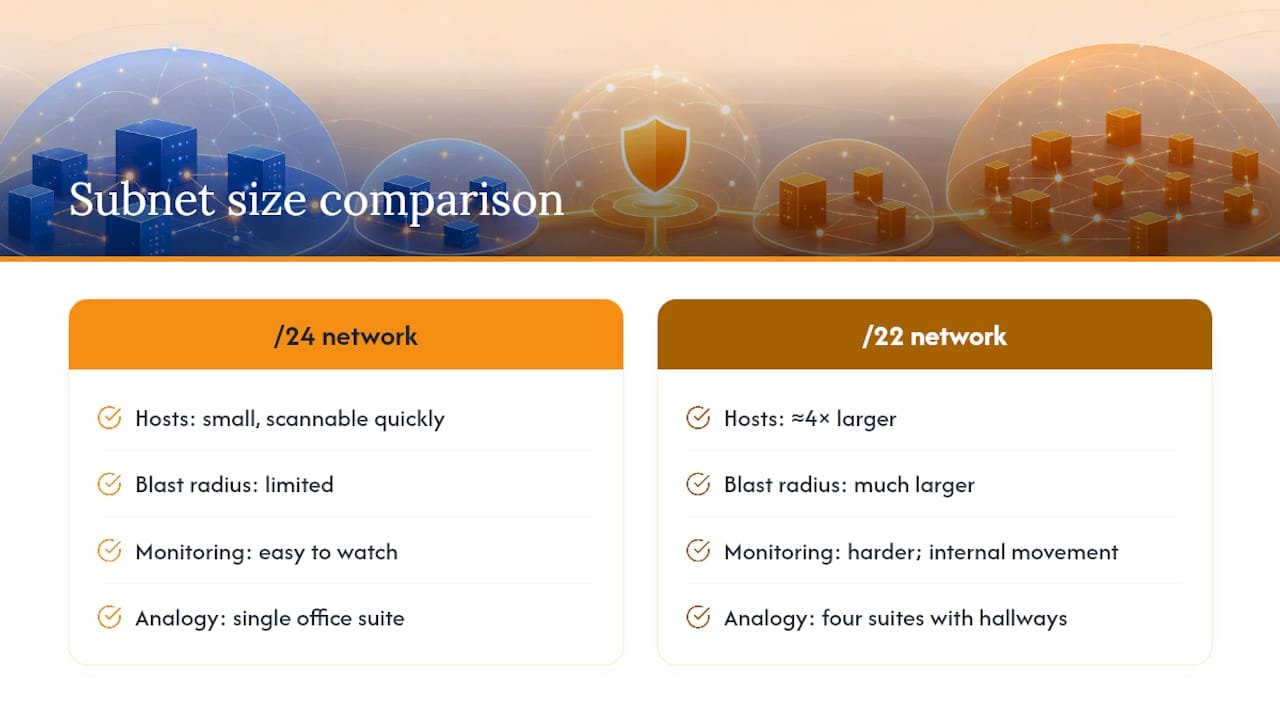
CIDR notation compresses a subnet mask into a slash and a number, and that number tells you how many hosts live in that range. A /24 network gives you a number of usable host addresses small enough to scan quickly and monitor closely. A /22 network spans roughly four times that number of usable addresses, which means a compromised device on a flat /22 has a much larger blast radius to move through before anyone notices. Practical subnetting guidance for IPv4 segmentation walks through exactly how to map trust zones, DMZ, user LAN, server LAN, database, and management, to specific CIDR ranges so each zone stays small enough to reason about.
Picture it as floor plans in a building. A /24 is a single office suite with one door in and out; you can watch that door. A /22 is four suites with internal hallways connecting all of them, and if you’re only watching the front door, you’ve missed everything happening inside.
IPv6 complicates this picture in ways beginners often miss. Many networks run dual-stack, IPv4 and IPv6 side by side, but monitoring tools and firewall rules built for IPv4 sometimes ignore IPv6 traffic entirely. That gap turns IPv6 into an unmonitored path in and out of the network. The deep dive on IP addressing and DNS for cybersecurity covers this exact pitfall, along with RFC 1918 private address ranges and the DNS record types attackers query during reconnaissance. If you only learn subnetting for security in an IPv4 context, you’ve learned half the picture.
Network Devices and Where Traffic Flows
Every device on a network has a specific security job, and knowing that job tells you where to place your sensors and where to enforce policy.
Switches operate at Layer 2 and are where VLAN segmentation actually gets enforced, separating broadcast domains so traffic on one segment can’t casually spill into another. Routers work at Layer 3, making forwarding decisions based on IP addresses, and access control lists on routers can block or permit entire subnets from talking to each other. Firewalls, whether standalone appliances or built into routers, sit at the enforcement point between zones and make the allow or deny call on every connection attempt. Proxies inspect and filter traffic at the application layer, often the point where outbound web traffic gets policy applied. NAT translates private addresses to public ones, which hides internal structure from the outside world but also means your logs need to track translated addresses, not just the original source, or you’ll misattribute traffic during an investigation.
Sensor placement follows directly from this map. Packet capture tools belong at chokepoints, the firewall interface, the core switch uplink, anywhere traffic between zones has to pass. Flow collectors work best deployed broadly across routers and switches since they’re lightweight enough to run everywhere. IDS sensors need to sit where they can see both directions of traffic for a given segment, usually mirrored off a switch port (SPAN) rather than inline, unless you’re running an IPS that needs to actively block.
Segmentation, VLANs, and Zero Trust: Proving Containment Works
Meaningful segmentation combined with enforcement and audit evidence is what actually reduces blast radius, not just having VLANs configured somewhere in your network diagram. This is the core network security control that separates networks that survive an incident from ones where a single compromised laptop turns into a full domain breach.
A basic segmentation matrix assigns each zone a specific role and defines exactly what’s allowed to cross into it.
| Zone | Typical CIDR Role | Allowed Inbound From |
|---|---|---|
| DMZ | Public-facing servers | Internet (specific ports only) |
| User LAN | Employee workstations | DMZ, internal services |
| Server LAN | Internal applications | User LAN, management zone |
| Database | Data storage | Server LAN only |
| Management | Admin and monitoring tools | Restricted admin subnet only |
This structure follows the deny-by-default principle used in security-driven segmentation best practices, where every zone starts closed and specific flows get opened only as needed. Cloud environments mirror this with VPCs, VNets, and security groups doing the same job as physical subnets and firewall rules.
VLANs, subnets, and microsegmentation solve overlapping but distinct problems. VLANs separate broadcast domains at Layer 2. Subnets separate address ranges at Layer 3. Microsegmentation goes further, applying policy to individual workloads or even individual processes, regardless of which subnet they happen to sit in. Zero Trust architecture treats subnet membership as an investigative boundary rather than proof of trust, layering identity-aware controls like certificate-based device authentication on top of the network structure so a device can’t move freely just because it’s physically on the “trusted” segment. This is a meaningful shift from older assumptions, and the NIST-aligned microsegmentation guidance from Tigera explains how identity-aware enforcement overlays traditional subnet-based design rather than replacing it.
Auditors rarely take your word that segmentation works. NIST SC-7(29) requires separate subnetworks for critical functions and expects you to prove it: a segmentation matrix showing zones and allowed flows, exported firewall or security group rules, routing tables, and documented connectivity tests showing denied traffic actually got denied.
Pro Tip: Run a connectivity test between two zones that should be blocked, and save the failed connection attempt as evidence. That single artifact often satisfies an auditor faster than a diagram ever will.
Core Network Security Controls and What Each One Actually Does
Prevention, detection, and access enforcement have to work together, because no single control catches everything. Network security as a discipline exists specifically because attackers probe every layer, so your controls need to cover every layer too.
- Firewalls enforce allow/deny rules at the network or application layer, and their logs are your first stop for understanding what got blocked.
- IDS/IPS watch traffic patterns against known signatures or behavioral baselines; IDS alerts, IPS actively blocks.
- NAC (Network Access Control) checks device identity and posture before granting network access at all, stopping unmanaged devices before they get an IP address.
- WAF (Web Application Firewall) filters HTTP/S traffic specifically, catching injection attacks that a standard firewall’s port-based rules would miss entirely.
- VPNs and secure gateways encrypt traffic in transit and, when paired with MFA, reduce the risk of credential-based remote access attacks.
Placement matters as much as selection. Edge firewalls and WAFs guard the perimeter, internal firewalls and NAC guard lateral movement between zones, and cloud-native equivalents (security groups, cloud firewalls) need the same deny-by-default logic even though they live in a console instead of a rack. The most common misconfiguration across all of these is an overly broad rule, “allow any to any”, added during a troubleshooting session and never removed.
Building Visibility: Packet Capture, Flow Logs, and SIEM
Packet capture gives you root cause; flow logs and SIEM give you scale. Knowing when to reach for each is a core skill in cybersecurity networking strategies, and mixing them up wastes time during an active incident.
| Method | Best For | Retention | Typical Tools |
|---|---|---|---|
| Packet capture (PCAP) | Root-cause forensics, payload inspection | Short (storage-heavy) | Wireshark, tcpdump |
| Flow logs | Baseline traffic, anomaly detection at scale | Long (compact records) | NetFlow, cloud VPC flow logs |
| SIEM correlation | Cross-source alerting, historical hunting | Long (indexed) | Splunk, Elastic, Microsoft Sentinel |
Packet capture versus flow-based detection exist for different jobs. You don’t run full packet capture across an entire enterprise network indefinitely, the storage cost alone makes that impractical, but you also can’t reconstruct exactly what happened during a breach from flow metadata alone. Flows tell you two hosts talked on a given port for a certain duration. Packets tell you what they actually said.
A basic triage checklist for a network alert looks like this: isolate the affected host or segment first, pull packet capture from the nearest chokepoint if the alert is still active, review the flow baseline to see if this traffic pattern is new or recurring, and check firewall logs to confirm whether the connection was ever actually permitted. Following that order keeps you from either overreacting to noise or missing a live compromise while you dig through logs.
Wireless Security and Remote Access: Where Attackers Get In First
Insecure Wi-Fi and poorly configured remote access remain two of the most common initial access vectors, which makes them a priority in any network security for professionals’ conversation, not an afterthought.
WPA3 should be the default wherever hardware supports it, and enterprise networks should run 802.1X authentication against a RADIUS server rather than a single shared passphrase that every employee and, eventually, every departed employee knows. Rogue access points, devices set up to mimic a legitimate network name and capture credentials, are a real threat on any network without active wireless scanning in place. Separating guest and IoT traffic onto its own VLAN, isolated from internal resources, limits what a compromised smart device or a guest laptop can actually reach.
Remote access deserves the same scrutiny. A modern VPN or zero-trust access broker paired with multi-factor authentication closes most of the gap that older, MFA-less remote access left wide open. Pair that with least-privilege microsegmentation on the remote side, so a compromised remote laptop doesn’t get the same network reach as someone sitting in the office, and you’ve closed one of the most exploited paths into corporate networks.
Common Network Attacks and the Defenses That Actually Stop Them
Attackers exploit weak segmentation, exposed services, and gaps in monitoring far more often than they exploit exotic zero-days, which is exactly why the network fundamentals covered above matter more than most beginners expect.
- DDoS (Distributed Denial of Service): Attackers flood a target with traffic to exhaust bandwidth or server resources. Defenses include rate limiting, traffic scrubbing services, and upstream filtering before traffic ever reaches the target. A mid-sized e-commerce site hit during a sales event often survives specifically because rate limiting kicked in before the origin server buckled.
- MitM (Man-in-the-Middle): Attackers intercept traffic between two parties, often on unsecured Wi-Fi. Certificate pinning, HSTS enforcement, and encrypted management interfaces close most of this gap. A classic case: an employee on public Wi-Fi hits a login page without HTTPS enforced, and credentials go straight to an attacker sitting on the same network.
- ARP spoofing: An attacker sends forged ARP messages to associate their MAC address with a legitimate IP, redirecting local traffic through their machine. Dynamic ARP inspection on switches and static ARP entries for critical devices are the standard defense.
- DNS spoofing: Attackers poison DNS responses to redirect victims to malicious sites. DNSSEC validation and monitoring for unexpected DNS response changes catch this before it does damage.
- Lateral movement: Once inside, attackers move from a low-value compromised host toward high-value targets, often through weak internal segmentation. This is precisely where the segmentation matrix and deny-by-default policy discussed earlier earn their keep: a properly segmented network turns one compromised workstation into a dead end instead of a stepping stone toward the database zone.
How Much Networking Do You Actually Need? A Role-Based Learning Path
The right depth of networking knowledge is role-dependent, and mapping topics to specific job functions keeps your studying focused instead of scattered across everything at once.
| Role | Must-Know Topics | Lab Task |
|---|---|---|
| SOC Analyst | Ports/protocols, flow logs, SIEM correlation | Analyze a sample PCAP for anomalous DNS traffic |
| Penetration Tester | Subnetting, host discovery, service enumeration | Run nmap scans against a lab subnet and interpret results |
| Network Security Engineer | Segmentation design, firewall rules, VLAN configuration | Build and document a segmentation matrix for a sample network |
Hands-on practice is where this knowledge actually sticks, and the tools below cost nothing to start with. Open Wireshark and filter for dns or tcp.port == 443 to isolate specific traffic types in a capture. Run a basic nmap scan with nmap -sV 192.168.1.0/24 to enumerate live hosts and services across a lab subnet. Use tcpdump from the command line with tcpdump -i eth0 port 53 to capture DNS traffic directly on a Linux box. None of these commands require expensive lab infrastructure, a home lab with a spare router and a couple of virtual machines covers most of it.
Certifications give this learning path structure and a credential employers recognize. CompTIA Network+ practice material validates the foundational networking skills covered throughout this guide, and it’s the natural first checkpoint before Security+, which builds directly on that networking base. CCNA goes deeper into routing and switching for anyone leaning toward network security engineering specifically. Structured courses like Networking in IT walk through these concepts alongside lab work rather than leaving you to piece it together from scattered tutorials, and a solid syllabus shows you exactly how each module maps to hands-on exercises before you commit.
Why Hands-On Networking Practice Changes How You Investigate
The gap between reading about subnetting and actually tracing an incident through one is bigger than most people expect going in. It’s one thing to know that a /24 gives you 254 hosts on paper. It’s another to sit with a real packet capture, watch a host on that subnet suddenly talk to an external IP on a port nobody uses, and know immediately why that matters because you’ve mapped that subnet’s role before.
That’s the real value of treating networking for cybersecurity as a practical skill rather than a topic to memorize for an exam. An incident that looks chaotic in the moment, alerts firing, a host behaving strangely, usually resolves into a clear story once you apply the layered thinking covered here: check the IP and subnet, check the port and protocol, check the payload. Analysts who’ve built that instinct through actual lab practice contain incidents faster than analysts who only recognize the vocabulary.
The conventional advice tells beginners to “learn networking basics” as a vague prerequisite before moving on to security tools. That undersells it. Networking isn’t a prerequisite you complete once, it’s the lens you use on every single investigation for the rest of your career, and treating it as a checkbox to clear before the “real” security work starts is a mistake that shows up later as slower incident response and weaker segmentation decisions.
Turn This Foundation Into a Certification and a Career Path
Reading through OSI layers, subnetting math, and segmentation matrices gets you the concepts. Closing the gap between concept and confident, hands-on execution is where guided lab work and instructor feedback save you months of trial and error that self-study alone tends to cost.

Totalcyber built its programs around exactly this gap. Instead of leaving you to piece together nmap syntax and firewall rule logic from scattered tutorials, our courses pair instructor-led labs with certification prep mapped directly to real SOC and pentest tasks, the same skills walked through in this guide. Here’s what that looks like in practice:
- Hands-on labs where you configure segmentation, run packet captures, and build firewall rules, not just watch someone else do it
- Direct instructor feedback when your subnet math or scan output doesn’t match what you expected
- Exam preparation aligned to CompTIA Network+ and Security+, the exact checkpoints covered above
Start with the beginner’s career guide to see how these networking fundamentals connect to specific entry-level roles, or check the training prerequisites checklist to see exactly where you stand before enrolling.
Frequently Asked Questions
How much networking do I need to know for an entry-level cybersecurity job?
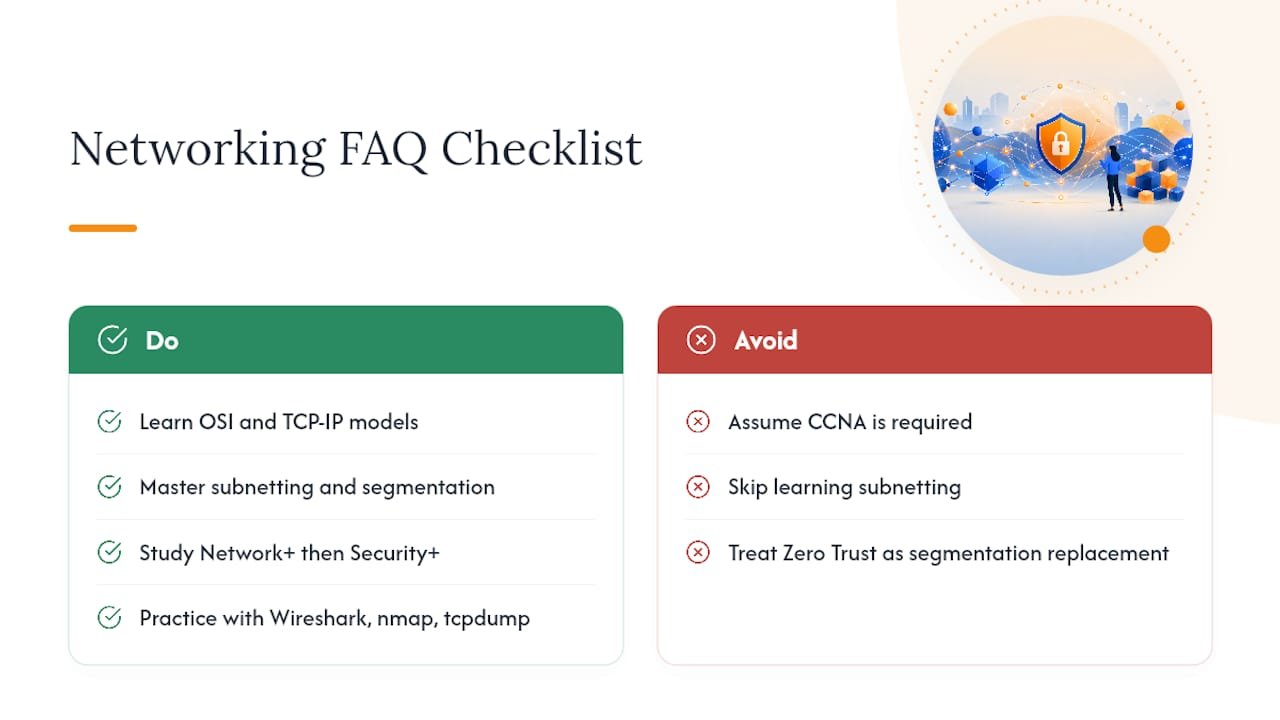
Enough to explain the OSI/TCP-IP model, read a subnet mask, recognize common protocols and ports, and understand how a firewall makes decisions. That covers most SOC analyst and junior security roles; deeper subnetting and segmentation design comes with network security engineering specifically.
Is subnetting really necessary if I want to work in cybersecurity, not networking?
Yes. Subnetting for security shows up constantly, scoping a vulnerability scan, tracing an attacker’s lateral movement, or designing a segmentation matrix, regardless of whether your job title says “network” anywhere in it.
What’s the fastest way to build networking skills in cybersecurity networking?
Combine structured study (Network+, then Security+) with hands-on lab work using Wireshark, nmap, and tcpdump on a home lab or a guided course environment. Reading about packet capture and actually running one are very different learning experiences.
Do I need CCNA before Security+?
Not necessarily. Network+ covers enough networking depth to support Security+ for most entry-level security roles. CCNA adds real value if you’re specifically aiming toward network security engineering or infrastructure-focused roles.
How does networking for cybersecurity connect to Zero Trust?
Zero Trust treats network position as an investigative boundary, not proof of trust, layering identity-aware controls like 802.1X and certificate-based authentication on top of traditional subnet and VLAN segmentation rather than replacing it.
Sources
The sources below back the standards, subnetting math, and segmentation guidance covered throughout this guide, and each one rewards a closer read if you want to go beyond the fundamentals.
- Network security
- Network Segmentation Best Practices | SubnetPlanner
- How to Plan IPv4 Subnetting for Network Segmentation and Security