
Threat hunting is a proactive, human-led search for attackers already inside your environment, aimed at the malicious activity your automated tools missed. The single most important thing for beginners: hunting only works if you have searchable logs across endpoints, identity, and network traffic, plus a narrow, testable question to chase. Start small, hunt one hypothesis at a time, and write down what you find, including nothing.
TL;DR:
- Threat hunting is most effective when focusing on specific scenarios like unauthorized admin tool use, lateral movement, or credential misuse with well-scoped queries.
- Beginners should start with indicator-based hunts using threat intelligence feeds before progressing to hypothesis-driven searches involving attacker techniques.
- The initial hunt should be a focused sweep, such as Event ID 4698 for scheduled tasks, with results cross-checked against recent deployment logs to filter false positives.
- Consistent documentation of both positive findings and false alarms improves future hunt accuracy, automation, and overall program effectiveness over time.
- Building foundational skills requires mastering log query languages, understanding attack techniques, and practicing hands-on labs to develop pattern recognition and query fluency.
Table of Contents
- What Is Threat Hunting Basics and How Does It Differ from Detection?
- Why Does Threat Hunting Matter for Reducing Dwell Time?
- Which Threat Hunting Methodologies Should Beginners Learn First?
- How Do You Run Your First Threat Hunt Step by Step?
- What Are Good Beginner Hunts to Try First?
- What Skills and Team Models Support Effective Threat Hunting?
- What Should You Prioritize in Your First 30 to 90 Days?
- How Do You Tell a Real Finding from a False Positive?
- What Do Real Threat Hunting Scenarios Actually Look Like?
- How Should You Update Hunting Hypotheses Over Time?
- A Beginner’s Reality Check on Threat Hunting
- Ready to Build Real Threat Hunting Skills?
- Sources
What Is Threat Hunting Basics and How Does It Differ from Detection?
Threat hunting starts from an assume-compromise mindset. Instead of waiting for an alert, you go looking for the attacker who already slipped past your firewall, your antivirus, and your SIEM’s correlation rules. That single mental shift, from reactive to proactive, is what separates hunting from every other blue-team function.
Detection is automated. Rules and signatures fire when a known bad pattern shows up, and an analyst triages the alert. Threat intelligence is contextual. It tells you which adversary groups are targeting your industry and what indicators they use. Hunting sits apart from both: a human forms a hypothesis about how an attacker might be operating undetected, then goes searching for evidence in raw data that no rule was written to catch.
This matters most against techniques that don’t trip alarms. Living-off-the-land attacks use legitimate tools like PowerShell or WMI, so signature-based defenses see normal activity. Credential misuse looks identical to a real employee logging in, unless you know what “normal” looks like for that specific account.
Hunting typically targets a handful of scenarios:
- Attackers using built-in admin tools instead of malware
- Compromised credentials being used outside normal patterns
- Persistence mechanisms planted for later use
- Lateral movement between systems that shouldn’t be talking to each other
None of that shows up in a dashboard on its own. It shows up when someone asks the right question of the right data.
Why Does Threat Hunting Matter for Reducing Dwell Time?
Dwell time, the gap between initial compromise and discovery, is where damage compounds. An attacker sitting undetected for weeks can map your network, escalate privileges, and stage data for exfiltration long before any alert fires. Hunting exists to shrink that window.
The payoff is highest in specific situations: after a suspected breach when you need to confirm the blast radius, around critical assets like domain controllers and financial systems, and against identity-based attacks that rarely generate a clean signature. A stolen credential used at 3 a.m. from a new device is invisible to most detection rules but obvious to a hunter comparing it against a baseline.
Why this matters: Hypothesis-driven hunting, the approach mature security programs prefer, works precisely because it targets the gap detection rules leave open. Waiting for an alert means waiting for the attacker’s mistake. Hunting removes that dependency.
For a beginner, the return on time invested is real but not universal. Hunting a low-value system with thin logging wastes hours. Hunting authentication data around a privileged account, even for thirty minutes, can surface something a SIEM rule never would.
Which Threat Hunting Methodologies Should Beginners Learn First?
Not every hunt starts the same way, and the four common approaches map roughly to how mature your program is.
- IOC-based hunting searches for known indicators, malicious IPs, file hashes, domains, pulled from threat intelligence feeds. Fastest to learn, lowest analytical demand.
- Baseline or anomaly hunting compares current activity against what’s normal for a user, host, or network segment. Requires weeks of clean baseline data before it produces reliable signal.
- Hypothesis-driven hunting starts with a specific, testable question about attacker behavior, then searches for evidence. This is the approach TechTarget identifies as the standard mature programs converge toward.
- Situational hunting reacts to current events, a new CVE, an industry-wide campaign, a partner breach, and searches your environment for related exposure.
Beginners should start with IOC sweeps. They’re mechanical, low-risk, and teach you the query syntax of your tools before you’re asked to invent a hypothesis from scratch. Cribl’s guidance for new hunters backs this progression: build confidence with sweeps, then graduate to hypothesis-driven work once your telemetry and query skills mature.
MITRE ATT&CK gives structure to that graduation. Instead of guessing, you pick a technique, say, T1053.005 for scheduled task abuse, and build a hypothesis around exactly how that technique would appear in your logs.
Pro Tip: Pick one ATT&CK technique per week when you’re starting out. Trying to hunt for everything at once produces shallow queries and no real findings.
How Do You Run Your First Threat Hunt Step by Step?
A hunt is not an open-ended fishing expedition. It follows a repeatable cycle, and TechTarget’s breakdown of the hunting process frames it in four stages: hypothesize, search, investigate, and respond.
- Form a hypothesis. Base it on an ATT&CK technique, a threat intel report, or a gap you’ve noticed in coverage. Keep it narrow: “Are scheduled tasks being created in temp directories?” beats “Is anyone doing anything malicious?”
- Search the relevant data. Pull logs scoped to your hypothesis, not your entire environment. If you’re hunting scheduled tasks, that means Windows Event ID 4698 across your endpoint fleet.
- Investigate anything unusual. For each result, ask who created it, when, from which host, and whether anything else correlates, a suspicious login, an unusual outbound connection.
- Respond and document. Escalate confirmed threats to your incident response process. Document everything else, including hunts that find nothing.
A solid first hunt, sometimes called “Hunt Zero,” is a scheduled-task sweep. Query Event ID 4698 over a recent period, then flag any task pointing to a path in %TEMP% or %APPDATA%, or referencing a .vbs or .ps1 file. That pattern maps directly to ATT&CK technique T1053.005 and is a favorite persistence method for attackers who’ve already gotten a foothold. Budget two to three hours for your first pass, most of that time reviewing results rather than writing the query.
Pro Tip: When you find a scheduled task worth investigating, check its creation time against your patch and deployment logs first. A surprising number of “suspicious” findings turn out to be legitimate software installers.
Escalate when you can’t explain a finding with a legitimate business reason. If a task, login, or process has no clean explanation after checking against known-good activity, hand it to incident response rather than sitting on it.
What Are Good Beginner Hunts to Try First?
A handful of scoped hunts give you real practice without requiring advanced query skills. Each one pairs a specific data source with a specific, checkable signal.
- Scheduled task creation (Windows Event ID 4698): flag tasks pointing outside normal program directories, a common persistence tactic.
- Authentication anomalies (identity logs): look for logins at unusual hours, from new geographies, or impossible travel between two locations in a short window. Credential stuffing patterns often surface this way, repeated failed logins followed by one success.
- PowerShell and process anomalies (EDR telemetry): search for encoded commands, unusual parent-child process relationships, like Word spawning PowerShell, or execution from temp folders.
- Suspicious DNS queries (DNS logs): hunt for newly registered domains, unusually long subdomain strings, or high query volume to a single external domain, all common command-and-control signals.
Keep every query scoped. Set a specific time range, usually 7 to 30 days, and filter by host group or user role before you run anything against your full environment. A query with no scope returns thousands of results and no clarity.
A single flagged event rarely proves anything alone. Corroborate across sources: a suspicious PowerShell execution paired with an unusual DNS query to the same host, at the same time, is a far stronger signal than either alone.
What Skills and Team Models Support Effective Threat Hunting?
Effective hunters combine technical fluency with pattern recognition. Prioritize learning to write log queries in whatever platform your organization runs, ELK, Splunk, or a comparable SIEM, understanding common network protocols well enough to spot abnormal traffic, and reading process trees to catch a legitimate parent process spawning something it shouldn’t.
- Query language fluency (SPL, KQL, or Elasticsearch DSL depending on your stack)
- ATT&CK technique mapping to structure hypotheses instead of guessing
- Basic scripting (Python or PowerShell) to automate repetitive searches
- Network protocol knowledge to recognize abnormal traffic patterns at a glance
Team models vary by organization size. A dedicated SOC with rotating hunters works for larger teams; smaller shops often assign hunting as a part-time responsibility layered onto existing analyst duties, and some outsource entirely to a managed detection and response provider. Microsoft notes that automation can triage routine alerts, but hunting itself still depends on human hypothesis formation.
Hands-on labs accelerate this far faster than reading alone, since query syntax and process-tree literacy are muscle memory skills, not concepts you absorb from a slide deck.
What Should You Prioritize in Your First 30 to 90 Days?
Move in this order, and resist the urge to skip ahead to advanced hunts before the basics are solid.
- Centralize your minimum telemetry first: authentication logs, endpoint process data, and DNS queries. These three sources alone cover most beginner hunt scenarios.
- Run three scoped hunts: a scheduled-task sweep, an authentication anomaly check, and one DNS-based hunt. Document each one, findings and non-findings both.
- Convert confirmed findings into detection rules so future occurrences trigger automatically, then schedule hunts on a recurring cadence, monthly at minimum, weekly for higher-risk environments.
How Do You Tell a Real Finding from a False Positive?
Most hunt results are not attacks. That’s normal, and treating every anomaly as a confirmed threat is the fastest way to burn credibility with the rest of your security team.
Start by checking the finding against known-good activity. A scheduled task in an odd folder might be a legitimate software installer, cross-reference it against recent patch or deployment logs before escalating. An unusual login location might be an employee traveling, check travel records or ask the user directly if your process allows it. A PowerShell command with encoded parameters might be a sanctioned admin script, verify against your change management records.
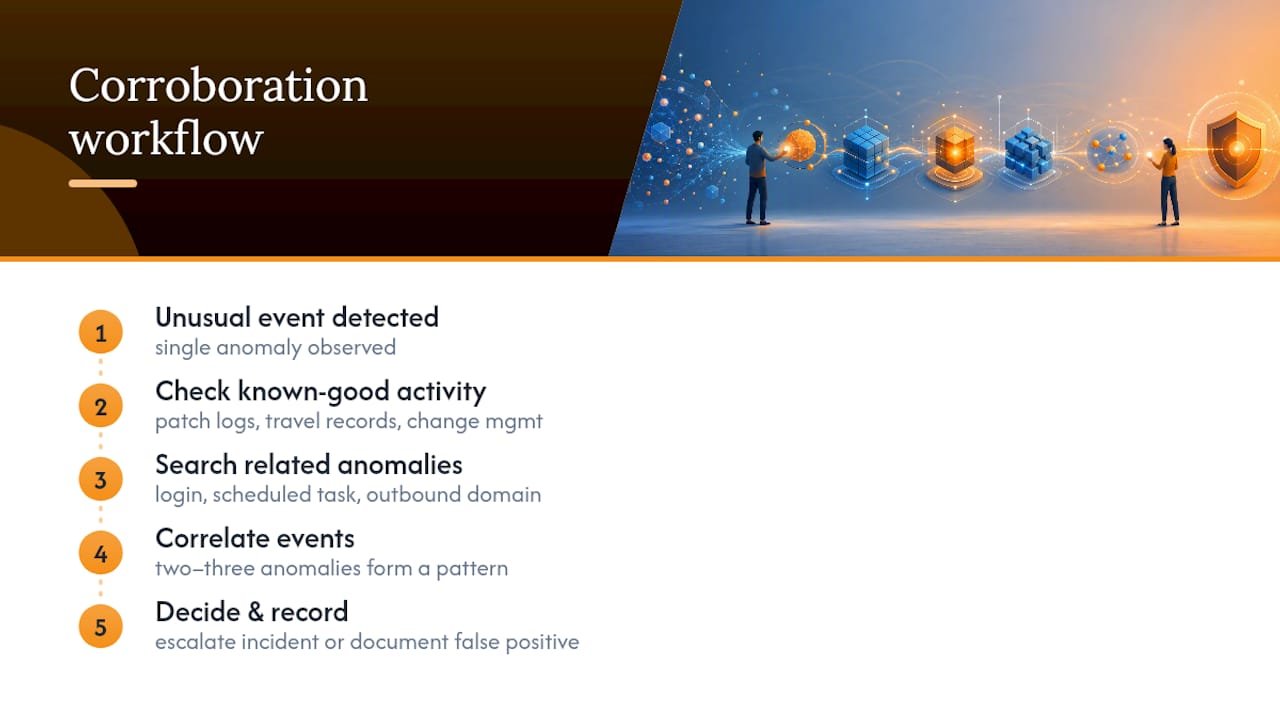
Corroboration is your best filter. A single unusual event is often noise. Two or three correlated anomalies, an odd login followed by a new scheduled task followed by an outbound connection to a domain registered last week, is a pattern worth escalating. Build the habit of asking “what else happened around this event” before you decide it’s worth an incident response ticket.
Document false positives with the same rigor as confirmed threats. Note why a finding turned out benign; that context saves the next analyst from re-investigating the same dead end six months later. Over time, this record becomes a tuning reference: patterns that repeatedly turn out harmless tell you where to narrow your query filters, while patterns that repeatedly need escalation tell you where automated detection rules should be built.
What Do Real Threat Hunting Scenarios Actually Look Like?
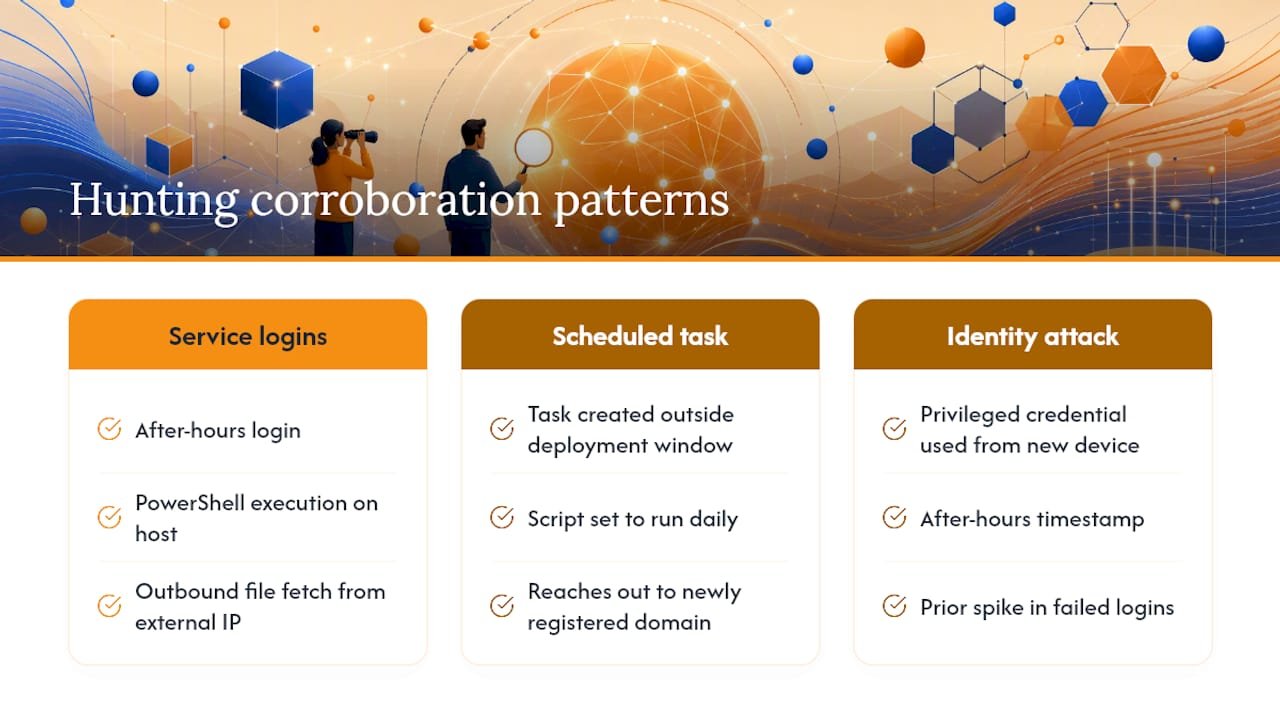
Consider a mid-size company running routine authentication log reviews. An analyst hunting for logins outside business hours finds a service account authenticating at 2 a.m., something no automated tool flagged because the login itself used valid credentials. Cross-referencing against process telemetry on the destination host reveals PowerShell execution shortly after the login, pulling a file from an external address. That chain, unusual timing plus unexpected process activity plus outbound traffic, is exactly the corroboration pattern that separates a real finding from noise.
Another common scenario involves the scheduled-task hunt described earlier. A hunter running the Event ID 4698 sweep finds a task pointing to a script in %APPDATA%, created outside any recent deployment window. Investigation shows it was set to run daily and reach out to a domain registered two weeks prior. No antivirus signature caught it because the script itself was legitimate PowerShell, just doing something illegitimate.
A third pattern shows up around identity attacks. A hunt scoped to privileged accounts finds a domain admin credential used from a device that never authenticated with that account before. On its own, this could be a password manager syncing across a new laptop. Paired with an unusual after-hours timestamp and a spike in failed logins on the same account earlier that week, it points toward credential compromise worth immediate escalation.
None of these scenarios required a novel tool. They required a hypothesis, scoped data, and someone willing to ask what else happened around the event.
How Should You Update Hunting Hypotheses Over Time?
A hunting hypothesis is not a one-time question. Revisit it as your environment, your threat landscape, and your data quality change.
Retire hypotheses that consistently produce nothing after multiple attempts across different time windows, that’s a signal your telemetry lacks coverage for that technique, not that the technique doesn’t matter. Refine hypotheses that produce too much noise by tightening scope, narrower time ranges, specific host groups, or additional corroborating fields.
New attacker techniques surface constantly, and MITRE ATT&CK is updated regularly to reflect them. Reviewing new or revised techniques quarterly and mapping a hypothesis to anything relevant to your industry keeps your hunt program current instead of static.
Keep a running hunt log, what you hunted, what you found, what you changed. Documenting negative results carries real value: a hunt that finds nothing still proves you have coverage in that area, and it tells the next analyst not to repeat the same search without a reason to expect different results. Programs that treat hunting as recurring work, not a one-off project, catch far more than programs that hunt once and stop.
A Beginner’s Reality Check on Threat Hunting
Most beginners overestimate the tooling and underestimate the discipline. You don’t need an enterprise SIEM to start hunting, you need a narrow question and the patience to document a negative result as carefully as a positive one. The biggest pitfall isn’t a lack of skill; it’s hunting everything at once instead of one scoped hypothesis at a time.
Practical labs matter more here than in almost any other cybersecurity discipline, because query syntax and pattern recognition only become intuitive through repetition. Start small, write down what you find, even nothing, and let each hunt sharpen the next one.
— Alden
Ready to Build Real Threat Hunting Skills?
Reading about Event ID 4698 sweeps is one thing. Running them against live lab data with an instructor checking your work is another, and it’s the gap that separates people who understand threat hunting from people who can actually do it under pressure. Some training programs pair hands-on labs with certification prep for CompTIA, EC-Council, and ISC2 credentials, so the skills you build map directly to what employers test for.

If you’re not sure whether your setup even qualifies as ready to hunt, work through the cybersecurity training prerequisites checklist first. It’ll tell you exactly what’s missing before you invest time in a course. From there, browse the full course catalog to find a program that matches where you are, whether that’s a first certification or a deeper dive into hunting-specific skills, and start building the muscle memory that no article alone can give you.
Sources
Beginners building a hunting foundation should bookmark MITRE ATT&CK for technique mapping, Microsoft’s threat hunting overview for prerequisites, and Splunk’s beginner guide for hands-on query strategy.
- What is cyber threat hunting? — Microsoft Security
- MITRE ATT&CK
- What is threat hunting? Key strategies explained — TechTarget
- Threat Hunting 101: A Beginner’s Guide — Cribl