
The fastest way to build home cyber lab on budget experience is this: spend week one in free community labs, then add one paid, instructor-led course that bundles certification prep with guaranteed lab access. That combination beats either extreme, buying a full paid bootcamp before you know if you like the work, or staying in free tools forever and never building a portfolio a hiring manager will trust. Hands-on lab time correlates directly with performance on scenario-based exam questions and with what employers actually test for in interviews, a point NIST’s NICE program makes explicit in its workforce development guidance. CompTIA builds its Security+ and CySA+ exams around performance-based tasks, not just multiple choice, which is exactly why lab reps matter more than lecture hours.
Here is what week one looks like:
- Create free accounts on two browser-based lab platforms and finish two beginner rooms or challenges.
- Research one paid, instructor-led course that includes certification prep and always-on lab access, such as those offered through Total Cyber Academy.
- Log every exercise you complete, screenshots and notes included, so you have proof of work by month three.
Stick to this rhythm for 90 days and you should have a working lab log, a clear certification target, and enough hands-on reps to walk into an interview with something to show.
Key Takeaways
Combining free community labs with one paid, lab-included certification course gets career-focused learners job-ready faster and cheaper than either extreme alone.
| Point | Details |
|---|---|
| Start free, add one paid course | Spend your first month in free browser labs before committing money to any single program. |
| Prioritize lab access over price | Choose programs guaranteeing always-available labs and graded feedback, not just the lowest sticker price. |
| Match path to timeline | Pick Starter, Career-prep, or Fast-track based on your urgency, not on what sounds most affordable. |
| Log every lab you complete | A running lab log becomes your portfolio and your interview talking points by month three. |
| Total Cyber Academy scales with you | Its instructor-led and self-paced courses bundle certification-aligned labs, mentorship, and veteran support as your single paid step. |
Table of Contents
- What Makes Virtual Labs Essential for Certification and Hiring
- Which Free and Low-Cost Lab Platforms Are Worth Your Time?
- How to Choose an Affordable Training Program That Actually Includes Lab Time
- Three Budget Paths: Starter, Career-Prep, and Fast-Track
- How to Combine Free Labs With a Paid Course Without Wasting Money
- How Do You Set Up a Home Cyber Lab Environment Step by Step?
- Where Total Cyber Academy Fits Once You’re Ready to Add a Paid Course
- Frequently Asked Questions
- Sources
What Makes Virtual Labs Essential for Certification and Hiring
Lab time closes the single biggest gap between a résumé and an actual job offer in entry-level cybersecurity. Hiring managers don’t just want someone who watched videos about port scanning; they want someone who has run an Nmap scan against a live target and knows what the output means. A survey-based study on cybersecurity distance education found that virtual labs measurably increased active learning and engagement compared to lecture-only formats, with strong response rates from both learners and educators at the institution studied.
That matters because CompTIA, EC-Council, and ISC2 exams increasingly lean on performance-based questions, simulated environments where you configure a firewall rule or triage a log file instead of picking an answer from a list. A review of remote cybersecurity lab design points out that labs built with real pedagogical intent, not just a sandbox bolted onto a syllabus, produce measurably better skill transfer.
Expect to encounter four lab formats as you build experience: capture-the-flag (CTF) challenges, cloud-hosted virtual machines, emulated network environments, and gamified scenario simulations that mimic incident response under time pressure. Each trains a different muscle, and the strongest programs rotate you through all four rather than parking you in one format for months.

Which Free and Low-Cost Lab Platforms Are Worth Your Time?
Start with browser-based community labs for foundational skills, then layer in low-cost sandbox subscriptions once you’re ready for intermediate scenario work. You don’t need a home server rack or a pile of refurbished hardware to get real reps in; you need a browser and a plan.
The landscape breaks into four useful categories:
- Free browser-based CTF platforms. Sites like TryHackMe offer guided beginner rooms covering Linux fundamentals, web exploitation, and basic networking, all run in-browser with no local setup. Best for absolute beginners in their first 30 days.
- Community editions of enterprise-grade ranges. Immersive Labs (Community Edition) and Project Ares from Circadence give a taste of gamified, scenario-driven training normally sold to enterprise security teams, useful once you’ve cleared the fundamentals and want cert-adjacent practice.
- Vendor-backed academy programs. Cisco Networking Academy pairs free and low-cost coursework with emulated network labs, a strong fit if your path runs through networking fundamentals before security specialization.
- Institutional and self-hosted lab tooling. Labtainers, built by the Naval Postgraduate School, gives students containerized lab exercises often distributed free through academic access; check whether your school or employer already has a license before paying for anything.
Two platforms worth naming for intermediate work: LetsDefend focuses specifically on blue-team, SOC-analyst style scenarios, log analysis, alert triage, incident response, which most beginner platforms skip entirely. StationX bundles course content with lab access at a lower price point than most instructor-led programs, useful as a bridge once free tools stop challenging you.
Cloud-hosted labs deserve a specific callout here: a comparative study of AWS EC2 versus local VirtualBox setups found cloud labs outperformed local virtualization on completion time, resource use, and remote accessibility. That means an aging laptop is not a disqualifier. Also check Skillsoft and ITProTV (now part of ACI Learning) for institutional or employer-sponsored access; many community colleges and workforce boards already have seats paid for that go unused.
How to Choose an Affordable Training Program That Actually Includes Lab Time
Pick a program that guarantees always-available lab access, maps directly to a certification you’re targeting, and gives you a real person to ask when you’re stuck. That last part gets skipped constantly. Plenty of “affordable” courses are just video libraries with a lab link tacked on that resets randomly or times out mid-exercise.
Run every paid option through this checklist before you hand over a credit card:
- Lab availability. Is lab access included for the full course duration, or does it expire after 30 or 60 days while you’re still working through the material?
- Lab variety. Does the program rotate through CTFs, cloud VMs, and emulated networks, or is it one format repeated with different labels?
- Certification alignment. Does the syllabus map directly to Security+, CySA+, CEH, or another named credential, with practice exams included?
- Instructor or mentor access. Can you ask a real person a question, or is support limited to a ticket queue that responds in days?
- Graded feedback. Are labs assessed, or do you just click through them with no verification you actually understood the material?
- Outcomes transparency. Does the provider publish anything about completion rates or career outcomes, or is it marketing copy with no substance behind it?
- Veteran and career support. If you’re transitioning from military service, does the program offer dedicated support, funding guidance, or career services?
Pro Tip: Before you enroll, email admissions and ask three specific questions: What’s the lab uptime guarantee? Do sandboxes reset between sessions or persist your work? Are there timed, exam-simulation labs that mirror the real certification format? A vague or slow answer to any of these tells you more than the sales page does.
Self-paced formats cost less and fit around a job or family schedule, but they demand more self-discipline. Instructor-led cohorts cost more, often justified by scheduled labs, live troubleshooting help, and a fixed pace that keeps you from stalling out in month two. Weigh that trade-off against your own track record with self-directed learning, not against what sounds cheaper on paper. Self-paced formats explained walks through that comparison in more detail if you’re torn.
Three Budget Paths: Starter, Career-Prep, and Fast-Track
Your timeline and risk tolerance decide which path fits. Someone testing whether cybersecurity is even the right field should not spend the same money as someone who already has a job offer contingent on a certification.
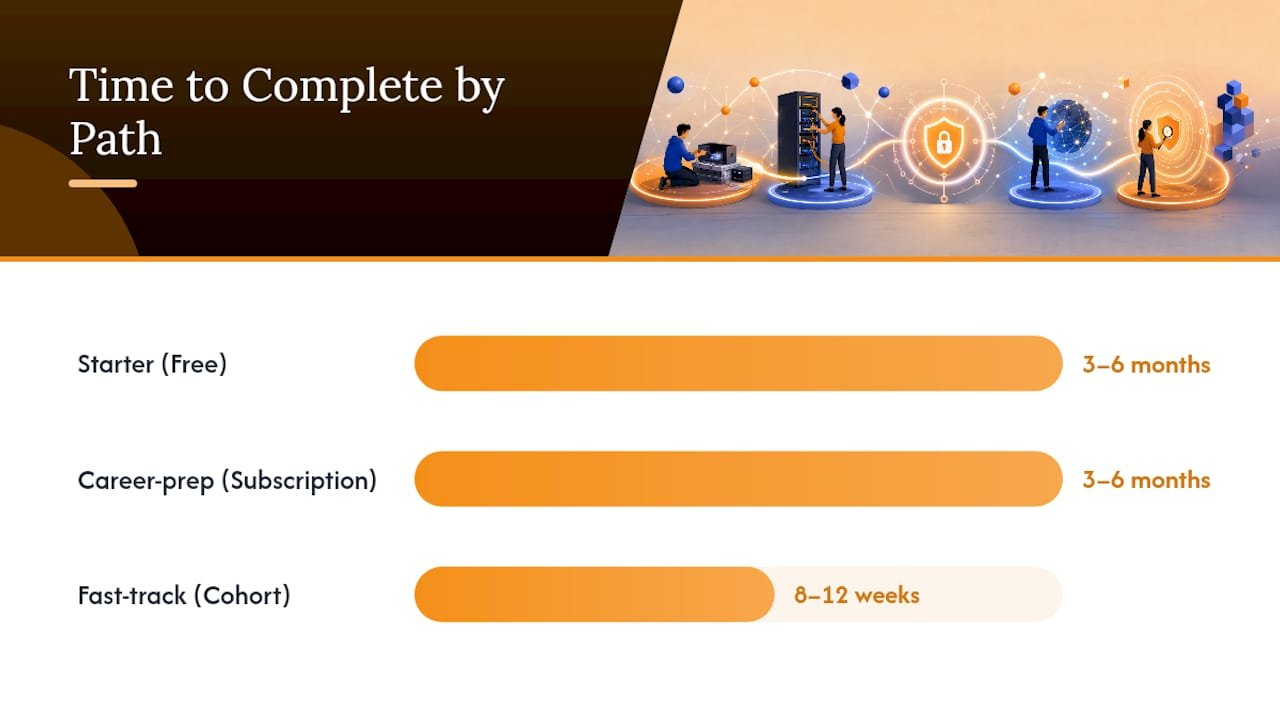
Starter costs nothing beyond your time: free community labs, self-study, three to six months at whatever pace your schedule allows. Career-prep blends a couple of low-cost subscriptions with one paid course, still three to six months, but with a certification target and structured labs. Fast-track means an instructor-led cohort with heavy, scheduled lab time compressed into eight to twelve weeks, the choice for veterans on a benefits timeline or career changers who need to move fast.
| Path | Typical Cost Shape | Time to Complete | Key Lab Types | Certification Fit |
|---|---|---|---|---|
| Starter | Free | 3–6 months | Browser CTFs, guided beginner rooms | Foundational, pre-cert exploration |
| Career-prep | Low monthly subscription plus one paid course | 3–6 months | Cloud VMs, emulated networks, cert-aligned labs | Security+, CySA+ |
| Fast-track | One-time payment, instructor-led cohort | 8–12 weeks | Gamified scenarios, graded live labs, exam simulations | Security+, CEH |
For a subscription-model reference point, Google’s professional cybersecurity certificate runs roughly $49 per month in certain markets and estimates 3 to 6 months at 5 to 10 hours per week, useful as a benchmark when you’re pricing out the career-prep path against other subscription options.
How to Combine Free Labs With a Paid Course Without Wasting Money
Use free platforms for breadth in the first month, then bring in a single paid course for guided depth and certification-specific practice once you know your target credential. Paying for two overlapping subscriptions is the most common budget mistake in this space.
A workable 8 to 12 week structure looks like this:
- Weeks 1 to 2: Complete beginner rooms on a free platform, covering Linux basics, networking fundamentals, and introductory web security.
- Weeks 3 to 4: Pick your certification target based on what engaged you most, then research and enroll in a paid course built around that credential, such as a Security+ live course.
- Weeks 5 to 8: Work through paid course labs on a fixed schedule, supplementing gaps with free platform exercises rather than duplicating what the course already covers.
- Weeks 9 to 12: Convert two or three of your strongest lab completions into portfolio writeups, then schedule your certification exam.
Pro Tip: Every lab you complete, free or paid, should end up in a running log with a one-paragraph summary of what you did and what you learned. That log becomes your interview talking points and your portfolio in one document.
Most of this work happens entirely in a browser. Verify that any paid course you’re considering runs on standard hardware, no local Proxmox cluster or dedicated GPU required, since the whole point of this path is avoiding hardware spend.
How Do You Set Up a Home Cyber Lab Environment Step by Step?
Setting up your practice environment takes less than an hour if you follow a fixed order instead of jumping between tools.
- Pick one primary browser-based platform first. Create an account, confirm it runs cleanly on your current device, and complete the onboarding challenge before adding a second platform.
- Set up a password manager and a dedicated practice email. You’ll be creating accounts across multiple platforms, and keeping practice credentials separate from personal accounts avoids a mess later.
- Bookmark your certification’s official exam objectives. CompTIA publishes exam objectives for Security+ and CySA+ directly; use that document to map which labs you complete against which exam domains.
- Confirm browser and connection requirements. Cloud-hosted labs need a stable connection and an updated browser, not local virtualization software, so check platform requirements before assuming you need new hardware.
- Start your lab log on day one. A simple spreadsheet with date, platform, exercise, and a two-sentence summary is enough; consistency matters more than format.
- Schedule fixed lab blocks weekly. Two 90-minute sessions per week beats seven scattered 15-minute attempts, based on how skill retention works in most active-learning research.
This sequence gets you into real practice within a day, not after a week of research paralysis over which platform is “best.”
Why This Path Makes Sense
Career-focused training only works when it moves people from curiosity to employment, and that has shaped how Totalcyber thinks about every course built. As a veteran-owned academy focused on hands-on labs and certification outcomes, the priority has always been giving learners real practice, not just lecture time. A budget-conscious path that starts free and adds one targeted paid course still gets you job-ready without wasted spend.
Where Total Cyber Academy Fits Once You’re Ready to Add a Paid Course
Total Cyber Academy is the single paid step worth adding once free labs stop challenging you, offering instructor-led and self-paced courses that include hands-on labs and certification prep instead of video lectures with a lab link bolted on.
That matters because the checklist earlier in this piece, lab availability, certification alignment, instructor access, graded feedback, is exactly how Total Cyber Academy courses are structured. A few specifics worth knowing before you enroll:
- Courses map directly to credentials like Security+ and CySA+, with lab work tied to exam objectives rather than generic IT topics.
- Veteran support is built in, not an afterthought, reflecting the academy’s veteran-owned foundation.
- Career services and mentorship are part of the instructor-led track, so you’re not troubleshooting alone at 11 PM.
If you’ve finished a few free beginner rooms and you’re ready to commit to a certification timeline, the beginner’s career guide walks through course options, timelines, and what to expect from enrollment through exam day.
Frequently Asked Questions
Do I need to buy hardware to build home cyber lab on budget experience?
No. Cloud-hosted and browser-based labs run on standard laptops, and a comparative study found cloud labs actually outperformed local virtualization setups on completion time and accessibility.
How long does it take to get job-ready using free platforms?
Most learners need three to six months of consistent practice on free platforms before they’re ready to add a certification-focused paid course, based on typical completion windows for entry-level cyber tracks.
Which certification should I target first?
Security+ is the most common entry point for career changers and veterans, with CySA+ as a logical next step for analysts moving toward blue-team roles.
Can I really get hired without a college degree if I have strong lab experience?
Many entry-level roles prioritize demonstrated hands-on skills and certifications over degrees, particularly when a candidate can show a documented lab log and relevant credentials.
Is a paid course worth it if free labs are available?
Free labs build foundational skills, but paid courses add certification alignment, instructor feedback, and structured pacing that most learners need to actually finish and pass an exam on schedule.
Sources
- The Impact of Virtual Laboratories on Active Learning and Engagement in Cybersecurity Distance Education
- Cloud-based virtual labs vs on-premises virtualization for cybersecurity education (MDPI)
- Survey and best practices for remote cybersecurity labs (ScienceDirect / review paper)
- NIST NICE: Resources for online learning content
- Launch a Cybersecurity Career | Get Job-Ready | Google