
Start with three skills: Identity & Access Management (IAM), configuration hygiene (private-by-default storage, scoped permissions), and logging/monitoring. These three areas cover the majority of real-world cloud incidents and form the foundation every entry-level cloud security role expects you to know.
Your first actions today:
- Enable MFA on every cloud account, using an app-based authenticator rather than SMS.
- Audit access by listing all IAM users, roles, and active keys in your test account.
- Check storage visibility by confirming every bucket or blob container is set to private.
- Turn on activity logging via AWS CloudTrail, Azure Monitor, or Google Cloud Audit Logs before doing anything else.
Pro Tip: Before you touch a single security setting, create a dedicated test account with a spending limit. Every mistake you make there is a learning opportunity, not a production incident.
Cloud security relies heavily on IAM as its primary control layer, which is why identity is the right place to start. The NSA’s cloud security guidance reinforces this: correct configuration and continuous monitoring are the two most critical practices for protecting cloud deployments.
Table of Contents
- What cloud security skills for beginners actually matter?
- Which cloud providers and tools should you practice on?
- How to build cloud security skills in 3 months
- Which certifications should beginners pursue first?
- Daily and weekly habits that remove most beginner risk
- Where to find hands-on labs and the best beginner resources
- Key Takeaways
- The habit that actually makes the difference
- Totalcyber’s training is built for exactly this starting point
- Useful sources to consult next
What cloud security skills for beginners actually matter?
The foundational toolkit for cloud security covers five skill areas. Each one maps directly to tasks an entry-level hire performs on day one.
| Skill Area | What You Learn | Entry-Level Task It Covers |
|---|---|---|
| Identity & Access Management (IAM) | Roles, policies, least-privilege principles | Creating and auditing user permissions |
| Shared Responsibility Model | Provider vs. customer security boundaries | Knowing what you must configure yourself |
| Logging & Visibility | CloudTrail, Azure Monitor, Cloud Audit Logs | Enabling and reading audit trails |
| Core Cloud Concepts | Compute, storage, networking, encryption, APIs | Configuring resources securely |
| Threat Detection | GuardDuty, Microsoft Defender for Cloud, Google Cloud SCC | Enabling alerts and reviewing findings |
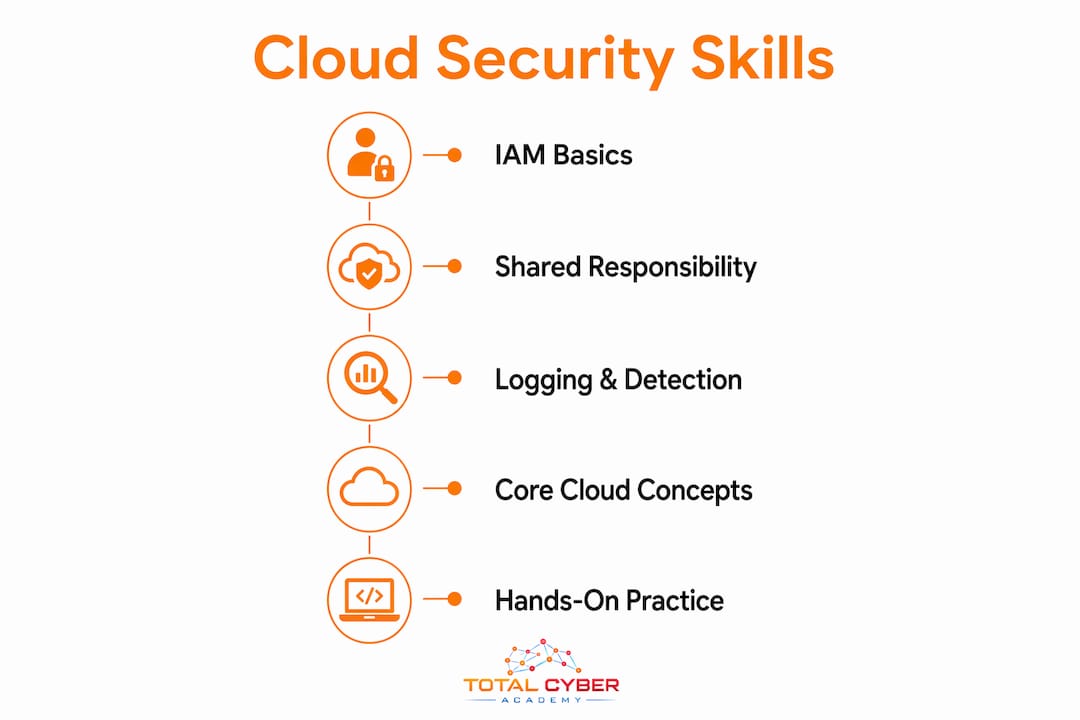
Identity & Access Management is the most critical skill. In cloud environments, there is no physical perimeter, so identity becomes the control point for every resource. Mastering IAM means understanding how to assign roles with the minimum permissions required, how to enforce MFA, and how to rotate credentials on a schedule.
The shared responsibility model defines what the cloud provider secures (physical infrastructure, hypervisors, managed services) versus what you must secure (data, configurations, access controls, application code). Misunderstanding this boundary is one of the most common sources of exposure. Public storage buckets and overly broad permissions are consistently cited as the leading causes of data breaches in cloud environments.
Logging and visibility close the gap between configuration and detection. AWS CloudTrail records API calls across your account. Azure Monitor aggregates activity logs and metrics. Google Cloud Audit Logs capture admin and data access events. None of these are on by default in every configuration, so enabling them is a deliberate, learnable step.
Core cloud concepts — compute instances, object storage, virtual networks, encryption keys, and API endpoints — are the building blocks you will configure and secure. Understanding how data moves between these components, and where encryption should be applied both at rest and in transit, is foundational knowledge for any cloud security role.
Which cloud providers and tools should you practice on?
Pick one provider and stay with it for at least 90 days. Switching between AWS, Azure, and Google Cloud early on fragments your learning and delays the hands-on confidence that comes from repetition.
AWS gives you AWS IAM for access control, AWS CloudTrail for API logging, and AWS GuardDuty for threat detection. Azure offers Azure Active Directory (now Microsoft Entra ID) for identity management and Microsoft Defender for Cloud (formerly Azure Defender) for unified threat protection. Google Cloud provides Google Cloud Security Command Center (SCC) for centralized security findings and posture management.
Provider-native detection services like GuardDuty, Defender for Cloud, and SCC give beginners high-signal alerts without requiring custom tooling. Enabling them early means you see real findings while you learn, which accelerates understanding far more than reading documentation alone.
Suggested hands-on labs to complete in your first month:
- Create an isolated test account with a billing alert set at $10.
- Create an S3 bucket (or Azure Blob container) and confirm it is set to private.
- Create an IAM role with a single, scoped permission and test it.
- Enable CloudTrail (or the equivalent) and locate your first log entry.
- Enable GuardDuty (or Defender for Cloud) and review the findings dashboard.
How to build cloud security skills in 3 months
A structured timeline removes the guesswork. Each month has a clear focus; each week has a deliverable.
Month 1: Fundamentals and hygiene
- Week 1: Set up your test account, enable billing alerts, enable logging, and run a basic security audit to document your starting configuration.
- Week 2: Study the shared responsibility model for your chosen provider; document what you are responsible for in a one-page reference sheet.
- Week 3: Complete IAM labs — create users, roles, and policies; test least-privilege by attempting actions outside a role’s scope.
- Week 4: Study encryption basics (at rest vs. in transit); enable default encryption on your test storage bucket and document the key management settings.
Month 2: Monitoring and detection
- Week 5: Enable GuardDuty or Defender for Cloud; review the findings dashboard daily and document two findings in plain language.
- Week 6: Study cloud networking — virtual private clouds (VPCs), security groups, and network access control lists (NACLs); configure a security group that allows only the ports you need.
- Week 7: Practice reading CloudTrail or Audit Logs; write a short incident walkthrough describing what a failed login attempt looks like in the logs.
- Week 8: Study common threats — misconfigured storage, insecure APIs, insider threats, and credential exposure; map each to the control that prevents it.
Month 3: Projects, cert prep, and job-ready artifacts
- Week 9: Build a mini-audit report for your test account covering IAM, storage, logging, and network configuration.
- Week 10: Write a simple incident response playbook for one scenario (e.g., a public bucket detected by GuardDuty).
- Week 11: Begin certification prep using practice exams and review any weak areas from your labs.
- Week 12: Finalize your portfolio artifacts (audit report, playbook, lab screenshots) and prepare to discuss them in interviews.
Performing simple audits in a test account is the fastest learning feedback loop available to beginners — it makes risk visible and turns theory into practice within minutes.

Which certifications should beginners pursue first?
Three certifications align well with the beginner roadmap:
CompTIA Security+ covers IAM, cryptography, network security, and threat detection. It is vendor-neutral, widely accepted by U.S. federal agencies and private employers, and pairs well with the Month 2 and Month 3 content in the plan above. Totalcyber offers Security+ preparation with hands-on labs built into the curriculum.
AWS Certified Cloud Practitioner validates foundational AWS knowledge — compute, storage, networking, and basic security services. It is the natural first AWS credential and aligns with Month 1 of the learning plan. Study materials for this path are available through the AWS Cloud Practitioner track at CertPath PDF Store.
Microsoft Azure Fundamentals (AZ-900) covers core Azure services and security concepts, including Azure Active Directory and Defender for Cloud. It is a strong choice if your target employer uses Azure-heavy infrastructure.
Cert timing matters. Attempt Security+ or Cloud Practitioner at the end of Month 3, after you have completed the hands-on labs. Sitting for an exam before you have practiced the concepts in a real environment produces lower pass rates and weaker retention.
Industry-recognized certifications map directly to job titles: Security+ aligns with SOC analyst and junior security engineer roles; Cloud Practitioner aligns with cloud operations and cloud support roles.
Daily and weekly habits that remove most beginner risk
Most cloud incidents trace back to a small number of repeated errors: public storage, excessive permissions, hardcoded credentials, and disabled logging. Building habits around these four areas removes the majority of practical risk.
Weekly checklist:
- Review IAM users and roles; remove any account that has not been used in 30 days.
- Confirm all storage buckets and containers are set to private.
- Check for any API keys or credentials stored in code repositories or environment variables.
- Verify that logging is still active and that no alerts have been silently disabled.
Daily habit: Spend five minutes reviewing the findings dashboard in GuardDuty, Defender for Cloud, or SCC. Over time, this builds pattern recognition for what normal looks like, which makes anomalies obvious.
Pro Tip: Avoid SMS-based MFA entirely. App-based authenticators are the minimum standard; for high-value accounts, use hardware-backed FIDO2/WebAuthn keys, which are resistant to phishing and SIM-swapping attacks.
Pair strong authentication habits with secure password practices — a password manager and unique credentials for every cloud account are non-optional at this stage.
Where to find hands-on labs and the best beginner resources
Official free tiers and documentation:
- AWS Free Tier — includes IAM, CloudTrail, and GuardDuty trial; sufficient for all Month 1 and Month 2 labs.
- Microsoft Azure Free Account — includes Azure Active Directory, Defender for Cloud trial, and Azure Monitor.
- Google Cloud Free Tier — includes Cloud IAM, Cloud Audit Logs, and Security Command Center standard tier.
- AWS IAM User Guide — the authoritative reference for roles, policies, and permission boundaries.
- Google Cloud IAM documentation — covers service accounts, workload identity, and policy conditions.
- Microsoft Entra ID documentation — covers conditional access, role assignments, and identity protection.
Community and portfolio resources:
- Join the r/cloudsecurity and r/AWSCertifications communities for peer learning and job market context.
- Publish your mini-audit report and incident playbook to a GitHub repository — hiring managers look for documented, practical work.
- Review the cybersecurity soft skills employers expect, including communication, curiosity, and the ability to explain technical findings to non-technical stakeholders.
- Use the Totalcyber practical cybersecurity experience guide to structure your portfolio before applying for roles.
Key Takeaways
Mastering IAM, configuration hygiene, and continuous monitoring gives beginners the specific skills that prevent the majority of real-world cloud incidents and satisfy entry-level employer expectations.
| Point | Details |
|---|---|
| IAM is the priority skill | Identity is the cloud perimeter; learn roles, least privilege, and MFA before anything else. |
| Misconfiguration causes most incidents | Private-by-default storage and scoped permissions prevent the leading causes of cloud data exposure. |
| Follow the 3-month plan | Monthly milestones and weekly deliverables build hands-on confidence and job-ready portfolio artifacts. |
| Certifications map to roles | CompTIA Security+ and AWS Cloud Practitioner align with SOC analyst and cloud operations job titles. |
| Totalcyber accelerates the path | Totalcyber’s hands-on labs and cert prep tracks are built specifically for beginners entering cloud security roles. |
The habit that actually makes the difference
Most beginners spend their first weeks reading documentation and watching videos, then wonder why they struggle to answer practical questions in interviews. The gap is almost always the same: they have studied cloud security but have not done cloud security.
The 3-month plan in this guide is structured around a specific principle — that hands-on repetition in a test environment builds the kind of pattern recognition that no amount of passive study replicates. Enabling GuardDuty and then watching it flag a misconfigured security group teaches you more in ten minutes than an hour of reading about threat detection. Writing an incident playbook, even a simple one, forces you to think through the sequence of events in a way that sticks.
The certification question is also frequently misframed. Beginners often treat certifications as the goal, when they are actually a validation of work already done. Sitting for Security+ after completing the hands-on labs in this plan is a very different experience than sitting for it cold. The labs are the preparation; the cert is the credential.
Soft skills matter more than most technical guides acknowledge. The ability to communicate security findings clearly to a non-technical manager, to document your work precisely, and to ask the right questions when something looks unusual — these are the traits that distinguish a hire from a candidate.
Totalcyber’s training is built for exactly this starting point
Career changers and beginners entering cloud security need more than a reading list. They need structured, hands-on training that mirrors what employers actually test for in interviews and on the job.
Totalcyber is a veteran-owned cybersecurity training organization that prepares beginners for real employment through hands-on labs, expert instruction, and industry-recognized certification preparation. The beginner tracks cover IAM, configuration hygiene, logging, and threat detection — the exact skills this guide prioritizes — with lab environments that let you practice safely before you ever touch a production system. For readers ready to move from self-study to structured training, the beginner’s career guide at Totalcyber is the clearest next step: it maps training tracks to job titles and explains what to expect at each stage of the learning path.
Useful sources to consult next
- What Is Cloud Security? | Microsoft Security — comprehensive overview of cloud security components, tools, and shared responsibility.
- How Does Cloud Security Work? | Cloudflare — clear explanation of IAM, encryption, firewalls, and configuration best practices.
- What Is Cloud Security? | Google Cloud — Google’s authoritative IAM and cloud security reference.
- NSA Cloud Security Basics — federal guidance on shared responsibility, configuration, and continuous monitoring.
- AWS IAM User Guide — the definitive reference for roles, policies, and permission boundaries on AWS.
- Microsoft Entra ID Documentation — covers conditional access, role assignments, and identity protection on Azure.
- Google Cloud IAM Documentation — service accounts, workload identity, and policy conditions for Google Cloud.
- Totalcyber Beginner’s Career Guide — structured training paths and career outcomes for beginners entering cloud security.
This article is general educational information, not professional security or legal advice. Verify current configurations, compliance requirements, and regulatory obligations with your cloud provider’s official documentation or a qualified security professional for your specific environment.
Recommended
- Practical Cybersecurity Experience: A Career Starter Guide – Total Cyber Academy!
- Cybersecurity Training Explained: A Beginner’s Career Guide – Total Cyber Academy!
- Career Changer Cybersecurity Success Roadmap: 2026 Guide – Total Cyber Academy!
- Cybersecurity Specialization Choosing Guide for 2026 – Total Cyber Academy!