
Burp Suite is an intercepting proxy and the standard toolkit for manual web application testing. It sits between your browser and the target application, letting you view and edit every HTTP request before it reaches the server. Mastering burp suite basics starts with three features: Proxy, Repeater, and HTTP History. Get comfortable with those three before touching anything else.
Here is the fastest path forward:
- Install Burp Suite Community Edition (free, sufficient for learning).
- Open Burp’s bundled browser or set your proxy to 127.0.0.1:8080.
- Intercept one request in Proxy, send it to Repeater, and change one value.
Everything else in Burp builds on that loop.
Key Takeaways
Manual proficiency with Proxy, Repeater, and HTTP History, built through repeated baseline-and-modify practice on authorized targets, is the foundation every other Burp Suite skill depends on.
| Point | Details |
|---|---|
| Master three tools first | Proxy, Repeater, and HTTP History cover most manual testing needs before you touch anything else. |
| Fix the CA certificate early | HTTPS interception fails without trusting Burp’s certificate, the most common setup blocker. |
| Change one variable at a time | Modify a single parameter in Repeater per test so you know exactly what caused a response change. |
| Practice only on authorized targets | Use Web Security Academy, Juice Shop, or DVWA to build skills legally and safely. |
| Structured labs speed up learning | Total Cyber Academy’s instructor-led penetration testing track adds feedback that self-paced tutorials can’t. |
Table of Contents
- Setting Up Burp Suite for Beginners
- What Do Burp Suite’s Core Tools Actually Do?
- How Do You Run a Basic Burp Suite Testing Workflow?
- Beginner Mistakes That Waste Testing Time
- What Should Beginners Prioritize First?
- What Overrated Burp Advice Should You Ignore?
- How Total Cyber Academy Builds on Burp Suite Fundamentals
- Sources
Setting Up Burp Suite for Beginners
Community Edition covers everything a new tester needs: Proxy, Repeater, Intruder (rate-limited), and the decoding tools. Professional adds the automated Scanner and removes Intruder’s throttling, but skip that expense until you’ve outgrown manual testing. Download only from the official PortSwigger release page, which covers Windows, macOS, and Linux, with a Java runtime bundled into the installer.
- Install Burp and launch a temporary project.
- Confirm the proxy listener is running on
127.0.0.1:8080(Burp’s default, per PortSwigger’s getting-started guide). - Either use Burp’s built-in Chromium browser, which handles proxy and certificate setup automatically, or configure your own browser with an extension like FoxyProxy for one-click switching.
- Install and trust Burp’s CA certificate: visit
http://burpwhile proxied, download the certificate, then import it into Firefox’s certificate store or the Windows/macOS system keychain. - Verify by browsing to any test site with Intercept turned on. You should see the raw request appear in Burp before it ever reaches the server.
Skipping the built-in browser is the single biggest reason beginners stall out. Certificate installation across different operating systems trips up more new testers than anything else in Burp, since HTTPS traffic simply won’t decrypt without it.
Pro Tip: If HTTPS sites show certificate warnings after setup, you likely imported Burp’s CA into the wrong certificate store. Firefox keeps its own store separate from the OS, so check there first.
What Do Burp Suite’s Core Tools Actually Do?
Each tab in Burp Suite has one clear job. Learning what belongs where cuts down on wasted clicks:
- Proxy captures traffic. Intercept ON pauses each request for manual review; Intercept OFF just logs everything to HTTP History, which is where you’ll spend most of your time reviewing traffic passively, including WebSocket messages.
- Repeater is where manual testing actually happens. You send a captured request here, tweak a parameter, resend it, and compare the response. This is the engine room of manual vulnerability testing.
- Intruder automates payload substitution across a request, useful for testing multiple inputs against a single parameter. Community Edition throttles Intruder’s speed, so treat it as a learning tool rather than a production fuzzer until you upgrade.
- Scanner runs automated vulnerability checks, but it’s only available in Burp Suite Professional or Enterprise. Community users skip this entirely and rely on manual technique instead, which is arguably the better way to actually learn the underlying vulnerabilities.
- Comparer, Decoder, Sequencer, and Organizer round things out: Comparer diffs two responses side by side, Decoder handles encoding transforms like Base64 and URL encoding, Sequencer analyzes token randomness, and Organizer stores requests you want to revisit.
How Do You Run a Basic Burp Suite Testing Workflow?
Manual testing follows a repeatable loop, and it only works against a target you’re legally authorized to test. Spin up PortSwigger’s Web Security Academy, OWASP Juice Shop, or DVWA through Docker, all built specifically for this kind of practice.
- Set your target’s domain in Target → Scope so HTTP History filters out noise from ads, analytics, and unrelated traffic.
- Browse the application normally with Intercept OFF, letting HTTP History fill up with real traffic.
- Pick one request that looks interesting, a login, a search query, a parameter in the URL, and note its baseline response: status code, body content, headers.
- Right-click and send it to Repeater.
- Change exactly one value (a parameter, a cookie, a header) and click Send.
- Compare the new response against your baseline. Did the status code shift? Did the body change length or content?
- Save the request/response pair, rename the Repeater tab something searchable, and jot down the exact steps you took while the details are still fresh.
This baseline-then-modify pattern is what PortSwigger’s own Web Security Academy labs and practitioner walkthroughs from Bugcrowd both build their exercises around.
Pro Tip: Name your Repeater tabs immediately after sending, something like “login-baseline” or “search-param-mod.” Ten tabs deep into a session, “Repeater (7)” tells you nothing.
Beginner Mistakes That Waste Testing Time
New testers tend to repeat the same handful of errors, and each one is easy to fix once you know it’s coming:
- Proxying every domain instead of scoping to the target, which buries useful traffic under noise.
- Skipping the baseline request, so there’s nothing to compare a modified response against.
- Changing multiple parameters at once in Repeater, which makes it impossible to know which change caused the difference.
- Ignoring session tokens and CSRF protections, which produces false positives when a request fails for authentication reasons that have nothing to do with the vulnerability you’re testing.
- Waiting until later to document findings, when the exact reproduction steps have already faded.
NICCS’s hands-on Burp Suite lab builds its curriculum specifically around structured, feedback-driven practice rather than passive reading, and that’s the difference between a beginner who plateaus and one who doesn’t.
What Should Beginners Prioritize First?
Structured labs shorten the feedback loop in a way unguided tinkering never does. A student poking around Burp on a random website for two hours often learns less than one who spends thirty minutes on a scoped Web Security Academy lab with a clear pass/fail signal. That gap is why Cybrary’s Burp Suite Basics course, indexed by NICCS, frames itself around hands-on competency rather than lecture time.
At Total Cyber Academy, we see the same pattern play out across every cohort: students who practice against a defined target with defined goals get to “I understand why this works” faster than students who only read documentation.
Alden, instructor at Total Cyber Academy, on classroom-tested onboarding for new penetration testers.
What Overrated Burp Advice Should You Ignore?
A lot of beginner guides push Intruder and automated scanning as the fast track to finding bugs. That’s backward for anyone starting out. Community Edition throttles Intruder deliberately, and Scanner isn’t even available without Professional, so leaning on automation early just teaches you to click buttons without understanding what the application is actually doing.
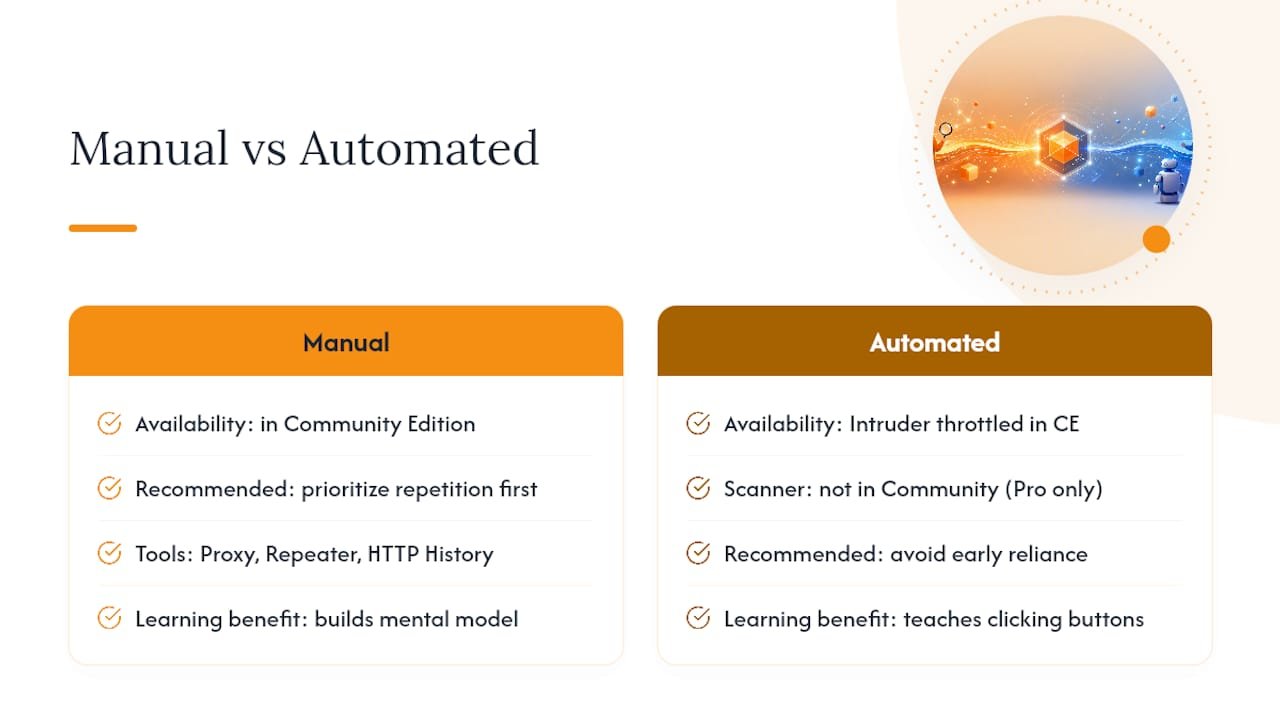
The judgment this article’s approach actually supports is simpler: manual testing with Repeater builds the mental model that automated tools later save you time on. You can’t interpret a scanner’s alert correctly if you’ve never manually confirmed a similar issue yourself. Conventional wisdom oversells “learn every tab” as the goal. It isn’t. The goal is fluency with Proxy, Repeater, and HTTP History, deep enough that you can explain, in plain language, why a modified parameter changed the server’s response.
Prioritize repetition over breadth. Run the baseline-then-modify loop against ten different parameters in a lab like Juice Shop before you ever open Intruder. That repetition, not tool coverage, is what turns “burp suite basics” into a skill instead of a memory of a tutorial you once followed.
How Total Cyber Academy Builds on Burp Suite Fundamentals
Reading through Repeater workflows gets you intercepting traffic. It doesn’t get you interview-ready or certification-ready, and that gap is where structured training earns its keep. Total Cyber Academy’s penetration testing track builds directly on the habits covered here: scoped targets, baseline comparisons, and documentation discipline, but adds instructor feedback on your actual findings instead of a lab’s automated pass/fail message.

Expect hands-on labs mirroring real assessments, direct instructor review of your Repeater sessions and reasoning, and certification prep mapped to CompTIA and EC-Council exam objectives. As a veteran-owned academy, Total Cyber Academy also builds in support structures specifically for veterans and career changers moving into technical roles, something a self-paced video course rarely offers. If you’ve worked through the setup and workflow above and want feedback on whether your methodology actually holds up, check the beginner’s career guide to cybersecurity training to see which track fits your background.
Sources
- Getting started with Burp Suite
- Burp Suite Basics from Cybrary – NICCS
- The ultimate beginner’s guide to Burp Suite
Recommended
- The Social Engineering Toolkit: A Practical Guide for Pen Testers – Total Cyber Academy!
- Wireshark Basics: A Beginner’s Packet Analysis Guide – Total Cyber Academy!
- How to Conduct a Basic Cyber Security Audit at Home – Total Cyber Academy!
- Networking for Cybersecurity: What to Learn and Practice – Total Cyber Academy!