
A workable Network+ study plan has four parts: a diagnostic test to find your gaps, a weekly schedule built around the five exam domains, daily subnetting drills, and timed practice exams before test day. Most beginners need 8 to 12 weeks. People with prior IT experience can often finish in 4 to 6. This guide lays out a 7-week schedule you can stretch or compress, with the hours, the order of topics, and the mistakes that cost candidates points.
TL;DR
- Plan for roughly 2 to 5 months of preparation, depending on your networking background. Beginners usually need 8 to 12 weeks at 6 to 8 hours a week.
- Start with a diagnostic practice test, then spend your time on the domains where you score lowest.
- Practice subnetting for 30 minutes every day until exam day. It is a habit, not a lecture topic.
- On exam day, flag the performance-based questions, answer the multiple-choice items first, and return to the simulations with your remaining time.
- US veterans may be able to recoup the exam fee through the GI Bill, including after a failed attempt.
Table of Contents
- How Long Network+ Preparation Really Takes
- Do You Need A+ First?
- Step Zero: Take a Diagnostic Test
- What the Exam Covers
- The 7-Week Network+ Study Plan
- Make Subnetting a Daily Habit
- Exam Day Strategy: Handle PBQs Wisely
- Choosing Study Resources Without Overspending
- Our Perspective: Pass the Exam, Then Use the Skills
- Paying for Network+ as a Veteran
- How Total Cyber Academy Can Support Your Plan
- FAQ
- Sources
How Long Network+ Preparation Really Takes
The honest answer is that it depends on what you already know. Industry guidance puts typical preparation at 2 to 5 months. Candidates with zero to one year of experience should plan for 8 to 12 weeks at 6 to 8 hours per week. Experienced candidates can often compress that to 4 to 6 weeks at 8 to 10 hours per week. The same source describes successful candidates who target 70 to 84 total hours across about seven weeks, while beginners starting from nothing can need far more.
Use these figures as a calibration tool, not a promise. Three questions help you pick a pace:
- Have you configured or supported a network? Helping users on a help desk, setting up a home router with VLANs, or working signals or communications in the military all count. If yes, lean toward the shorter schedule.
- Do you know how binary and IP addressing work? If subnetting looks unfamiliar, add two weeks. It is the single most procedural skill on the exam.
- How many hours can you protect each week? Six consistent hours beat a 20-hour weekend followed by nothing for ten days.
The plan below uses seven weeks at about 10 to 12 hours per week, which is a good fit for someone with a little IT exposure. If you are starting cold with a full-time job, stretch each phase and keep the same order.
Do You Need A+ First?
No. CompTIA lists A+ as a recommended stepping stone, not a prerequisite, and you can register for Network+ without it. The practical question is whether you have the fundamentals A+ teaches: how hardware, operating systems, and basic troubleshooting fit together.
If you have never worked with computers beyond using them, A+ first gives you vocabulary that makes Network+ easier. If you have done any help desk, field service, or military IT work, you can usually go straight to Network+. Take the diagnostic test in the next section. If you miss most of the basic questions on cables, ports, and the OSI model, spend a week on fundamentals before you start the schedule.
Step Zero: Take a Diagnostic Test
Before you read a single chapter, take a full practice test cold. Experts recommend starting with a diagnostic so you can see your knowledge gaps early instead of discovering them in week six.
Do not worry about the score. Record two things instead:
- Your percentage in each of the five domains.
- The specific topics you guessed on, even when you guessed right.
That list becomes your personal study priority. A candidate who scores well on security and poorly on troubleshooting should not spend equal time on both. You can run this diagnostic with our CompTIA Network+ practice exam.
What the Exam Covers
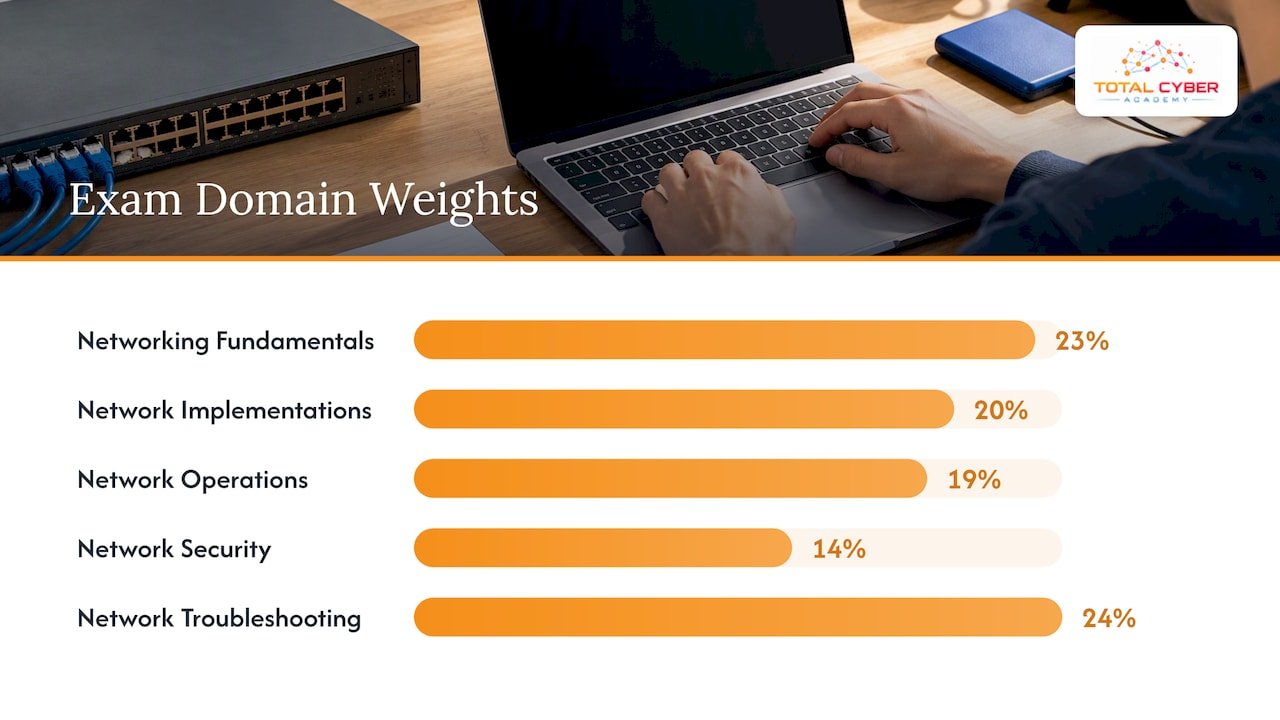
The current version is N10-009. CompTIA publishes the objectives for free, and you should download them and treat them as your checklist. The exam is organized into five domains, and the weighting guides how you divide your time:
| Domain | Approximate weight | What it tests |
|---|---|---|
| Networking Fundamentals | 23% | OSI model, ports and protocols, IP addressing, subnetting, cloud concepts |
| Network Implementations | 20% | Switching, routing, VLANs, wireless |
| Network Operations | 19% | Monitoring, documentation, high availability, disaster recovery |
| Network Security | 14% | Hardening, segmentation, attacks, access control |
| Network Troubleshooting | 24% | Methodology, command-line tools, cabling and connectivity problems |
Weights can shift between exam versions, so confirm them against the current objectives document on CompTIA’s site. Note that troubleshooting and fundamentals together make up nearly half the exam. Many candidates over-study security because it feels more exciting, then lose points on cabling and diagnostics.
Experts also point out that Network+ has evolved to include cloud integration, software-defined networking, and modern security frameworks. Old study materials that skip these topics leave holes. Check the publication date and the exam code on any book or video course before you commit.
The 7-Week Network+ Study Plan
Each week has a focus, a set of tasks, and a checkpoint. Add 30 minutes of subnetting practice to every day from week one, as described in the next section.
Week 1: Fundamentals and the OSI model
Build the vocabulary that every later topic depends on.
- Learn the seven OSI layers and the four-layer TCP/IP model, and be able to place a device or protocol on each.
- Study network topologies, cable types, and connector types.
- Memorize common ports and protocols with both the full name and the acronym.
That last point matters more than it sounds. Test-takers frequently report that questions lean heavily on acronyms rather than spelled-out terms. Make flashcards with the acronym on one side and the full name, port number, and purpose on the other.
Checkpoint: Draw the OSI model from memory and list 15 common ports without notes.
Week 2: IP addressing and routing
- Public versus private addressing, IPv4 classes, IPv6 address types and formats.
- Subnet masks, CIDR notation, default gateways, and DHCP and DNS roles.
- Static versus dynamic routing, and the basics of OSPF, BGP, and EIGRP.
This is the week where many beginners stall. If you feel lost, do not skip ahead. Slow down, and work problems on paper.
Checkpoint: Subnet a /24 into four equal networks and write the range, broadcast address, and usable hosts for each.
Week 3: Switching, wireless, and implementations
- VLANs, trunking, spanning tree, port security, and link aggregation.
- Wireless standards, frequency bands, channels, antennas, and authentication methods.
- Network devices: routers, switches, firewalls, access points, and where each sits in a design.
If you can, build a small lab. Free simulators let you create VLANs and routes in a few minutes, and configuring them once teaches more than reading about them three times.
Checkpoint: Explain what happens to a frame as it moves from a client in one VLAN to a server in another.
Week 4: Network operations
- Monitoring concepts: SNMP, syslog, NetFlow, and performance metrics.
- Documentation, diagrams, change management, and configuration baselines.
- High availability, redundancy, backups, and disaster recovery terms such as RPO and RTO.
- Cloud networking concepts and the basics of software-defined networking.
This domain is less technical, and the questions often read like workplace scenarios. Practice choosing the best action, not just a correct one.
Checkpoint: Take a 50-question practice set and review every wrong answer in writing.
Week 5: Network security
- Attack types: on-path, DoS and DDoS, VLAN hopping, rogue access points, phishing and social engineering.
- Defenses: ACLs, segmentation, NAC, firewalls, IDS and IPS, and hardening practices.
- Authentication and authorization concepts, including AAA, RADIUS, and multifactor authentication.
Security is only 14% of the exam, so avoid spending more than one week here unless your diagnostic showed a serious gap. If you are interested in the next step, this material is a natural bridge to Security+.
Checkpoint: Match ten attacks to the control that best mitigates each.
Week 6: Troubleshooting
At about a quarter of the exam, troubleshooting deserves the most careful study.
- Memorize the troubleshooting methodology in order, from identifying the problem to documenting the findings.
- Practice with ping, traceroute, nslookup, ipconfig and ifconfig, netstat, and arp, and know what each output tells you.
- Review cabling faults, wireless interference, duplex mismatches, and common IP configuration problems.
Checkpoint: Given a short symptom description, name the first command you would run and why.
Week 7: Practice exams and PBQ rehearsal
- Take at least two full-length timed practice exams, spaced a few days apart.
- Review every question, including the ones you got right by guessing.
- Rehearse simulation-style tasks: drag-and-drop port matching, cable selection, and configuration scenarios.
- Spend the final day on light review of weak topics, not new material.
A consistent score comfortably above the passing mark across two or three different question banks is a better readiness signal than one lucky high score.
Make Subnetting a Daily Habit
Subnetting is the topic that separates candidates who finish early from those who run out of time. It is a procedural habit more than a theory topic, and experts recommend 30 minutes of drills every day until the exam. The goal is for the process to become automatic so it costs you seconds, not minutes, under pressure.
A simple daily routine:
- Pick a random IP address and prefix length.
- Find the network address, broadcast address, first and last usable host, and number of usable hosts.
- Check your answer with a subnet calculator, then repeat with a harder prefix.
- Once a week, do ten problems against a timer.
Learn the powers of two up to 256 and the common mask values (128, 192, 224, 240, 248, 252, 254, 255) cold. Everything else builds on those.
Exam Day Strategy: Handle PBQs Wisely
The exam mixes multiple-choice items with performance-based questions, which are interactive simulations. One of the most common traps is spending too long on them early. PBQs often appear first and take real time, so successful candidates flag them and return later, securing the more predictable multiple-choice points first.
Instructors who have taken the current exam report the same pattern. One reported six PBQs on an 80-question exam, flagged them all, and went straight to the multiple-choice section. Another candidate described five PBQs. The number varies by sitting, so do not assume a fixed count.
A simple time plan:
- Skim the first few questions. If you see a PBQ, flag it and move on.
- Work through the multiple-choice items at a steady pace, flagging anything that needs more than a minute.
- Return to the PBQs with roughly half your time left. If you drilled them in week seven, they will go faster.
- Use your last minutes to revisit flagged items.
Choosing Study Resources Without Overspending
You need three things: a source that explains concepts, a source of hands-on practice, and a bank of practice questions written to current objectives. Any single book or video series rarely covers all three well.
When you compare training options, the format matters as much as the price. Self-paced video lets you fit lessons around shifts or deployments. Live instruction gives you a schedule, someone to ask, and accountability. An online training enrolment guide can help you think through how to judge flexibility, support, and delivery before you enroll in any program.
Whatever you pick, apply the same tests:
- Is it written or updated for N10-009, not the older N10-008?
- Does it include labs where you actually configure things?
- Are practice questions explained, not just scored?
- Can you reach a person when you get stuck?
Our Perspective: Pass the Exam, Then Use the Skills
We train a lot of career changers and veterans, and the pattern is consistent. The students who struggle are rarely the ones with the least background. They are the ones who study passively: they watch every video, highlight every page, and never configure anything or time themselves on a practice test.
Our view is that a certification should be the proof of a skill, not a replacement for it. That is why we emphasize hands-on labs, live tutoring, and mentorship from working cybersecurity professionals alongside exam preparation. Network+ matters because every later specialty depends on it. You cannot defend, test, or engineer a network you do not understand. Packet flow, addressing, and segmentation come up again in security analysis, penetration testing, and cloud work.
The employment picture supports building those foundations. The 2025 CyberSeek analysis notes that AI-related skills appear in roughly 10% of cybersecurity-adjacent job listings, which suggests employers want traditional networking knowledge combined with modern, secured enterprise environments. A candidate who can explain why a VLAN, an ACL, or a DNS record behaves a certain way stands apart from one who only memorized the answer key.
Our advice: treat your study plan as the first month of your career, not the last step before it.
— Alden
Paying for Network+ as a Veteran
If you served, check your benefits before you pay out of pocket. The VA states that veterans can use GI Bill benefits for reimbursement of certification exam costs, up to $2,000 per test. Reimbursement is available even if you fail, and there is no limit on how many times you can be reimbursed for taking a test. You claim it with VA Form 22-0803.
The VA also notes that it can pay for prep courses, but only those it has already approved, and it prorates your entitlement. Confirm eligibility and whether a specific course is approved with the VA directly, or with your school certifying official, before you enroll. Rules and amounts can change, so check the VA page for the current version.
How Total Cyber Academy Can Support Your Plan
If you want structure around this schedule, our Network+ courses are built for that. The CompTIA Network+ (009) On-Demand Course is $2,499.99 as a one-time payment and fits around work and family. The CompTIA Network+ N10-009 Live Course is $2,999.99 as a one-time payment and adds scheduled instruction. You can compare both on our CompTIA courses page, and if you want a longer path, our career programs take you from foundations toward roles in IT operations, cloud, and security.
Not sure whether you are ready? Our prerequisites checklist is a good first stop.
FAQ
How long does it take to study for the CompTIA Network+ exam?
Most people need between 2 and 5 months, according to industry guidance. Beginners typically plan for 8 to 12 weeks at 6 to 8 hours per week. Candidates with networking experience can often finish in 4 to 6 weeks at 8 to 10 hours per week.
Can I skip A+ and do Network+?
Yes. A+ is not a requirement for Network+. If you are comfortable with hardware, operating systems, and basic troubleshooting, you can start with Network+. If those basics are new to you, a short period of fundamentals first will make the networking material easier.
What are the objectives of the CompTIA Network+ exam?
The N10-009 objectives span five domains: networking fundamentals, network implementations, network operations, network security, and network troubleshooting. Troubleshooting and fundamentals carry the most weight. Download the official objectives from CompTIA and use them as a checklist.
Should I study subnetting every day?
Yes. Subnetting is a skill you build through repetition, and experts suggest 30 minutes of daily drills until exam day. Short, daily practice makes it automatic and saves time during the test.
Can veterans get the Network+ exam fee reimbursed?
Often, yes. The VA says GI Bill benefits can reimburse certification test fees up to $2,000 per test, even after a failed attempt. You submit VA Form 22-0803, so check the VA page for current requirements.
Sources
- Network+ Study Plan: 7-Week N10-009 Guide, LearnZapp
- Network+ Certification: What It Is and Why It Matters, VerifyEd
- Licensing and Certification Tests and Prep Courses, Veterans Affairs
- Passed Network+!, CompTIA Instructors Network
- Passed 009…We Need To Talk, CompTIA Instructors Network
- CyberSeek workforce data update, June 2025
- Online training enrolment guide for career growth