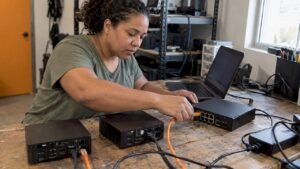
The most effective way to prepare for CompTIA Linux+ is to spend most of your hours at a command line, not in a book. Check first that you are studying the current exam: XK0-006, branded Linux+ V8, launched July 15, 2025, and its predecessor XK0-005 has retired. Older books, videos and forum advice that target XK0-004 or XK0-005 describe a test you can no longer take. This guide gives you a study plan, a lab setup, a realistic cost picture and an honest view of what the certification does for a career.
TL;DR
- Study for XK0-006 only. Download the current exam objectives from CompTIA and treat them as your checklist.
- Build a home lab with at least one Debian or Ubuntu-style system and one RHEL-style system, and do every task from the terminal.
- Plan for roughly 8 to 12 weeks if you already know basic IT, longer if you are starting from zero.
- The exam voucher was listed at $399 per attempt when last verified, so confirm the current price with CompTIA and use practice exams to avoid paying for a retake.
- Linux+ is a foundation for infrastructure and security roles, not a guaranteed salary: the wage that matters is the one for the job you land.
Table of Contents
- What Linux+ actually tests
- Who should take Linux+ and who should wait
- A 10-week study plan
- Build the lab first
- Choosing study materials
- The commands and skills worth overlearning
- How hard is Linux+?
- What Linux+ can do for your career
- Renewal and cost to keep in mind
- Our perspective: practical skill first, exam second
- Where our training fits
- Exam-week checklist
- FAQ
- Sources
What Linux+ actually tests
Linux+ validates the skills of a working Linux administrator. CompTIA describes the certification as covering securing the enterprise, powering the cloud and keeping systems running. In practice, that means the exam rewards people who can complete a task, not people who can recite a definition.
Expect the objectives to cluster around these areas:
- System management: installing and configuring systems, boot processes, package managers, services and processes.
- Storage and filesystems: partitions, logical volumes, mounting, quotas and permissions.
- Networking and services: IP configuration, DNS, SSH, firewalls and basic service troubleshooting.
- Security: users and groups, file permissions, SELinux or AppArmor, authentication and hardening.
- Scripting, automation and containers: shell scripts, scheduled jobs, Git basics and container concepts.
- Troubleshooting: diagnosing boot, performance, network and application problems from logs and command output.
The exact domain names and percentage weights belong to CompTIA’s official objectives document, and they can change between versions. Read that document before you buy anything else, and keep it open as you study.
Who should take Linux+ and who should wait
Linux+ suits three kinds of readers. The first is the entry-level IT professional, for example someone with A+ or Network+, who wants to move toward system administration. The second is the aspiring security analyst or penetration tester, since most security tooling and most servers run on Linux. The third is the career changer, including many veterans, who needs a vendor-neutral credential that shows hands-on competence.
If you have never opened a terminal, you can still start here, but build a base first. Our Linux skills for cybersecurity page shows how Linux fits into a six-month path toward security work. If you are weighing several first certifications, our cybersecurity prerequisites checklist can help you decide what to do in what order.
A 10-week study plan
This plan assumes about 8 to 10 hours per week. Stretch it to 14 or 16 weeks if you are new to IT, and compress it if you already administer Linux at work.
| Weeks | Focus | What to do in the lab |
|---|---|---|
| 1 | Orientation and setup | Download the objectives, build two virtual machines, learn the shell, navigation and help tools (man, --help, info) |
| 2 | Files, users, permissions | Create users and groups, set chmod, chown and ACLs, edit sudoers safely |
| 3 | Packages and services | Use apt and dnf, manage systemd units, read journalctl output |
| 4 | Storage | Partition a virtual disk, build LVM volumes, format, mount, persist in fstab, extend a volume |
| 5 | Networking | Configure interfaces with ip and nmcli, test DNS, set up SSH keys, tunnel a port |
| 6 | Security | Configure a firewall, enforce SELinux or AppArmor, harden SSH, audit logins |
| 7 | Scripting and automation | Write Bash scripts with loops, conditionals and exit codes, schedule with cron and timers, use Git |
| 8 | Containers, virtualization, cloud | Run and inspect containers, manage images and volumes, connect to a cloud instance |
| 9 | Troubleshooting | Break your lab on purpose and fix it: a failed boot, a full disk, a stopped service, a bad route |
| 10 | Practice exams and review | Take timed practice tests, review every miss, redo the weakest labs |
The order matters less than the habit. Each week, finish by doing the week’s tasks from memory with no notes. If you can’t, you haven’t learned it yet.
Build the lab first
You do not need expensive hardware. A laptop with 16 GB of RAM can run two or three lightweight virtual machines using VirtualBox, VMware Workstation Player or KVM.
A setup that covers the objectives well:
- One Debian-family system, such as Ubuntu Server or Debian, to practice
apt, AppArmor andufw. - One RHEL-family system, such as Rocky Linux, AlmaLinux or Fedora, to practice
dnf, SELinux andfirewalld. - A third VM or a cloud instance to practice SSH between machines, routing, and service dependencies.
- Snapshots before every risky change, so that breaking the system is a learning tool and not a setback.
The reason for two families is simple. The exam is vendor-neutral, so you are expected to recognize both package managers, both mandatory access control systems and both firewall front ends. Candidates who only use Ubuntu are the ones surprised by a RHEL-style question.
One practical tip from the Linux community applies here: when you are unsure how something works, read the documentation for your own distribution. Installation and administration guides teach you the habit of reading primary sources, which the exam and the job both reward.
Choosing study materials
Search results for this topic show the same pattern: video walk-throughs from people who passed, large printed study guides, forum threads and practice-question banks. Each has a role, and none replaces labs.
- The official objectives. Free, authoritative and the only true blueprint. Use them as a checklist and tick off each line only after you have done it in a terminal.
- A current book. A comprehensive study guide gives you reference depth and works well for lookups. Verify that the cover and the description say XK0-006. A book aimed at XK0-004 or XK0-005 will miss topics and include retired ones.
- Video or live instruction. Helpful if you learn by watching someone work, and especially valuable when you can ask questions. Check that it is current, and favor courses that make you type commands along with the instructor.
- Practice exams. Use these late in your preparation to learn the question style, including performance-based questions that put you in a simulated terminal. Do not memorize answers. Review every wrong answer until you can explain why it is wrong.
- Community threads. Good for strategy and morale. Treat specific claims about the exam with caution, because many were written for earlier versions.
A budget estimate from one third-party source puts a self-study route at the exam fee plus a modest amount for video and practice questions. Your actual number depends on the materials you choose and on any discounts available when you buy a voucher.
The commands and skills worth overlearning
Candidates who struggle usually do not fail on obscure topics. They fail on fundamentals performed under time pressure. Spend extra hours on these:
- Text processing:
grep,sed,awk,sort,uniq,cut, pipes and redirection. - Permissions and ownership: numeric and symbolic modes, special bits (SUID, SGID, sticky), default
umaskand ACLs. - Storage: the difference between a partition, a physical volume, a volume group and a logical volume, and the exact steps to extend each safely.
- Services:
systemctlstart, stop, enable, mask, and readingjournalctlwith filters. - Networking:
ip a,ip r,ss,dig,nmcli,/etc/hosts,/etc/resolv.conf. - Remote access: SSH key generation,
ssh-copy-id,scp,rsyncand port forwarding. - Scripting: variables, conditionals, loops, exit codes, and checking your own work with
echo $?. - Troubleshooting method: identify the problem, establish a theory, test it, fix it, verify, and document. Logs come first, guessing last.
How hard is Linux+?
It depends on where you start. Someone who already administers servers will find much of it familiar and need to fill gaps in areas like containers and SELinux. Someone coming from a help desk role will find the command line and storage sections the steepest part. A complete beginner needs time simply to become comfortable in the shell.
The exam is difficult for one consistent reason: it tests skills you can only build by doing. Reading about LVM and extending an LVM volume on a live system are two different experiences, and the performance-based questions expose that gap. This is why the plan above puts the lab at the center.
What Linux+ can do for your career
There is no authoritative national salary figure for people who hold Linux+ specifically. Pay depends on the job, your experience, your location, any clearance and the employer. A more honest benchmark is the occupation the certification helps you enter.
The Bureau of Labor Statistics reports May 2025 median pay of $129,180 for information security analysts, $99,130 for network and computer systems administrators and $62,890 for computer support specialists. The same BLS page shows a median of $109,470 for all computer and information technology occupations and projects about 280,000 openings per year in those occupations from 2025 to 2035.
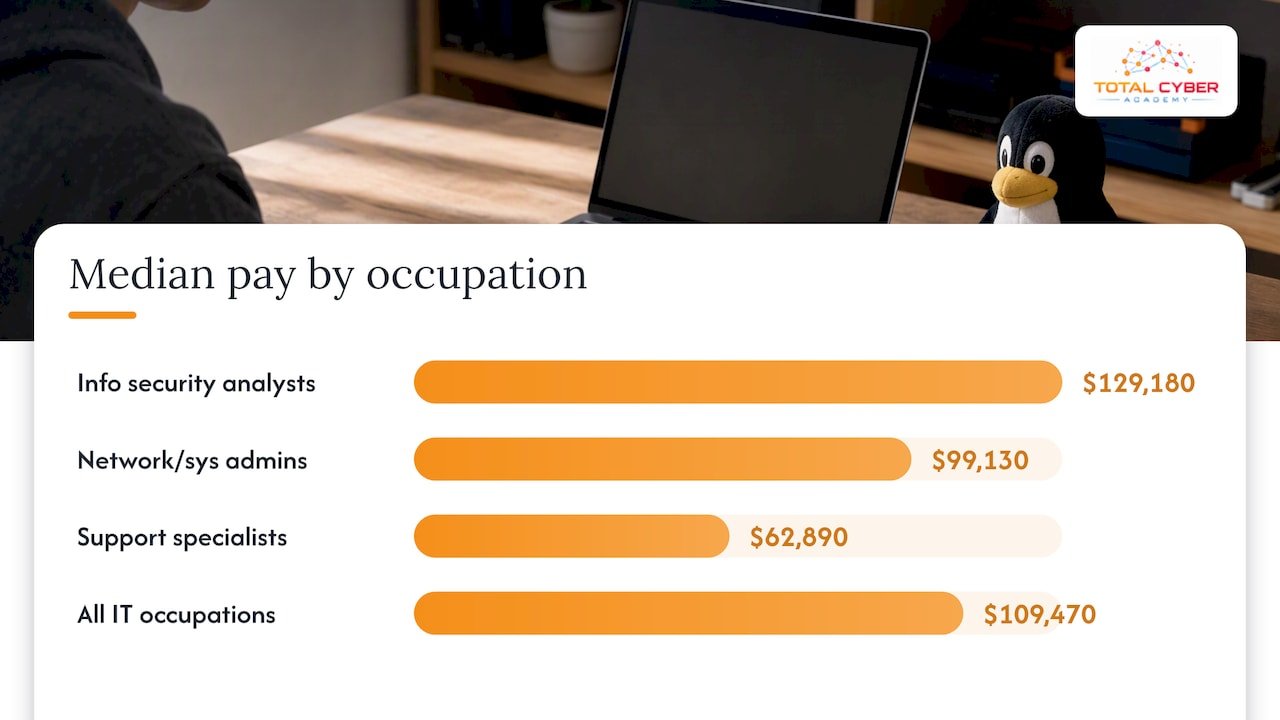
Two cautions follow. First, BLS notes that information security analysts typically need a bachelor’s degree plus experience, and the same is generally true for systems administrators, so a certificate alone does not replace experience. Second, those medians describe people already established in those jobs, not entry-level starting pay. Think of Linux+ as evidence that you can do the work, which helps you get the interview and the first role.
Renewal and cost to keep in mind
Linux+ is valid for three years. According to one third-party summary of CompTIA’s rules, you renew by earning 50 continuing education units or by retaking the exam, and earning a higher CompTIA certification can renew it too. CompTIA changes fees and policies, so confirm both on CompTIA’s own site before you pay.
Because CompTIA exam attempts are not free to repeat, the cheapest route to certification is passing the first time. That is a reason to take practice exams seriously and to schedule your voucher only once you are consistently scoring well above the passing line.
Our perspective: practical skill first, exam second
At Total Cyber Academy we train a lot of beginners, career changers, veterans and working IT professionals, and the pattern we see is consistent. Students who treat a certification as a memorization project tend to feel prepared and then freeze in the simulated terminal. Students who spend their weeks building, breaking and repairing systems pass more comfortably, and they also interview better, because they can describe what they actually did.
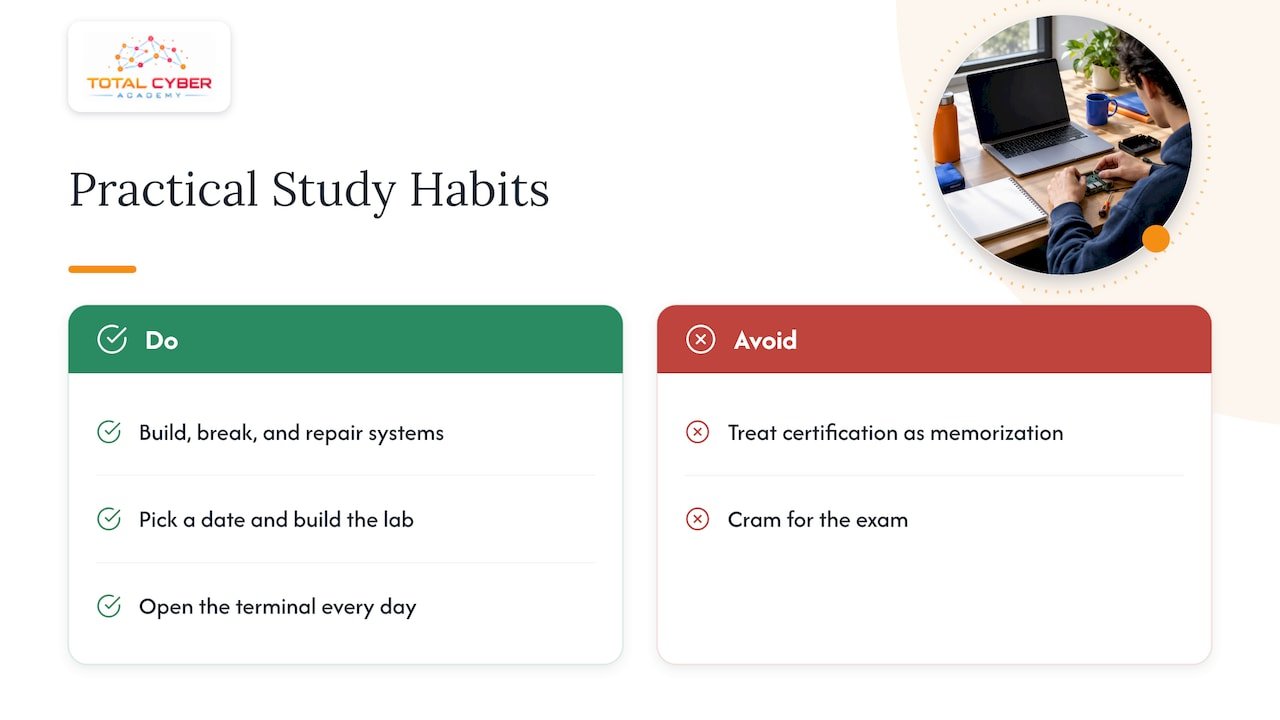
That is why our programs emphasize hands-on labs, instructor support, live tutoring and mentorship from active cybersecurity professionals, not exam-only preparation. A certification matters to employers, but the skill behind it is what keeps you employed. If you are a veteran, your discipline and your habit of following procedures are real advantages in Linux administration. Linux rewards exactly that kind of methodical work.
Our advice is to pick a date, build the lab this week, and open the terminal every day, even for twenty minutes. Consistency beats cramming on a subject like this.
— Alden
Where our training fits
If you prefer structured instruction to self-study, our CompTIA Linux+ On-Demand Course lets you work through the material on your own schedule. We list the price on the course page, so check it there. Our CompTIA courses page shows the rest of the catalog, and the career programs combine certification preparation with role-based skills for paths like Cybersecurity Engineer and IT Operations Specialist.
If you are earlier in the journey, you might start with Network+ or Security+, which pair naturally with Linux+. Our Security+ practice exam and Network+ practice exam pages are good places to test where you stand. Veterans can also read our veteran initiatives guide and our certification funding guide to see what support options may be available.
Exam-week checklist
- Confirm your exam is XK0-006 when you book it.
- Redo your weakest three labs from memory the week before.
- Take at least two timed practice exams and review each miss in a terminal, not only on paper.
- Practice moving quickly through performance-based tasks, and flag questions you want to revisit.
- Sleep, eat and arrive early. Check the ID requirements for your testing center or online proctoring in advance.
FAQ
What is the best way to study for Linux+?
Combine the official CompTIA objectives, one current course or book, and daily lab work on two Linux families. Finish with timed practice exams to learn the question style. Hands-on practice carries more weight than reading.
How hard is CompTIA Linux+?
It is moderately difficult for most people because it tests applied command-line skill, including simulated tasks. Candidates with some system administration or help desk background usually find it manageable with 8 to 12 weeks of focused study. Beginners should add time to learn the shell first.
What is the best Linux to learn on?
Use two. Pick a Debian-family system such as Ubuntu or Debian, and a RHEL-family system such as Rocky Linux or AlmaLinux. The exam is vendor-neutral and expects you to recognize the tools and conventions of both.
What is the average salary for someone with Linux+?
No reliable national figure exists for Linux+ holders alone. Use the job as the benchmark: BLS lists a May 2025 median of $99,130 for network and computer systems administrators and $129,180 for information security analysts. Your own pay will depend on experience, location and employer.
Sources
- BLS: Computer and Information Technology Occupations
- BLS: Information Security Analysts
- BLS: Network and Computer Systems Administrators
- CompTIA Digital Solutions Catalog: Linux+
- Certiguard: CompTIA Linux+ XK0-006 cost, format and renewal
- Linux Foundation Forums: how to learn Linux and Bash