
Cloud security is the discipline of protecting data, applications, and infrastructure hosted on someone else’s servers, and its single most important rule is that you never secure all of it alone. The provider locks down the physical data centers and core infrastructure; you own identity, data, and configuration. Do this today: turn on multi factor authentication and activity logging for every cloud account you touch. That one move closes the two gaps attackers exploit most often.
TL;DR:
- Most breaches result from compromised credentials via phishing rather than hacking, emphasizing the importance of strong identity management and monitoring unusual activity.
- Using immutable backups stored across multiple locations significantly improves ransomware resilience and helps ensure trustworthy disaster recovery.
- Cloud security tools like CSPM, CWPP, and CIEM are most effective when applied gradually, starting with native provider features before investing in advanced platforms.
- Building a cloud security foundation depends on prioritizing identity management, then extending to data, network, logging, and incident response, with ongoing training critical for evolving threats.
Table of Contents
- What Is Cloud Security Basics? The Shared Responsibility Model Explained
- The Five Core Pillars Every Beginner Should Learn First
- What Causes Most Cloud Breaches?
- Cloud Security Tools: CNAPP, CSPM, CWPP, CIEM, and More Explained
- Your Cloud Security Checklist: Day One Through 90 Days
- Building a Cloud Security Career: Learning Paths and Next Steps
- Compliance Standards Every Beginner Should Recognize
- Securing Third-Party Integrations and the Supply Chain
- Multi-Cloud and Hybrid Environments: Where Complexity Multiplies
- Why Ongoing Security Training Matters More Than a One-Time Course
- Backup and Disaster Recovery in the Cloud
- Where to Learn More: Trusted Resources for Cloud Security Basics
- Start With Identity, Not With Tools
- Sources
What Is Cloud Security Basics? The Shared Responsibility Model Explained
Every cloud provider divides security duties between itself and the customer, and where that line falls depends entirely on which service model you’re using. This is the shared responsibility model, and misunderstanding it is the fastest way to leave a door open without realizing it.
In Infrastructure as a Service (think AWS EC2 or Azure Virtual Machines), the provider secures the physical hardware, networking, and hypervisor. You’re responsible for the operating system, patching, firewall rules, and anything you install on top. In Platform as a Service (Heroku, Google App Engine), the provider also manages the runtime and operating system, so your job narrows to application code, data, and access controls. In Software as a Service (Salesforce, Microsoft 365), the provider handles nearly everything except how you configure user permissions, what data you upload, and who has access to it.
The pattern holds across all three: the less infrastructure you manage, the narrower your slice of responsibility becomes, but it never reaches zero. Even in a fully managed SaaS product, a careless admin can hand out excessive permissions or expose a shared file to the entire internet.
When you onboard any new cloud service, run through this quick checklist before you trust it with real data:
- Identify the service model (IaaS, PaaS, or SaaS) and pull up the provider’s shared responsibility documentation for it.
- Find out who controls identity and access. If it’s you, plan an access review before go-live.
- Check whether encryption is on by default or something you must enable manually.
- Confirm logging is active and check where those logs are stored and for how long.
- Ask who patches the underlying software. If the answer is “you,” add it to a recurring maintenance calendar.
Skipping this step is how organizations end up “secure” on paper while leaving the actual exposed surface unmanaged. The provider’s compliance certifications cover their half of the house. Yours is a separate inspection entirely.
The Five Core Pillars Every Beginner Should Learn First
Cloud security breaks down into five practical pillars: identity and access management, data protection, network security, logging and monitoring, and incident response. Providers consolidate tooling around these same categories, and modern CNAPP platforms bundle CSPM, CWPP, and CIEM functions specifically because they map to these five areas. Learn them in this order, because each one builds on the last.
-
Identity and access management (IAM). Enable multi factor authentication on every account, especially anything with administrative rights. Apply least privilege, meaning users and services get only the permissions their job requires, nothing more. Service accounts and API keys deserve the same scrutiny as human logins. A forgotten service account with owner-level access is a common way attackers move laterally once they’re inside.
-
Data protection. Encrypt data at rest and in transit. Most providers turn this on by default for storage services, but confirm it rather than assume it. Learn the basics of key management: who holds the encryption keys, how they rotate, and whether you or the provider controls them. This single decision determines how much control you retain if the provider itself is compromised.
-
Network security. Segment your environment using virtual private clouds (VPCs) or virtual networks (VNets) so a breach in one segment doesn’t cascade into everything else. Audit your security groups regularly. An open rule allowing traffic from anywhere (0.0.0.0/0) on a database port is one of the most common findings in cloud security audits, and it’s usually accidental.
-
Logging and monitoring. Enable activity and configuration logs the day you create an account, not after something goes wrong. Set alert priorities around the events that matter most: root or owner account use, repeated failed logins, and access from unexpected geographic locations. These signals catch intrusions early, often before real damage occurs.
-
Incident response. Know your escalation path before you need it. When something looks wrong, preserve logs immediately, isolate the affected resource rather than shutting it down outright (shutting down can destroy forensic evidence), and follow a documented chain of who gets notified and when.
Pro Tip: Master identity first. Nearly every other pillar depends on it: your data protection controls, your network segmentation, and your incident response plan all assume you know exactly who has access to what. Treat IAM as the trust boundary, not just another checkbox.
What Causes Most Cloud Breaches?
Misconfiguration, not sophisticated hacking, causes the overwhelming majority of cloud security incidents. Attackers don’t need to break encryption or write custom malware when a storage bucket is left publicly readable or a security group permits inbound traffic from any IP address on earth.
Start your own audit with these high-yield checks:
- Search your storage buckets and file shares for public read or write access. This is consistently one of the most common misconfigurations that leads to data exposure.
- Review every security group or firewall rule that allows traffic from 0.0.0.0/0, and tighten it to specific IP ranges wherever possible.
- Confirm that default credentials on any deployed service have been changed.
- Check for unused or orphaned resources still holding valid credentials or access.
Credential compromise is the second major threat category, usually arriving through phishing. An attacker who tricks an employee into entering credentials on a fake login page doesn’t need to exploit any software vulnerability at all. That distinction matters: software vulnerabilities and misconfigurations are different problems requiring different fixes. A vulnerability gets patched. A misconfiguration gets corrected through review and policy, and it tends to recur unless you build recurring checks into your workflow.
Ransomware in cloud environments often spreads through compromised credentials rather than traditional malware delivery, encrypting or deleting accessible storage and backups. This is exactly why backup immutability matters, a topic worth returning to later in this guide.
Watch for these indicators of compromise: unexpected new IAM users or roles, API calls from unfamiliar geographic regions, sudden spikes in outbound data transfer, and security tools or logging being disabled without a documented change request. Any one of these on its own might be nothing. Two or more together deserve immediate investigation.
Cloud Security Tools: CNAPP, CSPM, CWPP, CIEM, and More Explained
The tool landscape confuses most beginners because the acronyms overlap and vendors market them inconsistently. Here’s the plain-language version of each category, along with when you’d actually reach for it.
- CSPM (Cloud Security Posture Management) continuously scans your cloud configuration against best practices and flags drift, like a storage bucket that quietly became public last week.
- CWPP (Cloud Workload Protection Platform) protects the actual running workloads, virtual machines, containers, and serverless functions, against runtime threats.
- CIEM (Cloud Infrastructure Entitlement Management) tracks who and what has access to your cloud resources, catching permission sprawl before it becomes an attack path.
- CASB (Cloud Access Security Broker) sits between users and cloud services to enforce policy, most useful in SaaS-heavy environments with many third-party apps.
- CDR (Cloud Detection and Response) watches for active threats in real time and supports faster incident response once something is already happening.
- SIEM (Security Information and Event Management) aggregates logs across your entire environment into one place for correlation and alerting.
- CNAPP (Cloud Native Application Protection Platform) bundles CSPM, CWPP, and CIEM into a single platform, reflecting how these functions increasingly consolidate as organizations mature past basic manual checks.
You don’t need all of these on day one, and buying tooling before you understand what it’s protecting is a common beginner mistake. Start with what’s already sitting inside your provider’s console. AWS Security Hub, Microsoft Defender for Cloud, and Google Security Command Center all offer built-in posture checks, and enabling cloud-native detection and automated remediation features costs nothing extra and catches a large share of common misconfigurations.
Third-party CNAPP or standalone CSPM tools become worth the investment once you’re managing multiple accounts, multiple cloud providers, or a team large enough that manual review no longer scales. For a single account or a learning environment, the provider dashboard is not just sufficient. It’s the right place to build your fundamentals before adding complexity.
Your Cloud Security Checklist: Day One Through 90 Days
Securing a cloud account isn’t a single afternoon of work. It’s a sequence, and doing the steps out of order leaves gaps. Here’s the order that actually works, broken into three phases.
Day one, before you do anything else:
- Enable multi factor authentication on the root or owner account and every administrative user.
- Turn on activity and configuration logging (AWS CloudTrail, Azure Activity Log, GCP Cloud Audit Logs) and confirm logs are retained somewhere outside the account they’re monitoring.
- Search for and lock down any publicly accessible storage.
- Remove or downgrade any account holding broad, unrestricted administrative roles it doesn’t need.
Week one through month one:
- Build a full inventory of every resource, user, and service account in the environment. You can’t secure what you don’t know exists.
- Run a least-privilege review, trimming permissions down to what each identity actually uses, not what seemed convenient to grant.
- Run your first CSPM scan, whether through a provider-native tool or a dedicated platform, and triage the findings by severity.
- Set up backups following the 3-2-1 rule: three copies of your data, on two different media types, with one copy off-site or in a separate cloud region. Make at least one copy immutable using a feature like S3 Object Lock or Azure Immutable Blob Storage, so ransomware can’t encrypt or delete your recovery point.
By 90 days:
- Extend security review into your CI/CD pipeline, checking that deployment credentials aren’t over-privileged and that infrastructure-as-code templates don’t bake in insecure defaults.
- Run a tabletop incident response exercise: walk through a hypothetical breach scenario with your team (or on your own, if you’re learning solo) and identify where your response plan has gaps.
- Schedule quarterly permission reviews going forward. Access rights decay over time as people change roles, and a one-time cleanup doesn’t stay clean.
Pro Tip: Treat administrative access as something granted just in time, not something left standing permanently. Short-lived credentials and temporary elevation for admin tasks dramatically shrink the window an attacker has to exploit a compromised account.
Building a Cloud Security Career: Learning Paths and Next Steps
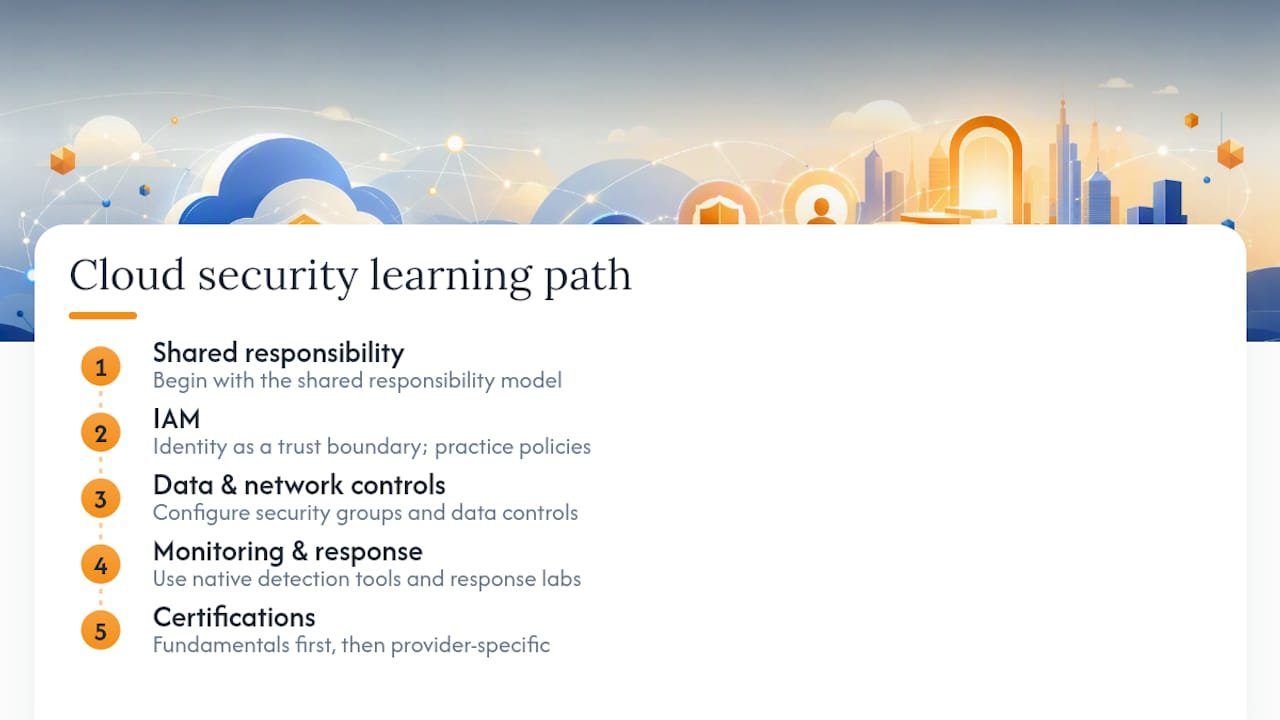
Learning cloud security in the same order this guide covers it, shared responsibility, then IAM, then data and network controls, then monitoring and response, mirrors how entry-level roles are actually structured. Employers want to see that you understand not just definitions but how to apply them in a live environment, which is why hands-on labs matter more than memorizing acronyms.
Entry-level training built around this progression typically runs a few months of part-time study when it includes real lab work in AWS, Azure, or GCP, giving you practice configuring IAM policies, security groups, and native detection tools rather than just reading about them, a structure that mirrors how established professional certificate programs are paced. That kind of repetition is what turns concepts into muscle memory.
Certifications worth targeting as a beginner generally fall into two categories: broad security fundamentals (useful before specializing) and cloud-provider-specific credentials (useful once you’ve picked a platform to focus on). Both matter, but sequencing them wrong wastes time, provider-specific material makes far more sense once you understand general security principles first.
There are resources available that follow this exact sequencing. The cloud security skills guide for beginners maps out which skills to prioritize and in what order. If you learn better by doing than reading, some guides on building practical cybersecurity experience walk through how to structure home lab practice so it reflects job requirements. And if identity as a trust boundary intrigued you in the IAM section above, the zero trust basics guide goes deeper into that mindset shift using a home lab approach.
Compliance Standards Every Beginner Should Recognize
Cloud security and regulatory compliance overlap constantly, and beginners often assume the cloud provider’s certifications cover their own obligations. They don’t, not fully. Compliance frameworks apply to how you configure and use the service, not just to the infrastructure underneath it.
GDPR governs how organizations handle personal data of individuals in the European Union, requiring encryption, access controls, and breach notification within 72 hours regardless of which cloud provider stores the data. HIPAA applies to protected health information in the United States and requires specific safeguards around who can access patient data and how it’s transmitted. Using a HIPAA-eligible cloud service isn’t the same as being HIPAA compliant. Compliance depends on how you configure that service. PCI DSS governs payment card data and mandates network segmentation, encryption, and strict access logging anywhere card numbers are stored or processed.
The pattern across all three: the provider gives you tools capable of meeting the standard, but the compliance burden itself sits with you as the customer, the same shared responsibility logic that runs through every pillar in this guide. If your work touches regulated data, treat the relevant framework’s technical requirements as a checklist against your own configuration, not as something the provider handles automatically. Getting this wrong is a common and costly assumption for beginners moving into regulated industries.
Securing Third-Party Integrations and the Supply Chain
Every API connection, browser extension, and third-party app you authorize expands your attack surface, often invisibly. A vendor with access to your cloud environment inherits some of your trust boundary whether you’ve thought about it that way or not, and a breach on their end can become a breach on yours.
Before connecting any third-party service, check exactly what permissions it requests and whether it needs all of them. A marketing analytics tool asking for write access to your production database is a red flag worth questioning, not a default to accept. Review the vendor’s own security posture where possible: do they publish a security page, list compliance certifications, or disclose how they handle a breach on their end?
Rotate API keys and tokens issued to third parties on a schedule, not indefinitely, and revoke access immediately when a vendor relationship ends. Maintain an actual inventory of every integration connected to your cloud accounts. Most organizations underestimate how many exist until they audit for the first time, and forgotten integrations are exactly where stale, over-permissioned access tends to hide.
Treat vendor risk with the same rigor as your own configuration, because from an attacker’s perspective, the easiest way into a well-defended environment is often through a poorly-defended partner. Supply chain compromises don’t require breaking your defenses directly when a trusted integration provides a side door.
Multi-Cloud and Hybrid Environments: Where Complexity Multiplies
Running workloads across AWS, Azure, and Google Cloud simultaneously, or blending on-premises infrastructure with cloud resources, multiplies your shared responsibility boundaries instead of simplifying them. Each provider structures IAM, logging, and security groups differently, and a policy that works perfectly in one environment can behave unpredictably when translated to another.
The core challenge is consistency. Security teams managing multi-cloud environments often end up with fragmented visibility, one dashboard per provider, making it easy to miss a misconfiguration because nobody was looking at that particular console that week. Hybrid environments add another layer: data moving between on-premises systems and the cloud needs consistent encryption and access policy on both sides of that boundary, not just one.
The practical answer for beginners isn’t to avoid multi-cloud environments, since most mid-size and larger organizations end up there eventually, but to prioritize centralized visibility early. A SIEM or CNAPP platform capable of ingesting logs and configuration data from multiple providers into one view prevents the fragmented-dashboard problem before it takes hold. Standardizing your IAM naming conventions and permission structures across providers, even when the underlying platforms differ, also pays off enormously once you’re managing more than one environment at a time.
If you’re just starting out, get comfortable with one provider deeply before adding a second. Multi-cloud complexity is worth understanding conceptually early, but hands-on mastery of a single platform’s IAM and networking model builds the foundation you’ll need before juggling three at once.
Why Ongoing Security Training Matters More Than a One-Time Course
Cloud environments change constantly. Providers ship new services, default settings shift, and attackers adapt their phishing templates faster than most training calendars update. A single onboarding session on security basics does not hold up six months later, which is why recurring training and awareness programs matter more in cloud environments than they did in traditional on-premises security.
Effective programs combine a few different formats rather than relying on one. Short, frequent refreshers on phishing recognition work better than an annual hour-long lecture nobody remembers by March. Simulated phishing campaigns test whether training actually changed behavior, not just whether someone sat through a slide deck. And technical staff need deeper, hands-on refreshers, quarterly reviews of new provider features, updated misconfiguration patterns, and lessons from any recent incidents, their own or industry-wide.
The goal isn’t compliance theater. It’s building a team that catches the phishing email before it becomes a credential compromise, and questions the unusual permission request before it becomes a breach. Awareness training that stays generic and infrequent produces exactly the gap attackers count on: an employee who technically completed training but never internalized the specific behaviors that matter.
Backup and Disaster Recovery in the Cloud
Cloud backups fail for a different reason than on-premises backups: proximity. A backup stored in the same account, region, or even the same storage bucket as your production data is vulnerable to the same ransomware event, misconfiguration, or credential compromise that took out the original.
The 3-2-1 rule still applies in the cloud: three copies of your data, across two different storage types or providers, with one copy isolated from your primary environment. The addition that matters most for ransomware resilience is immutability. An immutable backup, using a feature like S3 Object Lock or Azure Immutable Blob Storage, cannot be altered or deleted even by an attacker holding valid administrative credentials for a set retention period. That single control has saved organizations from paying ransoms because their recovery point simply couldn’t be touched.
Disaster recovery planning also needs a tested restoration process, not just a backup that exists. A backup nobody has ever restored from is a backup you don’t actually trust yet. Document your recovery time objective (how long restoration should take) and recovery point objective (how much data loss is acceptable), and test the actual restoration process on a schedule, not just when disaster strikes for the first time.
Where to Learn More: Trusted Resources for Cloud Security Basics
A handful of sources are worth bookmarking as you go deeper than any single article can take you.
- NIST’s Cybersecurity Framework offers standards-based language for controls and mappings that many compliance frameworks reference directly, useful once you need to translate “best practice” into formal documentation.
- The Cloud Security Alliance publishes widely referenced guidance on cloud-specific threats and control frameworks that most cloud certifications draw from.
- Your provider’s own security documentation (AWS, Azure, GCP) should be your first stop for platform-specific configuration guidance, since generic advice can’t capture every console’s exact settings.
- For structured, hands-on learning rather than scattered reading, Totalcyber’s beginner’s guide to hands-on cybersecurity training explains how lab-based practice builds the skills that documentation alone can’t teach.
If your organization is also handling physical device retirement as part of a broader security policy, certified hard drive destruction guidance covers the disposal side that cloud security discussions often leave out entirely.
Start With Identity, Not With Tools
The conventional advice on getting into cloud security tells beginners to start collecting certifications or trying every security tool they can find. That’s backward. The research behind this guide points to a clearer priority: identity is the trust boundary that determines whether everything else holds up, and it’s usually the pillar people skip past fastest because it feels less exciting than incident response or threat hunting.
Most beginner mistakes trace back to the same root cause, not understanding exactly what they’re responsible for versus what the provider handles. Fix that mental model first, then IAM, then work outward. Tools matter far less than most course marketing suggests. A beginner who deeply understands least privilege and can explain why an open security group is dangerous will outperform someone who’s memorized five acronyms but never configured a real permission boundary.
Prioritize hands-on practice over passive reading from day one. Cloud security rewards people who’ve actually broken something in a lab environment and had to figure out why.
— Alden
Ready to move from reading about cloud security to practicing it? Totalcyber’s beginner-focused training programs walk you through exactly this sequence, shared responsibility, IAM, data and network controls, monitoring, and incident response, using hands-on labs instead of slide decks, so you build the practical skills that entry-level cloud security roles actually require.
Sources
- Cloud security is a shared responsibility — Palo Alto Networks
- Types of cloud security — SentinelOne
- NIST Cybersecurity Framework — NIST
- Cloud security fundamentals for beginners — Protego (2024)
- What is cloud security? — Microsoft