
The Social-Engineer Toolkit, universally abbreviated as SET, is an open-source, Python-driven penetration-testing framework purpose-built for simulating social-engineering attack techniques in authorized security assessments. Created by Dave Kennedy and maintained under the TrustedSec project, SET lives at the trustedsec/social-engineer-toolkit repository on GitHub and has accumulated extensive adoption and broad usage across the global security community. Its modular architecture covers phishing, credential harvesting, infectious media generation, QR-code attacks, and direct Metasploit payload integration, making it one of the most complete social engineering tools available for lab-based training and professional engagements.
Before anything else: SET is a dual-use framework. Using it against systems or individuals without explicit, documented authorization is illegal under the Computer Fraud and Abuse Act and violates every recognized standard of cybersecurity ethics.
Key capabilities at a glance:
- Spear-phishing and mass email attack vectors
- Website cloning with credential harvesting
- Infectious media (USB/CD) payload generation
- QR-code attack generation
- PowerShell and Windows-specific attack vectors
- Native Metasploit integration for payload delivery and listener management
Key Takeaways
SET is a Python-driven, open-source framework maintained by TrustedSec that requires explicit written authorization before use and covers spear-phishing, credential harvesting, infectious media, QR attacks, and Metasploit payload delivery.
| Point | Details |
|---|---|
| Authorization is non-negotiable | Never run SET without a signed scope document; unauthorized use violates the CFAA. |
| Core modules to know | Spear-phishing, site cloner, infectious media generator, QR code generator, and payload/listener cover the primary attack vectors. |
| Lab isolation is mandatory | Use isolated VLANs, test accounts, sinkhole domains, and dedicated VMs to prevent accidental harm. |
| SET vs. cloud platforms | Use SET for teaching and proof-of-concept; prefer cloud phishing platforms when deliverability and reporting scale matter. |
| Totalcyber for structured practice | Instructor-led labs at Totalcyber provide pre-scoped environments and expert oversight for safe, career-building SET training. |
Table of Contents
- What does the social engineering toolkit actually do?
- How do you install SET on Kali, Ubuntu, or WSL?
- Common SET workflows you can run in an authorized lab
- How to set up a safe lab and what defenders should verify
- Integrating SET with Metasploit for payload and listener management
- Keeping SET updated and fixing common errors
- Where to find official SET downloads and documentation
- When is SET the right tool, and when should you use something else?
- Structured training accelerates SET skills and reduces legal risk
- Sources
What does the social engineering toolkit actually do?
SET’s strength is its guided, menu-driven interface that maps directly to real-world social engineering attack techniques. Each module corresponds to a distinct attack vector, and testers can chain them together within a single engagement. The table below maps each core module to its primary use case and the assessment objective it serves.
| Module | Primary Attack Vector | Assessment Objective |
|---|---|---|
| Spear-Phishing Attack Vectors | Targeted email with malicious attachment or link | User awareness, click-rate measurement |
| Website Attack Vectors | Site cloning + credential harvesting | Control validation, password reuse testing |
| Infectious Media Generator | Malicious USB/CD payload | Physical security, autorun controls |
| QR Code Generator | QR pointing to controlled server | Mobile user awareness |
| Create a Payload and Listener | Metasploit payload + reverse shell | Red-team post-exploitation simulation |
| PowerShell Attack Vectors | Windows-specific script execution | Endpoint detection validation |
| Third-Party Modules | Community-contributed vectors | Specialized or custom test scenarios |
The spear-phishing module lets you craft targeted emails with malicious attachments, selecting from pre-built templates or custom content. The website cloning module uses setoolkit’s built-in site cloner to mirror a target login page, host it locally via Apache, and capture submitted credentials in real time. Infectious media generation creates autorun-capable payloads for USB drives, which remain a valid physical-social test vector in environments where endpoint controls are under review.
Pro Tip: For engagements where email deliverability is critical, SET’s SMTP relay configuration often struggles against modern secure email gateways (SEGs) with DMARC, DKIM, and SPF enforcement. In those cases, a cloud-based phishing simulation platform with dedicated sending infrastructure will produce more operationally realistic results. Reserve SET’s phishing module for lab training and proof-of-concept demonstrations.
How do you install SET on Kali, Ubuntu, or WSL?
SET runs natively on Kali Linux, Debian, Ubuntu, and most Debian-derived distributions. The Kali Tools entry for SET notes that the legacy se-toolkit command is deprecated; the correct startup command on all current distributions is sudo setoolkit.
Installation options:
- Kali Linux (recommended for most testers): SET is pre-installed. Launch it with
sudo setoolkit. If it is missing, runsudo apt update && sudo apt install set. - Debian/Ubuntu (from source): Clone the repository, install dependencies, and run the installer.
- WSL (Windows Subsystem for Linux): Functional for menu navigation and payload generation, but listeners require a routable IP. Configure a network bridge or VPN tunnel before running any callback-dependent module.
- Docker/containers: Similar networking caveat applies. Expose the listener port explicitly and confirm the container IP is reachable from test targets.
From-source install (Debian/Ubuntu):
sudo apt update && sudo apt install git python3 python3-pip
git clone https://github.com/trustedsec/social-engineer-toolkit
cd social-engineer-toolkit
pip3 install -r requirements.txt
sudo python3 setup.py
sudo setoolkit
Dependency checklist before your first session:
| Dependency | Purpose | Install Command |
|---|---|---|
| Python 3 | SET runtime | sudo apt install python3 |
| pip3 | Python package manager | sudo apt install python3-pip |
| Apache2 | Hosts cloned sites | sudo apt install apache2 |
| Metasploit Framework | Payload generation + listeners | sudo apt install metasploit-framework |
| git | Cloning and updating repo | sudo apt install git |
A practical walkthrough of SET menus and common attack flows, including sample troubleshooting steps, is available at Awjunaid.
Common SET workflows you can run in an authorized lab
Each workflow below is a high-level procedural outline. None of these steps should be executed outside a scoped, documented engagement.
Phishing and spear-phishing
Select Social-Engineering Attacks → Spear-Phishing Attack Vectors from the SET menu. Choose a pre-built template or import a custom one. Configure your SMTP relay credentials (a dedicated test relay or an internal mail server authorized for the engagement). SET logs delivery status and, when combined with a credential harvester, tracks link clicks and form submissions.
Website cloning and credential harvesting
Navigate to Website Attack Vectors → Credential Harvester Attack Method → Site Cloner. Enter the target URL (your authorized test login page), and SET mirrors it locally. Start Apache (sudo service apache2 start) to serve the cloned page. Captured credentials are written to a local log file in real time. After the test, review the log, sanitize captured data per your evidence-retention policy, and shut down the listener.
Infectious media generation
Select Infectious Media Generator. Choose a payload type (Metasploit-based reverse shell is common for lab demos). SET writes the payload to a specified output path. Mount the output to a USB drive in a fully isolated lab environment. Treat the media as live malware: label it, log its chain of custody, and destroy or sanitize it immediately after the test concludes. Review safe practices for software and media handling before running this module with students.

QR-code attack
Select QR Code Generator. Point the QR to your controlled lab server (not a public URL). Generate the image, embed it in a test document or poster, and distribute it within the authorized test environment. Collect server access logs to measure scan rates and identify which devices connected.
Payload delivery with Metasploit
SET’s Create a Payload and Listener option calls Metasploit’s msfvenom to build a payload and then launches msfconsole with a pre-configured handler. Confirm Metasploit is running and reachable before starting this workflow. The listener IP must be routable from the target network; a misconfigured listener is one of the most common causes of silent test failures.
How to set up a safe lab and what defenders should verify
A poorly scoped SET lab can produce real harm: credentials captured from production accounts, payloads that escape the test network, or legal exposure from undocumented testing. The checklist below applies whether you are an instructor running a class exercise or a professional tester preparing a client engagement.
Authorized lab setup checklist:
- Obtain a signed scope-of-work or rules-of-engagement document before any testing begins.
- Isolate the lab network from production systems using VLANs, firewall rules, or a physically separate switch.
- Use dedicated test accounts with no access to real data or production systems.
- Configure sinkhole domains for captured credentials so they cannot be replayed against live services.
- Run SET on a dedicated VM with snapshots taken before and after each test session.
- Enable full packet capture and system logging on the lab host for evidence retention.
- Define a clear cleanup procedure: delete payloads, sanitize logs of real credentials, and document findings before ending the session.
Scenario matrix:
| Assessment Objective | SET Module | Safety Control |
|---|---|---|
| User click-rate awareness | Spear-Phishing | Isolated SMTP relay, no production mail |
| Credential reuse validation | Site Cloner + Harvester | Sinkhole domain, test accounts only |
| Physical access controls | Infectious Media Generator | Air-gapped lab, labeled media, chain of custody |
| Mobile user awareness | QR Code Generator | Controlled lab server, no public DNS |
| Endpoint detection validation | Payload + Listener | Isolated VLAN, pre-authorized callback IP |
Defender mitigations to verify during or after a SET-based test:
- Multi-factor authentication on all accounts targeted by credential harvesting
- Secure email gateway rules for DMARC, DKIM, and SPF enforcement
- URL filtering and domain reputation blocklists tuned to catch cloned-site domains
- Endpoint detection and response (EDR) alerts for script execution and autorun events
- User awareness training covering phishing recognition and suspicious link behavior
Pro Tip: Route all SET listeners through an internal VPN or a pre-authorized HTTP/S tunnel (such as a controlled ngrok-equivalent on your own infrastructure) rather than exposing a raw listener port to the internet. This prevents accidental callbacks from outside the test scope and keeps your listener IP off public threat-intelligence feeds.
Integrating SET with Metasploit for payload and listener management
SET and Metasploit interoperate through msfvenom for payload generation and msfconsole for listener management. When you select a Metasploit-based payload in SET, the framework calls msfvenom with your chosen payload type (commonly windows/meterpreter/reverse_tcp for Windows lab targets), output format, and listener IP/port. SET then launches a corresponding multi/handler in Metasploit automatically.
Listener management requires a stable, routable IP on the interface SET binds to. Common port choices are 443 and 8443, which blend with legitimate HTTPS traffic and are less likely to be blocked by perimeter firewalls during authorized tests. Avoid port 4444 in production-adjacent environments; it appears on most EDR and firewall block lists by default.
On payload obfuscation: SET offers basic encoding options via msfvenom. Use encoding in tests specifically designed to evaluate whether endpoint controls detect obfuscated payloads. Avoid heavy obfuscation in training labs where the goal is demonstrating detection, not evading it. Obfuscated payloads that escape a lab network create real incident-response obligations.
After each session, remove all payloads from test systems, close all listeners, and archive logs per your evidence-retention policy. Document what was captured, what was not, and what controls succeeded or failed.
Keeping SET updated and fixing common errors
SET generates or updates set.config on every launch. For persistent configuration changes (listener IP, default ports, Apache path), edit set.config directly rather than relying on the interactive menu, which resets to defaults on restart. The GitHub repository README documents every configurable parameter.
Update process:
- Navigate to your SET directory:
cd /path/to/social-engineer-toolkit - Pull the latest changes:
git pull origin master - Re-run the installer if dependencies changed:
sudo python3 setup.py - On Kali, check for package updates:
sudo apt update && sudo apt upgrade set - Review the repository changelog for deprecation notices before running updated modules.
Common errors and fixes:
- Apache not serving cloned sites: Confirm Apache is running (
sudo service apache2 status) and that SET’s web root path inset.configmatches your Apache document root. - SMTP relay failures: Verify relay credentials, confirm the relay server allows connections from your lab IP, and check that port 25 or 587 is not blocked by your host firewall.
- Metasploit listener not connecting: Confirm
msfconsoleis running, themulti/handleris active, andLHOSTmatches the interface IP reachable from the target. - Permission errors on launch: Always run SET with
sudo. Running without elevated privileges causes silent failures on port binding and file writes. - WSL listener failures: Configure a network bridge in WSL2 settings or use a VPN to expose a routable IP, as documented in the trustedsec/social-engineer-toolkit repository issues.
Where to find official SET downloads and documentation
The canonical sources for SET code, documentation, and licensing are listed below. Always download from these sources; third-party mirrors may contain modified or malicious versions.
| Resource | URL | Best For |
|---|---|---|
| GitHub Repository | github.com/trustedsec/social-engineer-toolkit | Code, README, issue tracker, LICENSE |
| TrustedSec Project Page | trustedsec.com/resources/tools/the-social-engineer-toolkit-set | Project overview, download guidance, community links |
| Kali Tools Page | kali.org/tools/set/ | Distribution-specific install notes, package details |
| IEEE Academic Reference | ieeexplore.ieee.org/document/5967295/ | Academic context, systematic assessment methodology |
Read the project’s LICENSE file before distributing SET or using its code outside a scoped engagement. The license governs redistribution rights and places explicit restrictions on unauthorized use.
When is SET the right tool, and when should you use something else?
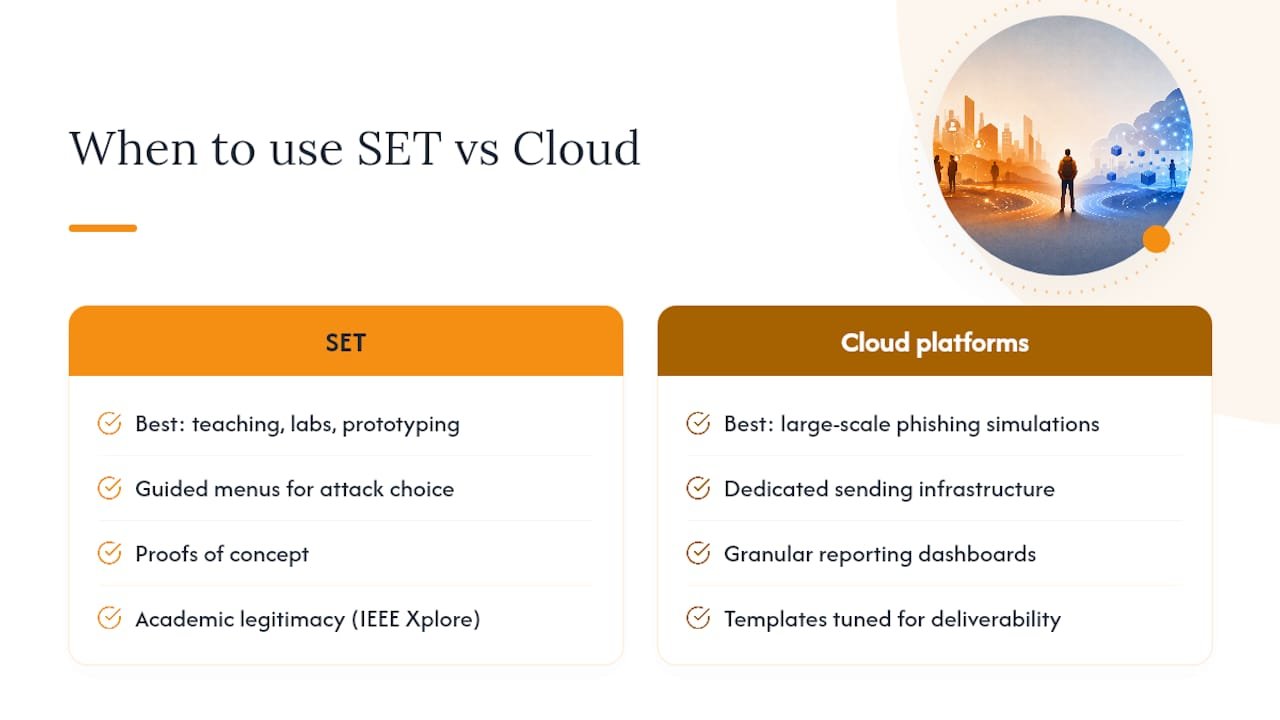
SET occupies a specific and well-defined niche. For learning social-engineering mechanics, building foundational lab skills, and running quick proof-of-concept demonstrations, it remains one of the most practical open-source security tools available. Its guided menus make attack vector selection explicit, which is exactly what you want when teaching a class or onboarding a junior tester. The IEEE Xplore paper on SET situates it within systematic social-engineering assessment methodology, confirming its academic and professional legitimacy.
Where SET shows its age is in email deliverability. Modern secure email gateways with DMARC enforcement, sandboxing, and reputation scoring will catch most SET-generated phishing emails before they reach a test target’s inbox. That is not a flaw in SET; it is a reflection of how much the threat landscape has shifted since SET’s early releases. As cybersecurity threats continue to evolve, enterprise red teams running large-scale phishing simulations increasingly rely on cloud-based platforms with dedicated sending infrastructure, granular reporting dashboards, and pre-built template libraries tuned for deliverability.
The practical guidance: use SET when you are teaching, prototyping, or validating a specific control in a contained lab. Use a cloud phishing platform when scale, deliverability, and reporting depth are the primary requirements. The two approaches are complementary, not mutually exclusive. Instructors get the most value by combining SET labs with a modern phishing simulation platform, so students understand both the mechanics of an attack and the operational realities of running one at scale.
Structured training accelerates SET skills and reduces legal risk
Solo experimentation with SET carries real legal and operational risk, particularly for learners who have not yet internalized the authorization requirements or the network-isolation discipline that professional engagements demand. Instructor-led labs change that dynamic. A structured environment provides pre-scoped lab networks, documented rules of engagement, and an instructor who can intervene before a misconfiguration becomes a liability.
Totalcyber’s hands-on penetration testing and cybersecurity engineering programs are built specifically for veterans, career changers, and junior IT professionals who need practical lab experience alongside certification preparation. Courses cover CompTIA Security+, CEH, and hands-on red-team skills, including social-engineering assessment workflows. If you are ready to move from reading about SET to running authorized engagements under expert supervision, check the training prerequisites checklist to confirm you are prepared, then visit Total Cyber Academy to enroll in a program that fits your schedule and career goals.
Sources
- How to use Social-Engineer Toolkit
- trustedsec/social-engineer-toolkit
- TrustedSec | The Social Engineering Toolkit (SET)
- Social Engineering Toolkit — A systematic approach to social engineering | IEEE Xplore
- setoolkit: A social engineering framework used for phishing, credential harvesting, and more | Abdul Wahab Junaid
This article is for general educational purposes. Always confirm the legal and regulatory requirements for security testing in your jurisdiction with qualified legal counsel before conducting any assessment.