
A successful A+ study plan pairs a time-boxed schedule for the 220-1201 and 220-1202 exams with hands-on troubleshooting practice and repeated practice testing, not passive review of flashcards. This structure mirrors the Technical Support Specialist role that CISA defines for entry-level IT work, and organizations such as Total Cyber Academy build their A+ courses around that same job-ready framing.
TL;DR:
- Completing two full-length practice tests above the passing score before booking exams significantly reduces the need for a second attempt.
- Hands-on troubleshooting labs and real-world scenario practice develop job-ready skills beyond passive review or flashcard memorization.
- Studying should align with specific job tasks, such as component replacement or network troubleshooting, rather than solely objective list mastery.
- Using topic-level breakdowns from practice tests helps prioritize weak areas and guides targeted remediation before retesting.
- Structured, instructor-supported courses with labs and ticket-style scenarios improve both exam readiness and actual help-desk effectiveness.
Table of Contents
- Two study schedules for the 220-1201 and 220-1202 exams
- What to study and practice in each A+ domain
- Running labs that build real troubleshooting skill
- Using practice tests to close knowledge gaps
- Study habits that improve retention and job readiness
- Why job task alignment matters more than memorization
- Where Total Cyber Academy fits into this plan
- Sources
- FAQ
Two study schedules for the 220-1201 and 220-1202 exams
Your available hours per week should determine which timeline you follow. Full-time learners benefit from an accelerated pace, while working professionals need a schedule that respects existing job and family commitments.
- Weeks 1 to 3 (8-week plan): Cover hardware, networking, and mobile device domains at a rate of two topics per day, pairing each with a short lab.
- Weeks 4 to 5 (8-week plan): Move into operating systems and software troubleshooting, running at least one ticket-style scenario daily.
- Weeks 6 to 7 (8-week plan): Complete security fundamentals and operational procedures, then begin full-length practice tests.
- Week 8 (8-week plan): Review weak domains from practice-test breakdowns and book both exams.
- Weeks 1 to 4 (12-week plan): Study hardware and networking on evenings and weekends, at a slower pace of one topic every two days.
- Weeks 5 to 9 (12-week plan): Add operating systems, mobile devices, and security content, continuing with weekly labs.
- Weeks 10 to 12 (12-week plan): Run practice tests every week, close remaining gaps, and schedule the exams once scores are consistent.
Book the exams only after two consecutive full-length practice tests land comfortably above the passing threshold. Rushing into the exam window before that consistency shows up is the most common reason candidates need a second attempt.
What to study and practice in each A+ domain
Each domain on the 220-1201 and 220-1202 exams maps to a specific set of job tasks, and your study time should mirror that mapping rather than treating the objectives as a vocabulary list.
- Hardware: Learn to identify components, replace failed parts, and follow safe repair procedures, then complete two hands-on tasks such as swapping a hard drive and reseating memory.
- Networking and mobile devices: Practice cabling standards, basic TCP/IP concepts, Wi-Fi troubleshooting, and mobile OS configuration on a real or virtual device.
- Operating systems and software: Perform clean installs, manage drivers and updates, and walk through recovery options when a system fails to boot.
- Security essentials: Study the mitigation steps tied to common threats covered on the exam, including malware removal and account lockdown procedures.
- Troubleshooting process: Document each step you take, reproduce the fault before attempting a fix, and close out the scenario the way a help-desk ticket would be closed.
That final point deserves emphasis, since the CISA Technical Support Specialist role and the associated Technical Support work role documented by NICCS both center on this exact troubleshoot-and-resolve pattern rather than isolated fact recall.
Pro Tip: Keep one running document titled “Fixes I’ve Made” and add every lab resolution to it: it becomes both a study aid and a talking point for interviews.
Running labs that build real troubleshooting skill
Hands-on practice separates candidates who pass the exam from candidates who can also do the job on day one. A simple, repeatable lab template keeps that practice consistent even with limited equipment.
- Write down the objective, such as “diagnose why a workstation will not connect to Wi-Fi.”
- List the materials needed, whether a spare laptop, a virtual machine, or a home router.
- Follow safe-handling basics: ground yourself against electrostatic discharge, use the right screwdriver set, and keep screws organized by component.
- Work through the steps, record the expected result, and log what actually happened.
- Write the resolution as if closing a support ticket, including the root cause and the fix applied.
A budget lab setup, a decommissioned desktop, a spare phone, and free virtualization software, covers most of the hardware and OS objectives without requiring a full workbench.
Using practice tests to close knowledge gaps
Practice tests exist to tell you where to spend your remaining study time, not just to predict a pass or fail outcome. Take your first full timed test only after completing one pass through all domains, and record that score as your baseline.
- Review the topic-level breakdown from each test rather than only the overall percentage.
- Prioritize remediation on the two or three lowest-scoring domains before retaking a full test.
- Repeat a full-length test every one to two weeks once you have covered all domains.
- Simulate real exam conditions, timed and without notes, during your final week before the test date.
Practice tests with topic-level breakdowns, like the CompTIA Network+ practice exam format many candidates use to rehearse timed conditions, turn a single score into a prioritized study list rather than a pass or fail verdict.
Study habits that improve retention and job readiness
Active recall and spaced repetition help facts stick, but pairing them with lab work is what turns a memorized answer into a skill you can perform under pressure.
- Quiz yourself from memory before rereading a topic, then schedule a repeat quiz several days later.
- Keep a lab log and a troubleshooting checklist so each new scenario builds on the last one instead of starting from zero.
- Mix topics during review sessions instead of studying one domain in isolation for hours at a time.
- Limit passive reading time and replace it with deliberate practice: a timed drill, a lab, or a mixed-topic quiz.
Pro Tip: Schedule mixed-topic review sessions on weekends, since exam questions rarely stay inside one domain and your practice should not either.
Why job task alignment matters more than memorization
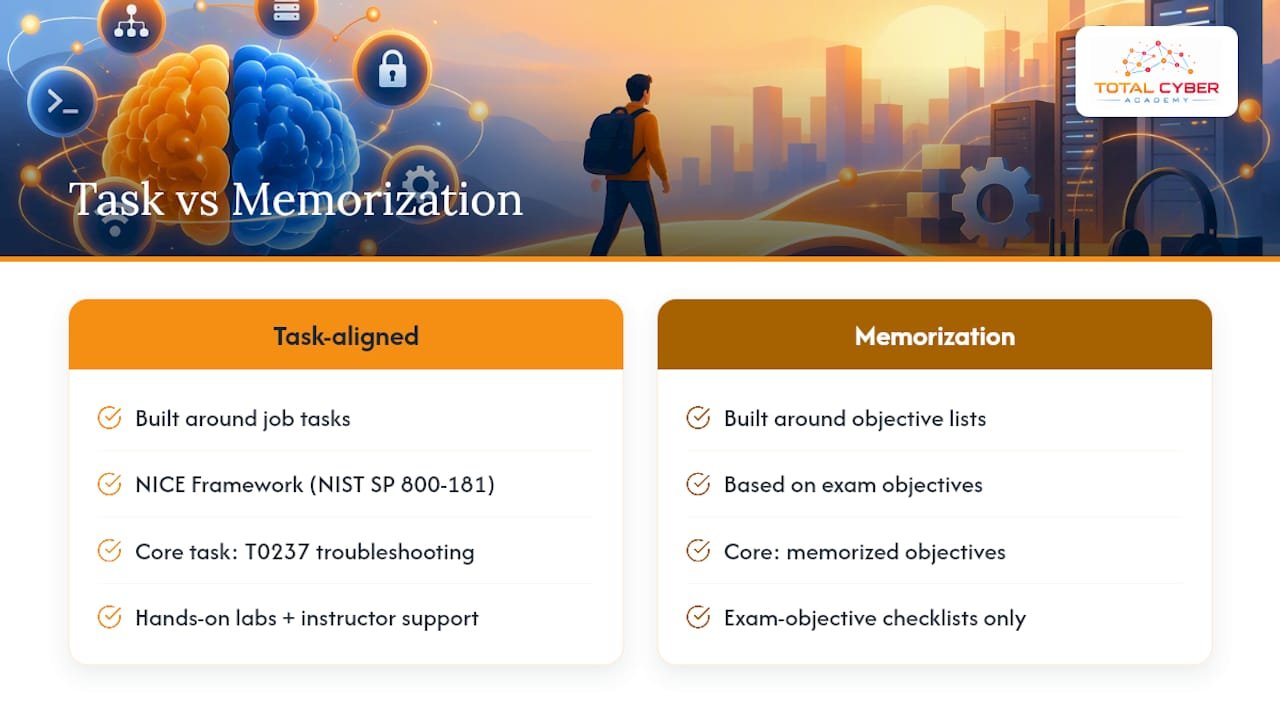
An A+ study plan built around job tasks holds up better under real working conditions than one built around memorized objective lists. The NICE Framework, documented in NIST SP 800-181, gives training providers a standard set of tasks and skills to map against, and task T0237, troubleshooting system hardware and software, sits at the center of the entry-level Technical Support work role.
That alignment is why Total Cyber Academy structures its A+ preparation around hands-on labs and instructor support rather than exam-objective checklists alone, giving learners a closer approximation of actual help-desk conditions before they sit for either exam.
— Alden
Where Total Cyber Academy fits into this plan
A provider offers A+ preparation that follows the same domain structure and ticket-style practice recommended throughout this plan, backed by instructor support rather than a purely self-directed course.
- The CompTIA A+ 220-1101 on-demand course covers hardware, networking, and mobile device domains with hands-on lab modules.
- The 220-1102 on-demand course builds on that foundation with operating systems, security, and troubleshooting content.
- The bundled on-demand package covers both exams in a single enrollment for readers following the full schedule outlined above.
Instructor access and lab-based quizzes inside each course line up with the weekly milestones in the schedules above, providing a course-aligned way to follow the plan instead of assembling materials from scratch. Explore the full course catalog to find the option that fits your timeline.
Sources
- Technical Support Specialist | CISA
- Cybersecurity Workforce Framework (NICE Framework) | NIST SP 800-181
- Technical Support NICE Framework Work Role | NICCS
FAQ
How long should I spend studying for the A+ exams?
Most candidates use either an 8-week accelerated schedule or a 12-week part-time schedule, depending on available study hours per week. Both schedules cover the same domains, with the 12-week version spreading the same content over evenings and weekends.
How much hands-on practice do I need for the A+ exams?
You need enough repetition to complete common tasks, like component replacement, OS installation, and network troubleshooting, without hesitation. Running a ticket-style lab for each domain, documented as CISA’s Technical Support Specialist role describes, builds that fluency faster than reading alone.
When should I take my first full practice test?
Take your first full timed practice test after completing one pass through all exam domains, then use the topic-level breakdown to guide remediation. Repeat a full test every one to two weeks after that until your scores are consistently above the passing threshold.
Does A+ certification actually prepare me for a help-desk job?
Yes, when the study plan is built around real job tasks rather than memorized definitions. The A+ objectives map closely to the Technical Support work role tracked by NICCS, which centers on installing, configuring, and troubleshooting hardware and software for end users.
What is the fastest way to close a knowledge gap before the exam?
Identify your lowest-scoring domain from a full practice test, then run a focused lab and a short quiz on that domain alone before retesting. Repeating this cycle on two or three weak domains is usually faster than rereading the entire objective list again.