
The most effective Security+ lab practice combines a safe, isolated home lab for tools such as Wireshark and Nmap with guided exercises mapped to the exam objectives. The SY0-701 exam includes performance-based questions, so reading alone will not carry you through it. You need to have configured a firewall rule, read a packet capture and worked through a log before you sit down at the test center. This guide covers what to practice, how to build a lab that cannot hurt anyone, and how to tell whether your skills are improving.
TL;DR
- The SY0-701 exam is capped at 90 questions in 90 minutes and mixes multiple-choice with performance-based items, so hands-on practice is part of the exam, not an extra.
- Build your lab on isolated virtual machines, keep it off your production network, and scan only systems you own.
- Practice by domain: networking and firewalls, threat detection, vulnerability assessment, incident response and hardening.
- Take a snapshot before each exercise, repeat the task from memory a week later, and use timed practice exams to measure progress.
- Structured labs with an instructor save time when you do not know what to practice next.
Table of Contents
- What Security+ practice labs are
- Which skills and exam objectives your labs should cover
- Build a safe home lab
- Practice legally and safely
- Free and paid ways to practice
- How to progress and measure improvement
- Our perspective
- Structured Security+ training with labs
- FAQ
- Sources
What Security+ practice labs are
A practice lab is a controlled environment where you perform security tasks instead of reading about them. It can be a set of virtual machines on your own computer, a browser-based environment provided by a course, or a mix of both. The goal is the same: turn a definition such as “network segmentation” or “vulnerability scan” into something you have done with your own hands.
This matters because of how CompTIA tests. The official exam objectives list multiple-choice and performance-based questions, and recommend a minimum of two years of IT administration experience with a focus on security, along with hands-on experience with technical information security. Few candidates have that much experience, which is exactly what labs are meant to compensate for. Performance-based questions put you in a simulated interface and ask you to configure, sort or analyze something. If you have only memorized terms, these questions are where a pass turns into a fail.
Labs also help with the multiple-choice items. Scenario questions describe a situation and ask for the best next step. People who have performed the step recognize the right answer faster than people who have only read about it.
Which skills and exam objectives your labs should cover
The SY0-701 objectives are organized into five domains. The exam objectives document gives each domain a weighting. Use those weightings to decide where your lab hours go.
| Domain | Weight | What to practice hands-on |
|---|---|---|
| General Security Concepts | 12% | Access control models, encryption and hashing, certificates, basic zero trust ideas |
| Threats, Vulnerabilities, and Mitigations | 22% | Spotting phishing indicators, malware behavior, vulnerability scanning, hardening |
| Security Architecture | 18% | Firewall rules, network segmentation, secure cloud and virtualization settings |
| Security Operations | 28% | Log analysis, packet capture, incident response steps, identity and access management, automation |
| Security Program Management and Oversight | 20% | Risk registers, policy review, audit evidence, compliance concepts |
Security Operations carries the largest weight, and it is also the domain where labs pay off most. Governance topics in the last domain are less tool-driven, so practice them with scenarios and written exercises rather than software.
Lab exercises by skill area
Here is a practical set of exercises that map to those domains. Each one can be completed in an evening once your environment is working.
Networking and architecture
- Build two virtual networks and place a firewall VM between them. Write rules that allow web traffic and block everything else, then test each rule.
- Create a small DMZ and move a web server into it. Confirm which machines can and cannot reach it.
- Capture traffic with Wireshark while you browse, ping and run DNS lookups. Identify the protocol, source, destination and port for ten different packets.
- If networking is your weak spot, our guide to networking for cybersecurity lays out what to learn and in what order.
Threat detection and vulnerability assessment
- Run an Nmap scan against your own lab machines. Compare the open ports you find with what you expected, and explain every difference.
- Scan a deliberately vulnerable web application or server with a vulnerability scanner such as OpenVAS, then sort the findings by severity and propose a fix for the top three.
- Review a sample phishing email and list every indicator: sender mismatch, urgency, link destination, attachment type.
Incident response and hardening
- Read authentication logs from a Linux and a Windows VM after you deliberately generate failed logins. Find the pattern that would trigger an alert.
- Walk through the incident response phases (preparation, detection, containment, eradication, recovery, lessons learned) against a scenario you create, such as a compromised user account.
- Harden a fresh operating system: disable unneeded services, enforce a password policy, enable the host firewall and turn on logging. Then re-scan it and compare with the first scan.
Cryptography and identity
- Generate a key pair, encrypt and decrypt a file, and compare hashes before and after a file is altered.
- Set up multifactor authentication on a test account and document what changes at login.
If you want to see how an attacker thinks, a short side trip is worthwhile. Our walkthroughs on Metasploit basics and the Social Engineering Toolkit show these tools in a contained setting. Security+ does not require you to operate them, but knowing what an exploit attempt looks like in your logs makes the defensive side much easier to understand.
Build a safe home lab
A beginner lab does not need expensive hardware. A recent laptop or desktop with 16 GB of memory and enough free disk space for several virtual machines is a comfortable starting point, and a hypervisor such as VirtualBox is free. With 8 GB you can still run two or three small machines at a time.
What to install
A workable starter set looks like this:
- A hypervisor. VirtualBox or an equivalent that supports snapshots and virtual networks.
- An attacker or analyst machine. Kali Linux or another Linux distribution with Nmap and Wireshark.
- A firewall VM. pfSense is a common choice for practicing rules and segmentation.
- Target machines. A Windows VM, an Ubuntu Server and an intentionally vulnerable web application you can break without consequences.
- A monitoring tool. Security Onion or a similar platform lets you see alerts and logs the way an analyst does.
Keep it isolated
This is the part beginners skip, and it is the part that matters. Put every lab machine on an internal-only or host-only virtual network, so nothing you scan or exploit can reach your home network, your work laptop or the internet. Add a second network adapter to the machines that need updates, and disable it again when you finish.
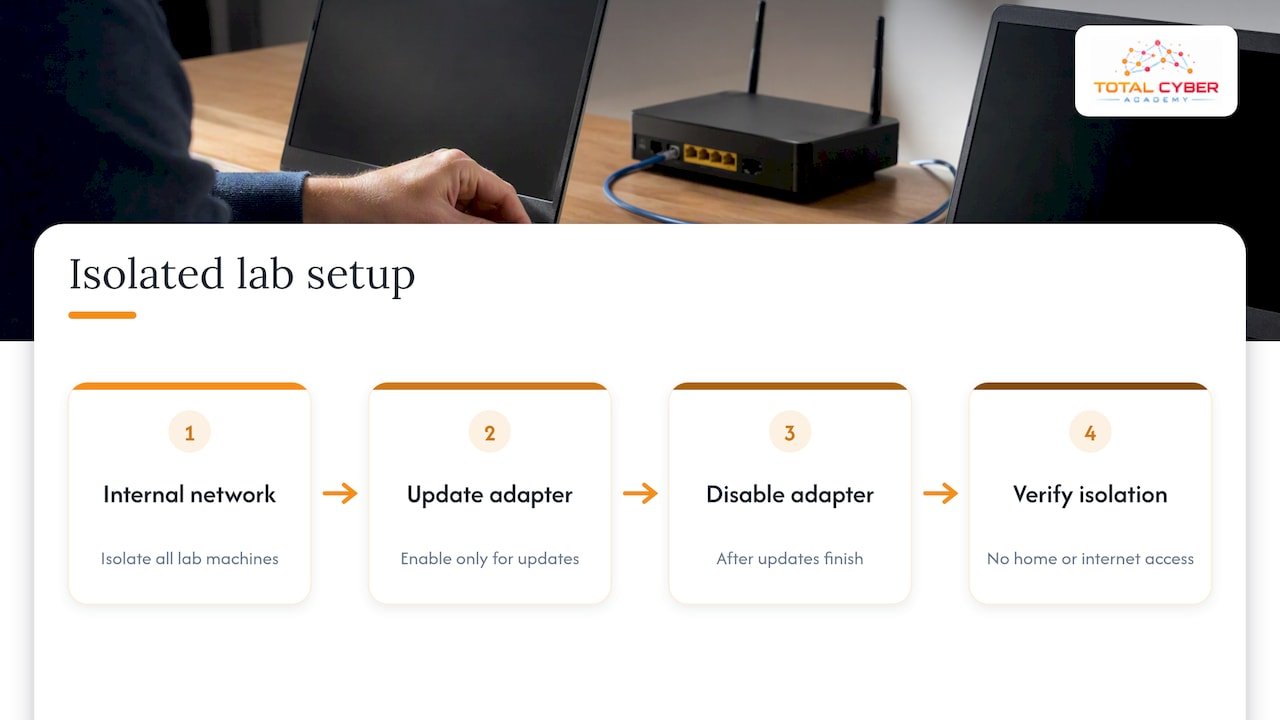
Our own pentesting lab setup guide walks through a two-network layout with isolation and verification checks, including how to confirm that your lab truly cannot reach anything outside itself. Run those checks every time you change the configuration, not only once.
The same principle appears in federal guidance: CISA’s implementation guidance recommends that agencies segment guest and cybersecurity lab traffic, ideally physically, to limit the impact on the enterprise network. Your home lab is smaller, but the reasoning is identical, and it is a good example of the segmentation concepts the exam asks about.
Snapshots are your reset button
Before every exercise, take a snapshot of each virtual machine involved. When you finish, or when you break something, roll back to the clean state. This lets you repeat the same task three times without rebuilding anything, and repetition is how procedures stick.
Practice legally and safely
The rule is simple: scan and test only systems you own or have written permission to test. That includes your own virtual machines, and it excludes your neighbor’s Wi-Fi, your employer’s network and any website that has not invited testing.
CISA’s vulnerability disclosure policy template shows how organizations define this boundary. It asks researchers to avoid disrupting production systems and to test only the systems expressly within the policy’s scope. Treat your lab the same way: write down what is in scope (the VMs on your internal network) and treat everything else as off limits.
A few habits keep you out of trouble:
- Confirm your lab network is isolated before you launch any scan.
- Never point a scanner at an IP address you have not verified belongs to your lab.
- Use intentionally vulnerable applications designed for practice, not live sites.
- Keep malware samples, if you ever use them, inside a VM with networking disabled.
Unauthorized scanning can violate computer crime laws in the United States, and a Security+ credential is meant to show that you know where that line is.
Free and paid ways to practice
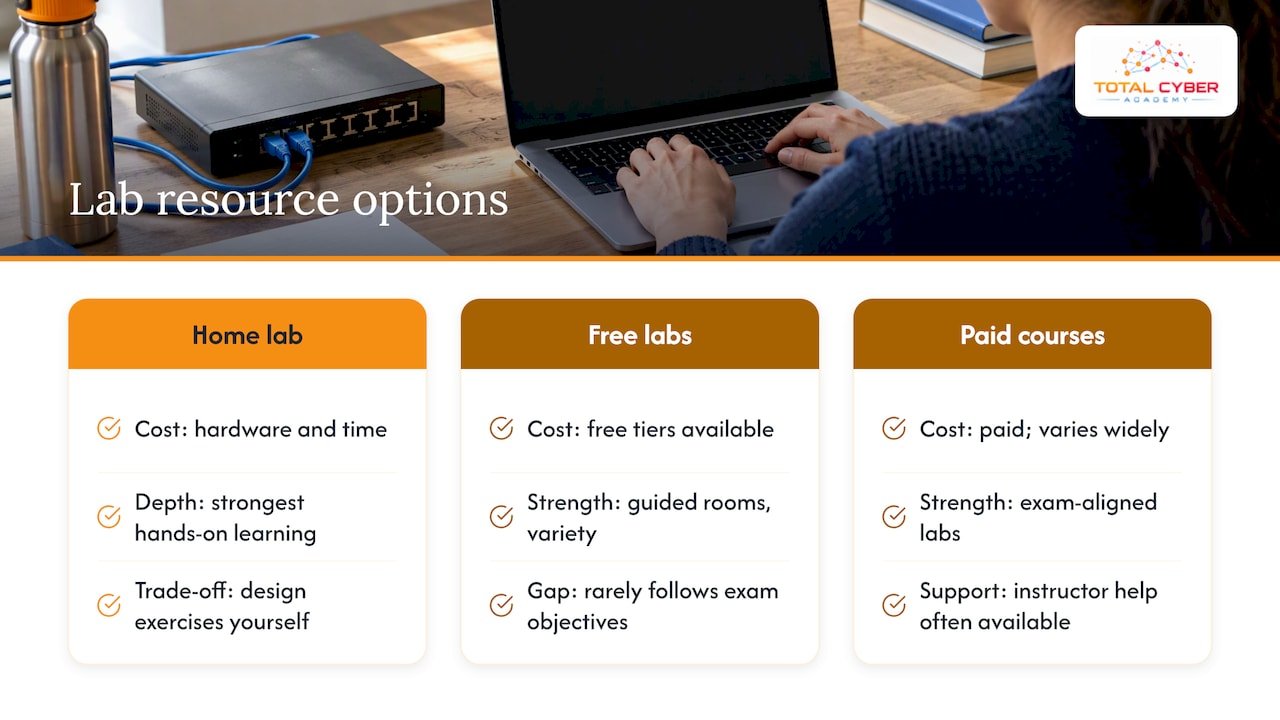
There are three broad kinds of lab resources, and most successful candidates combine at least two.
Home labs. Free apart from your hardware and your time. They give you the deepest understanding of how things connect, but you must decide what to practice and design the exercises yourself. Without a plan it is easy to spend a month on installation and never reach incident response.
Free browser-based labs and challenge platforms. Many sites offer free tiers with guided rooms and capture-the-flag challenges. They are convenient and good for variety. Their weakness for exam prep is alignment: they are rarely organized by Security+ objective, so you may spend hours on offensive techniques that the exam barely touches.
Course-based labs. Paid courses provide labs built around the exam objectives, often with an instructor to unstick you when a configuration fails. Cost varies widely, so check what is included before you buy: lab access duration, number of exercises, whether practice exams and mentoring are part of the package, and whether you can retake sections.
A sensible split for most learners is to use a course to set the roadmap, a home lab for repetition on the topics that confuse you, and timed practice exams to check readiness.
How to progress and measure improvement
Lab hours do not guarantee skill. Progress shows when you can do something without the walkthrough. Use these stages.
Stage 1: Follow along
Complete each exercise with instructions open. Your goal is simply a working result: a firewall rule that blocks traffic, a scan that returns output. Do not worry about speed.
Stage 2: Repeat from memory
Roll back your snapshot a week later and repeat the exercise using only your own notes. Anything you cannot do tells you exactly what to review. Write that list down.
Stage 3: Explain it
For each exercise, write two sentences on what the control does and what attack it prevents. The exam asks “which control best addresses this scenario,” and this habit trains the same reasoning.
Stage 4: Test under pressure
Take timed practice exams. Our Security+ practice exam gives you a way to check your recall against exam-style questions, and the exam’s 90-minute limit means pacing is a skill of its own. Track your score by domain, not only overall. A 78% average can hide a 55% in Security Operations, the heaviest domain.
A simple tracking sheet
Keep a spreadsheet with one row per objective and four columns: studied, lab completed, repeated from memory, practice-exam score. When every row has a check in the first three columns and your practice scores are consistently strong, you are ready to schedule the exam. Look at the official exam objectives as your master list.
If Network+ topics feel shaky, fix them first. Our Network+ practice exam and the guide to how Network+ opens the next CompTIA stacks can help you decide whether to start there.
Our perspective
We train a lot of career changers and veterans, and the pattern repeats. The learners who struggle are rarely the ones who lack intelligence; they are the ones who have watched hours of video and never touched a tool. A student who has built a firewall rule, broken it and fixed it understands what a performance-based question is asking in a way no flashcard delivers.
Our view is that certification should be a byproduct of real skill, not a substitute for it. That is why our courses put labs, live tutoring and mentorship from active cybersecurity professionals alongside exam preparation. Passing Security+ is useful, but the interviewer who asks “tell me about a time you investigated an alert” will not accept a score report as an answer. Your lab notes and the incidents you walked through can.
Our practical advice: do not wait until you feel ready to start labs. Start in week one, keep exercises short, and treat every failure as the most useful data you will collect.
— Alden
Structured Security+ training with labs
If you would rather not design your own curriculum, our CompTIA Security+ 701 on-demand course is priced at $2,499.99 as a one-time payment and pairs exam preparation with hands-on practice. Prefer a scheduled class with an instructor? The Security+ SY0-701 live course is $2,999.99. Both are listed on our courses page, along with the rest of our CompTIA and EC-Council catalog.
Veterans and career changers can also look at our career programs, which connect certification study to job-ready skills. Not sure about prerequisites? The prerequisites checklist covers what to have in place before you start.
FAQ
Do I need a home lab to pass Security+?
No, but you need hands-on practice somewhere. A home lab, a course-provided lab environment or both can serve that purpose. What matters is that you have performed the tasks the objectives describe, because performance-based questions assume it.
How many hours of lab practice is enough?
There is no official number, so measure by outcome instead. When you can repeat each exercise from memory after a snapshot rollback and explain what it defends against, you have practiced enough on that objective. Spend more time on the domains where your practice-exam scores are lowest.
What computer do I need for Security+ labs?
A laptop or desktop with 16 GB of memory runs several lightweight virtual machines comfortably. You can start with 8 GB by running two or three machines at once. Free hypervisors such as VirtualBox are enough for the exercises in this guide.
Is it legal to run Nmap and vulnerability scans at home?
It is legal against systems you own, such as VMs on your isolated lab network. Scanning systems you do not own or have permission to test can break the law and violate policy. Use the scope idea from CISA’s disclosure template: test only what is expressly in scope.
Are free labs enough, or should I pay for a course?
Free labs and a home setup can work for self-directed learners with time and an IT background. A course adds objective-aligned exercises, instructor help and a defined path, which is usually the faster route for beginners and career changers.
Sources
- CompTIA Security+ SY0-701 Exam Objectives
- CISA Vulnerability Disclosure Policy Template
- CISA Implementation Guidance: Segmenting Traffic and Telemetry