
Metasploit Framework is an open-source penetration-testing toolkit used to find, verify, and exploit security weaknesses in a controlled setting. The immediate next step for a beginner is to install it, initialize the database, and open msfconsole, its primary command-line interface. Every action that follows should happen only in an authorized lab environment, since unauthorized testing carries serious legal consequences.
TL;DR:
- Metasploit must be installed and initialized in a secure, authorized environment to avoid legal issues or accidental damage.
- Running
msfupdate,msfdb init, and regularly reviewinginfobefore using modules are critical steps for safe, effective testing.- Focus on core commands like
search,use,set, andcheckto efficiently identify vulnerabilities before exploiting.- Understanding module types and payload options, especially Meterpreter’s capabilities, helps prevent unintended impacts during penetration tests.
- Practicing on lab systems such as Metasploitable, combined with structured learning and instructor guidance, accelerates skill acquisition and reduces common beginner mistakes.
Table of Contents
- How to Get a Working Metasploit Install Quickly
- The Essential Msfconsole Commands Every Beginner Should Know
- Module Categories, Payload Types, and a Meterpreter Primer
- A Minimal, Safe Pentest Workflow You Can Practice in a Lab
- Quick Legal and Ethical Rules for Beginners
- Where to Practice and What to Learn Next
- Why an Instructor-Led, Hands-On Course Speeds Learning for Metasploit
- Author Note: Common Beginner Mistakes and a Concise Study Tip
- Get Hands-On With Metasploit Through Guided Labs
- Authoritative Docs and Tutorials to Read Next
- Sources
- FAQ
How to Get a Working Metasploit Install Quickly
Beginners have three practical paths into the framework. Kali Linux ships with Metasploit preinstalled, which is the fastest route for most learners. Windows and Linux users who prefer a standalone setup can run the official installer, and some Linux distributions offer Metasploit through native package managers, though those versions can lag behind the current release.
- Download the installer from the official get-started page or confirm Kali’s preinstalled version with
msfconsole -v. - Run the installer with administrator or root privileges, since the setup process installs a PostgreSQL database alongside the framework.
- Update the framework with
msfupdateor your package manager’s update command before your first session. - Initialize the database with
msfdb init, which creates the schema Metasploit needs to store hosts, services, and scan results. - Confirm the install by launching
msfconsoleand checking that the banner loads without database connection errors.
Windows installs occasionally trip over antivirus software flagging payload files, so exclude the installation directory if scans interrupt setup. On Linux, permission errors around the PostgreSQL socket are the most common snag, usually solved by rerunning msfdb init as the correct user.
The Essential Msfconsole Commands Every Beginner Should Know
Once msfconsole loads, a small set of commands covers nearly everything a new user needs. The Imperva overview of Metasploit describes msfconsole as the framework’s primary interface, and its search function supports operators that narrow results by type, platform, and known vulnerability identifiers.
helpor?lists every available command and a short description.search type:exploit platform:windowsfilters modules by category and target operating system, narrowing down search results.search cve:2021-34527finds modules tied to a specific vulnerability identifier.use <module path>loads a module so you can configure and run it.infodisplays a module’s description, required options, and known targets.options(orshow options) lists the parameters you still need to set.set RHOSTS <target>andsetg RHOSTS <target>assign values, withsetgapplying globally across modules.show targetslists the specific platform or version variants a module supports.checktests whether a target is actually vulnerable before you run anything.runorexploitexecutes the module.sessionslists and manages active connections after a successful exploit.db_nmapruns an Nmap scan to discover hosts and services, storing results in your workspace.
Reading the info output before running a module matters more than any other habit on this list. Rapid7’s documentation treats reviewing module details and running check as standard practice precisely because skipping them risks unintended, destructive actions against a target.
Pro Tip: Run sessions -K to kill all active sessions and close cleanly the moment your lab exercise ends.
Module Categories, Payload Types, and a Meterpreter Primer
Metasploit organizes its capabilities into distinct module types, and understanding the difference keeps you from misusing them. According to Vectra’s breakdown of Metasploit’s architecture, the framework is modular: exploit modules trigger a specific vulnerability, auxiliary modules handle scanning and enumeration without exploiting anything, and post-exploitation modules run tasks after you already have access.
- Exploit modules deliver the actual attack against a vulnerability.
- Auxiliary modules scan, fingerprint, or enumerate targets without triggering an exploit.
- Payload modules define what happens once an exploit succeeds, such as opening a shell.
- Post-exploitation modules gather information or move laterally after access is established.
Payloads come in two forms: single payloads are self-contained, while staged payloads send a small initial stager that then pulls down the rest, which is smaller but requires a stable connection. windows/meterpreter/reverse_tcp is a typical staged example. Meterpreter itself is an advanced, in-memory payload that avoids writing to disk, supports file transfer, and can pivot into other network segments, a set of advantages Vectra also documents. Those same capabilities make it appropriate for authorized testing only, and reviewing info and options before execution remains the simplest way to avoid unintended damage.
A Minimal, Safe Pentest Workflow You Can Practice in a Lab
Every session should start with confirmed, written authorization for the specific systems in scope. From there, a simple sequence carries you from reconnaissance to a documented result.
- Confirm scope and authorization before touching a single command.
- Run reconnaissance with
db_nmap -sV -sC <target>so results save directly to your active workspace. - Search for a relevant module, then run
infoandshow targetsto confirm it fits the target. - Run
checkto verify the target is actually vulnerable before exploiting anything. - Set
RHOSTS, choose a payload, and runexploitwhile watching for a new session. - Perform limited, documented post-exploitation tasks, then close sessions and record findings.
Rapid7’s own quick-start guidance describes this same arc at the product level: gather information, scan, exploit, post-exploit, clean up, and report. The Framework version follows the identical logic with console commands instead of a project dashboard.
| Workflow stage | Primary command | Purpose |
|---|---|---|
| Reconnaissance | db_nmap |
Import scan data into the workspace |
| Module selection | search, info |
Confirm the module fits the target |
| Validation | check |
Test vulnerability before exploiting |
| Exploitation | set, exploit |
Execute and open a session |
| Cleanup | sessions -K |
Close connections and end the engagement |
Quick Legal and Ethical Rules for Beginners
Metasploit is legal to use only against systems you own or have explicit written permission to test. Never point it at production systems or real data outside a defined scope, and keep any post-exploitation activity brief and documented.
- Get written authorization or rules of engagement before every test.
- Practice exclusively against intentionally vulnerable systems like Metasploitable, other lab VMs, or CTF platforms.
- Never exfiltrate real data, even in a lab, to build good habits early.
- Stop and consult a mentor or your rules of engagement whenever you are unsure.
Where to Practice and What to Learn Next
Metasploitable and similar vulnerable VMs give you safe, repeatable targets, and CTF platforms add scored challenges once you outgrow the basics. Beyond Metasploit itself, strengthen Linux command-line fluency, Nmap scanning, basic scripting, and core networking concepts. Our Nmap tutorial for beginners and Burp Suite basics guide both pair naturally with the workflow above.
- Read the official Metasploit and Rapid7 documentation for command and module references.
- Practice on Metasploitable, local VMs, or CTF platforms before touching anything live.
- Build parallel skills in Nmap, Linux CLI, and basic scripting.
- Review our social engineering toolkit guide for adjacent testing techniques.
Why an Instructor-Led, Hands-On Course Speeds Learning for Metasploit
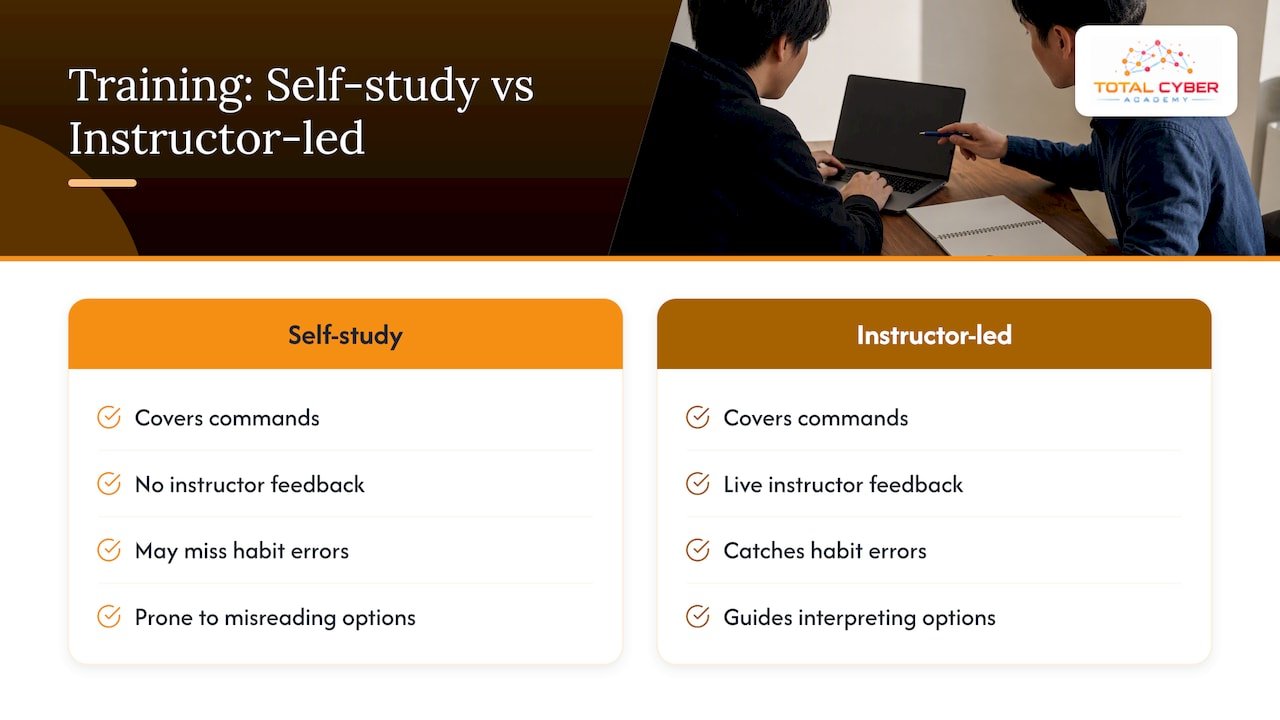
Self-study covers commands, but instructor feedback catches the habits that self-study misses, like skipping check or misreading module options under time pressure. The training organization is built around hands-on labs, certification preparation, and real-world scenarios rather than exam memorization alone. Guided lab environments and live mentorship from working cybersecurity professionals give learners a faster path from reading about a command to using it correctly under supervision, which is the gap self-paced tutorials most often leave open.
Author Note: Common Beginner Mistakes and a Concise Study Tip
Three mistakes show up constantly: skipping msfdb init, ignoring info before running a module, and exploiting without running check first. A simple four-week plan works well: week one covers installation and console commands, week two covers scanning and module search, week three covers safe exploitation on Metasploitable, and week four covers Meterpreter and reporting. Structured courses and labs accelerate every one of those weeks.
— Alden
Get Hands-On With Metasploit Through Guided Labs
Reading command references only takes you so far before you need a real target, feedback on your mistakes, and a structured path toward certification. Total Cyber Academy’s Penetration Tester Program builds those hands-on labs and mentor feedback directly into the curriculum, alongside certification preparation aligned to CompTIA and EC-Council exams, so the skills above turn into a documented, job-ready capability rather than a weekend experiment.

Explore the Penetration Tester Program and see how instructor-led labs fit your schedule.
Authoritative Docs and Tutorials to Read Next
- FreeCodeCamp’s Metasploit tutorial walks through msfconsole commands and Meterpreter with practice examples.
- Rapid7’s module documentation covers module search, targets, and the
checkcommand in detail. - The Metasploit get-started page lists the current download and installation paths.
- Proud Lion Studios’ threat landscape overview offers context on why practicing attacker techniques helps defenders.
Sources
- Metasploit (Imperva)
- Metasploit: What It Is and How It Works (Vectra)
- Managing Metasploit | Metasploit Documentation (Rapid7)
- Learn Metasploit for beginners — FreeCodeCamp
FAQ
Can You Explain What Metasploit Is and How It Works?
Metasploit Framework is an open-source toolkit for finding, verifying, and exploiting vulnerabilities in systems you are authorized to test. It works through msfconsole, where you search for a module, configure its options, and run it against a target, often followed by a payload like Meterpreter for post-exploitation tasks.
Is Metasploit Still Useful?
Yes, Metasploit remains a standard tool for penetration testing and vulnerability validation, with active documentation and module updates maintained through Rapid7. Its modular design lets both beginners and experienced testers reuse the same console commands across a wide variety of targets.
What Are the Commands Used in Metasploit?
The core commands include help, search, use, info, options, set, check, run or exploit, and sessions. Database commands like db_nmap import scan results directly into your workspace, a workflow Rapid7’s documentation covers alongside the full command reference.
How Do I Start Metasploit?
Install the framework through the official installer or use Kali Linux, where it comes preinstalled, then run msfdb init to set up the database. Launch the console by typing msfconsole, and confirm it loaded correctly before running any commands against a lab target.