
A workable Security+ study plan does three things: it covers all five SY0-701 domains in proportion to their exam weight, it puts practice questions in from the first week, and it fits the hours you actually have. For most people with a full-time job or active duty obligations, that means eight weeks at 8 to 10 hours per week. Faster is possible with IT experience, and slower is perfectly reasonable. This guide gives you the framework, three timelines, and a checklist for the last week.
TL;DR
- The current required exam is SY0-701: up to 90 questions in 90 minutes, a mix of multiple-choice and performance-based items, with a passing score of 750 on a 100 to 900 scale.
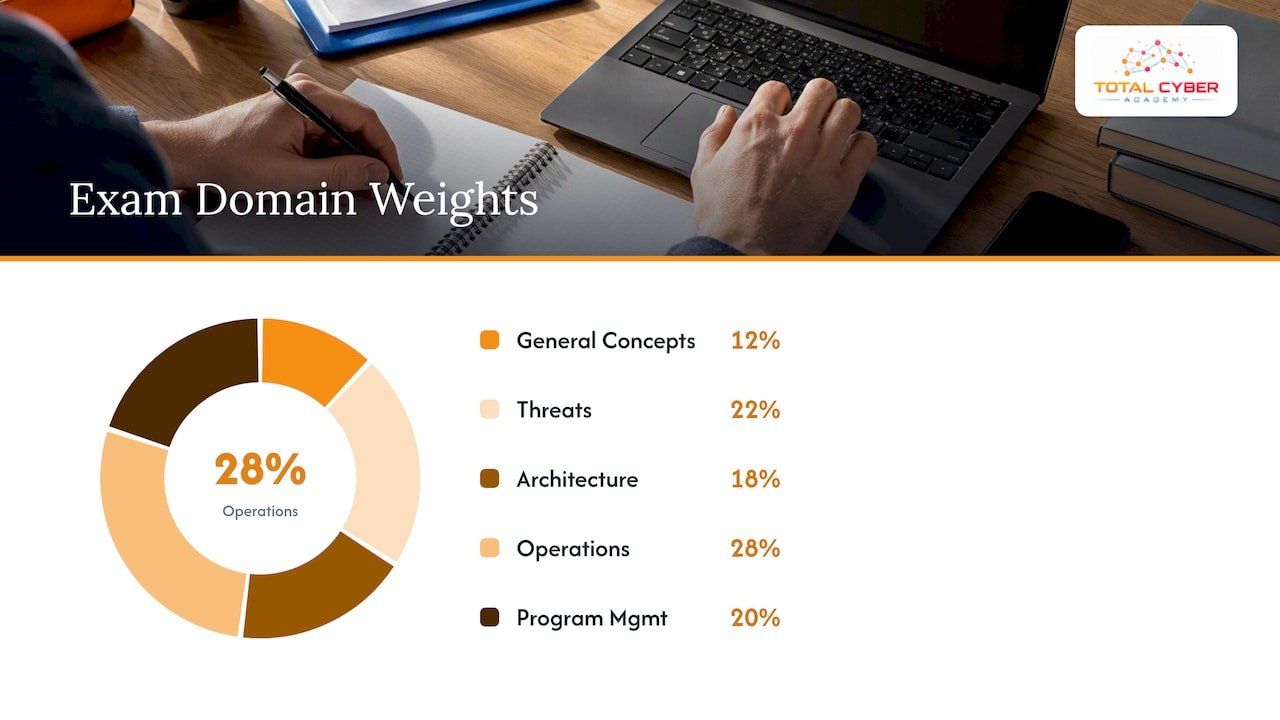
- Spend your time where the points are: Security Operations (28%) and Threats, Vulnerabilities, and Mitigations (22%) together make up half the exam.
- Choose a timeline by experience: 4 weeks if you already work in IT, 8 weeks for most career changers, 12 weeks if you are starting from zero or studying around a heavy schedule.
- Take a baseline practice test in week one and a full-length timed exam at least twice before test day, then study from the results, not from the table of contents.
- Use one primary course and one question bank. Adding more resources rarely adds more learning.
Table of Contents
- What the SY0-701 exam asks of you
- How long should you study?
- Choose your resources: one course, one question bank
- The 8-week Security+ study plan
- Adapting the timeline
- Using practice questions the right way
- For veterans and career changers
- Our perspective: study for the job, not only the test
- Support when you want a structured route
- The final week and exam day
- FAQ
- Sources
What the SY0-701 exam asks of you
Before you pick a schedule, know the target. The SY0-701 exam objectives describe a test of up to 90 questions, lasting 90 minutes, built from multiple-choice and performance-based questions. Performance-based questions put you in a simulated task, such as configuring a rule or ordering the steps of an incident response, so recognition of terms alone will not carry you. The passing score is 750 out of 900, and the same source lists Network+ and two years of IT administration and security experience as recommended, not required, background.
The objectives are divided into five domains:
| Domain | Weight | What it covers |
|---|---|---|
| 1. General Security Concepts | 12% | Security controls, CIA triad, zero trust, cryptography basics, change management |
| 2. Threats, Vulnerabilities, and Mitigations | 22% | Threat actors, attack types, indicators, hardening and mitigation techniques |
| 3. Security Architecture | 18% | Secure network and cloud design, data protection, resilience and recovery |
| 4. Security Operations | 28% | Monitoring, vulnerability management, identity and access, incident response, automation |
| 5. Security Program Management and Oversight | 20% | Governance, risk, third-party risk, compliance, audits, security awareness |
The weights come from the same objectives document. Notice that Domain 1, the one most books start with, is the lightest. It is still worth studying first, because its vocabulary is used in every other domain. For a deeper walk through each domain, see our Security+ domains explained guide.
CompTIA retires and replaces exam versions on its own schedule, so confirm on CompTIA’s official certification page that SY0-701 is the code you are booking before you pay for a voucher.
How long should you study?
There is no single correct number of hours, and anyone who quotes one as a fact is guessing. What we see work in practice is to size the plan to your starting point:
- Working IT professional (help desk, sysadmin, network technician): 3 to 4 weeks at 10 to 12 hours a week. You already know networking and operating systems, so the new material is mostly governance, risk and security terminology.
- Career changer or veteran with technical military experience: 6 to 8 weeks at 8 to 10 hours a week. You understand operational discipline and often threat concepts, but the vendor-neutral vocabulary and networking details need time.
- Starting from zero: 10 to 12 weeks at 6 to 8 hours a week, with Network+ concepts or a short IT fundamentals course first.
As for hours per day, consistency beats intensity. Ninety minutes on five days a week keeps material in memory better than one eight-hour Saturday. If you can only study on weekends, plan two sessions of three hours rather than one marathon, and spend 20 minutes on flashcards on a weekday evening.
Choose your resources: one course, one question bank
The most common mistake is collecting six resources and finishing none. Pick:
- One primary course. A video course, an instructor-led class, or a textbook. It should follow the SY0-701 objectives in order.
- One practice question bank with explanations for every answer, including the wrong ones.
- One flashcard method for acronyms, port numbers, and control types. Make your own cards from the questions you miss.
- Hands-on practice for the performance-based questions: a home lab, a virtual machine running a packet capture, a firewall rule exercise.
If you want structure and a person to ask, our Security+ 701 On-Demand Course is built around the SY0-701 objectives with labs and practice, and the Security+ practice exam gives you a question bank to measure progress. Our study best practices article covers technique in more detail.
The 8-week Security+ study plan
This is the core schedule. Compress or stretch it using the timelines below. Each week has a reading or video block, a hands-on block, and a practice block.
Week 1: Baseline and Domain 1
Take a 50 to 90 question practice test cold, before studying. You will score low, and that is the point: it shows which domains need the most work. Then study Domain 1: the CIA triad, control categories (technical, managerial, operational, physical) and types (preventive, detective, corrective), zero trust, and the basics of public key infrastructure, hashing and encryption. Build your flashcard deck from day one.
Week 2: Domain 5, governance and risk
Study Domain 5 early, while the Domain 1 vocabulary is fresh. Risk assessment, risk appetite, third-party risk, compliance frameworks, audits, and security awareness programs are reading-heavy and tend to be unfamiliar to technical people. Doing them early keeps them from being crammed at the end. Practice calculating annualized loss expectancy by hand.
Week 3: Domain 2, threats and attacks
This is the attacker side: threat actors and their motivations, social engineering, malware types, application and network attacks, and indicators of compromise. Pair each attack with its mitigation, because exam questions usually ask for the best response to a scenario, not a definition. Real incident write-ups help here; examples of compromised credential exposure show how phishing, reuse and leaked passwords turn into the indicators you will be asked to recognize.
Week 4: Finish Domain 2, start Domain 3
Complete vulnerability types and mitigation techniques such as segmentation, patching, least privilege and hardening. Then begin Security Architecture: network design, firewalls, VPNs, cloud models, virtualization, and secure application deployment. Open a packet capture tool and look at real traffic at least once this week.
Week 5: Finish Domain 3 and take your first full exam
Wrap up data protection, resilience, backup strategies, and site considerations. At the end of the week, take a full-length timed practice exam, 90 minutes, no notes. Review every question, right and wrong. Log each miss by domain and by cause: did you not know it, misread it, or overthink it?
Weeks 6 and 7: Domain 4, Security Operations
This is the largest domain at 28%, so it gets two weeks. Cover monitoring and logging, vulnerability scanning and management, identity and access management (MFA, SSO, federation, privileged access), incident response phases, digital forensics basics, and automation. Walk through a full incident lifecycle on paper: detection, containment, eradication, recovery, lessons learned. Do hands-on log reading, because log interpretation is a favorite performance-based question topic.
Week 8: Review, weak spots, and final exams
Take a second full practice exam early in the week. Spend the next three days only on your weakest domains, using the miss log. Take a final practice exam two or three days before the test, then lighten up. Details are in the final-week section below.
Adapting the timeline
The 4-week sprint
Combine weeks into pairs: Domains 1 and 5 in week one, Domain 2 in week two, Domains 3 and 4 in week three, and week four for practice exams and review. This only works if you already know networking, operating systems and basic security. Study 10 to 12 hours a week and start practice questions on day one.
The 12-week extended plan
Add a two-week foundation phase before the 8-week plan: networking models, IP addressing, common ports and protocols, and operating system basics. Our Network+ study plan can serve as that foundation, and the Network+ practice exam helps you check whether you are ready to move on. Add a buffer week in the middle for anything that slipped.
Building the schedule around real life
Write your plan on a calendar, not just in your head. A spaced-repetition approach, where you review each topic after one day, one week and one month, matches how this exam rewards recall of many small facts. A guide to building an exam study schedule explains how to pace reviews backward from the test date, which is a useful way to set your own deadlines. Book your exam date once you are about two-thirds through the plan, so the deadline becomes real without being a gamble.
Using practice questions the right way
Practice exams are a measuring instrument, not a study method. Used well, they do three jobs:
- Baseline: week one, to rank the domains.
- Gap finding: after each domain, 20 to 30 questions on that domain only, reviewed in full.
- Readiness check: two or three full timed exams in the last third of the plan.
A reasonable readiness signal is scoring comfortably above the 750 passing mark on several different full exams, not on one that you have already seen. Because question banks differ in difficulty, treat your trend as more meaningful than any single number. If your scores are rising and your misses are shrinking to a few topics, you are close. If you are repeating questions and scoring well only because you remember the answers, switch banks.
For performance-based questions, practice the format itself: drag-and-drop ordering, matching controls to scenarios, and reading a log excerpt to pick the right action. Your lab time pays off here.
For veterans and career changers
Your background changes the plan, mostly by moving time from one domain to another.
- Military IT, communications or intelligence roles: you probably know more about access control, incident reporting, and operational security than you think. Skim Domain 5 and Domain 4’s incident response content, and put the saved time into cryptography, cloud, and the vendor-neutral terminology.
- Non-technical military or civilian background: start with the 12-week plan. Your discipline with routines is an advantage; the gap is usually networking.
- Limited time: shift-work and family commitments argue for shorter, fixed sessions. Four 90-minute blocks beat one long weekend session.
If you are weighing certifications for a first cybersecurity role, our overview of why Security+ is worth earning and the cybersecurity training prerequisites checklist can help you decide where to start. Ask your education office or transition counselor about funding or voucher options that apply to your situation, since eligibility rules vary and change.
Our perspective: study for the job, not only the test
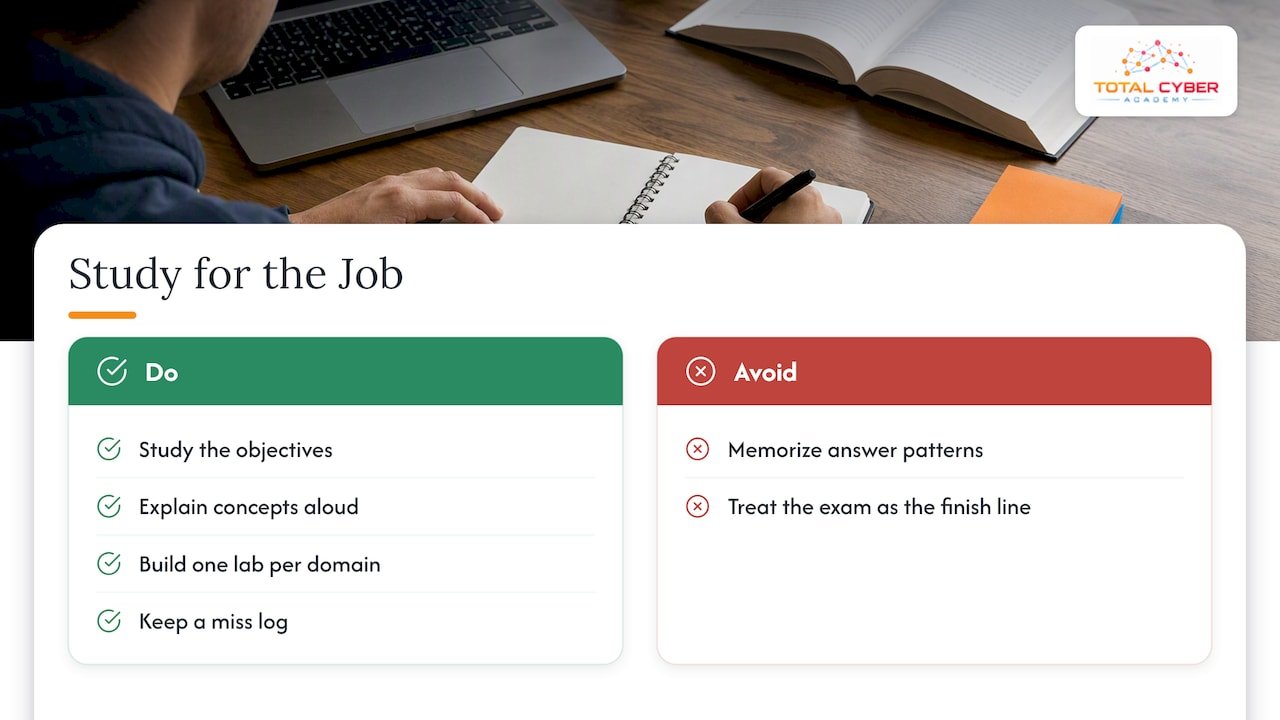
We train people who need Security+ to get hired, so we judge a study plan by what it leaves you able to do. A candidate who memorizes answer patterns can pass, but the first interview question about how they would investigate a suspicious login exposes the gap. That is why we emphasize hands-on labs next to every domain, live tutoring for questions that a video cannot answer, and mentorship from active cybersecurity professionals.
Our advice is plain. Study the objectives, but explain each concept aloud as if teaching a coworker. Build one small lab for each domain. Keep your miss log, because it is the most honest record of what you do not know yet. And treat the exam as the first checkpoint on a career path, not the finish line.
— Alden
Support when you want a structured route
Self-study works for disciplined learners with IT experience. If you would rather have a guided path, we offer the Security+ SY0-701 On-Demand Course at $2,499.99 and the Security+ SY0-701 Live Course at $2,999.99, both one-time payments, with labs, exam preparation and instructor support. You can compare them with our other certification options on the courses page, or look at our career programs if you want a full path from training to a job role.

Veterans can also reach out to us about the support we provide for service members and former service members.
The final week and exam day
Seven to four days out: take your last full practice exam under real conditions. Review only the misses. Re-read your flashcards for acronyms, port numbers, and control types. Stop learning new material on the third day before the test.
The day before: do one light 30 to 45 minute review, then stop. Confirm your testing appointment, location or online-proctoring requirements, and the acceptable forms of identification with the testing provider. Prepare your ID and, if testing at home, a clear desk and a working camera and internet connection.
On exam day:
- Do the performance-based questions first or last by choice, but decide before you start. Many candidates flag them and return after the multiple-choice items so time pressure does not rush the simulations.
- Read the last line of each question first to see what is being asked, then read the scenario for the facts that matter.
- Look for the word “best,” “first,” or “most” in the question. Several answers may be technically true while only one fits.
- Flag, move on, and return. With 90 minutes and up to 90 questions, you have roughly a minute per item on average, so do not sink five minutes into one.
- Eliminate two wrong answers before choosing between the remaining two.
After you pass, update your resume the same day, add the credential to your professional profiles, and plan your next step, whether that is CySA+, a cloud certification, or a hands-on program.
FAQ
How many hours a day should I study for Security+?
Most people do well with 60 to 120 minutes a day, five or six days a week, which adds up to 8 to 10 hours weekly. If you work full time, shorter daily sessions are easier to sustain than long weekend blocks. Experienced IT staff can push toward 2 hours a day for a 3 to 4 week sprint.
Is Security+ worth it in 2026?
For entry and mid-level security and IT roles, it remains a widely recognized baseline credential, and it is a common first certification for career changers and veterans. It does not replace hands-on skills, so pair it with labs. Check current job postings in your target area to see how often employers list it.
Can I pass Security+ in two weeks?
It is possible for someone with strong IT and security experience who can study full days, but it is a high-risk plan for most candidates. If you take that route, start with a practice exam, study only your weak domains, and take at least two full timed exams. If your scores are not clearly above 750, move the exam date.
Do I need Network+ before Security+?
No, it is not a requirement. CompTIA recommends Network+ and two years of experience as background, so if networking is new to you, add two to four weeks of foundation study before starting the main plan.