
Identity and access management is the discipline that ensures the right people and systems have the right access to the right resources at the right time. For beginners, the single most important action is straightforward: enable multi-factor authentication everywhere it’s offered and apply least privilege, meaning no account gets more access than its job requires. Authoritative bodies like NIST, CISA, and Microsoft treat identity as the front line of defense, not a background IT chore.
TL;DR:
- Enabling multi-factor authentication with hardware tokens or authenticator apps is strongly recommended, especially over SMS-based methods vulnerable to interception.
- Regularly reviewing and revoking outdated or unnecessary permissions through automated access recertifications prevents privilege creep and enhances security.
- Applying least privilege access in combination with context-aware, real-time conditional access policies helps verify identities explicitly and limit breach impact.
- Proper management of user lifecycle stages—joining, moving, and leaving—must be automated and regularly audited to prevent lingering access for ex-employees or misassigned roles.
- Hands-on training using labs and instructor-led courses accelerates mastery of IAM workflows, reducing mistakes and building resilience against real-world attacks.
Table of Contents
- What Are the Core Identity and Access Basics?
- Authentication vs. Authorization: What’s the Difference?
- Why Identity Is the New Security Perimeter
- Managing the Identity Lifecycle: Join, Move, Leave
- Understanding OAuth, OIDC, SAML, and PARC
- How to Strengthen Your Identity and Access Habits Today
- Where Beginners Should Learn and Practice IAM
- What I’ve Learned Teaching IAM to Beginners
- Build These Skills With Guided, Hands-On Training
- Sources
- FAQ
What Are the Core Identity and Access Basics?
IAM breaks down into four functions that work together, according to IBM’s framework. Miss one, and the whole chain weakens.
- Authentication confirms someone is who they claim to be, typically through a password, a mobile push, or a biometric scan.
- Authorization decides what that verified person can actually touch once they’re inside.
- User lifecycle management governs how accounts get created, modified, and eventually shut down.
- Access governance audits and enforces all of it, catching the accounts that slipped through the cracks.
Picture a new employee’s first day. Authentication lets her log into the company laptop. Authorization determines whether she can see payroll records or just the shared drive. Lifecycle management provisions her accounts on day one and revokes them the day she leaves. Governance reviews her permissions every quarter to confirm she hasn’t quietly accumulated access she no longer needs. Skip governance, and you get what security teams call privilege creep: employees holding onto rights long after the job that required them ended.
Authentication vs. Authorization: What’s the Difference?
Authentication happens first and asks “who are you?” Authorization happens second and asks “what are you allowed to do?” A hotel key card illustrates it well: swiping to unlock your room is authentication, but that same card won’t open the manager’s office, because authorization limits it by design.
Common authentication factors include:
- Passwords and PINs (the weakest, most attacked category)
- Time-based one-time passcodes (TOTP) from an authenticator app
- Push notifications to a registered device
- Hardware security keys like YubiKeys
- Biometric scans, including fingerprints and facial recognition
- Digital certificates issued to a device or user
Authentication methods increasingly combine two or more of these into multi-factor authentication (MFA). Passwordless approaches, which swap the password entirely for a device based key or biometric, resist phishing far better than a code typed into a fake login page.
Pro Tip: Not all MFA is equal. SMS codes can be intercepted through SIM swapping, so prioritize an authenticator app, a hardware token, or a phishing-resistant standard like FIDO2 wherever your accounts support it.
Why Identity Is the New Security Perimeter
Firewalls used to be the main defense line. Now that employees work from coffee shops, home offices, and airport lounges, Microsoft’s Zero Trust guidance treats identity itself as the perimeter that matters most. Three principles anchor this shift:
- Verify explicitly. Every login gets checked against context: device health, location, and behavior, not just a password.
- Use least privilege access. Grant only the permissions a task requires, and grant them just in time when possible.
- Assume breach. Design systems as if an attacker is already inside, limiting how far they can move.
Conditional access puts these principles into practice by evaluating signals in real time. A login attempt from an unmanaged device at 3 a.m. might trigger a step-up authentication challenge, while the same user logging in from a trusted office network sails through.
Credential theft remains one of the most common paths into a network. CISA’s guidance for administrators points to stolen and phished credentials as a dominant attack vector across breach investigations, which is exactly why identity governance and MFA sit at the top of its recommended practices list.
Managing the Identity Lifecycle: Join, Move, Leave
Every identity moves through three phases, often abbreviated as JML: Join, Move, and Leave. Getting this wrong is how ex-employees keep access to systems months after their last day, and it’s how a marketing hire ends up with finance permissions after a department transfer.
- Join. A new hire or new system gets provisioned with the minimum access needed to start working, tied to a defined role.
- Move. When someone changes teams or gets promoted, old permissions should be revoked as new ones are granted, not simply piled on top.
- Leave. Departure triggers immediate deprovisioning across every connected system, ideally automated rather than dependent on someone remembering to file a ticket.
Access reviews and recertification close the loop. Periodically, managers or system owners confirm that each person’s access still matches their actual job. Segregation of duties prevents one person from having enough privilege to both request and approve the same transaction, a control that matters heavily in finance and healthcare settings. Automation, defined approval chains, and centralized logging make all three JML stages far more reliable than manual spreadsheets.
Understanding OAuth, OIDC, SAML, and PARC
Three protocols show up constantly once you look under the hood of modern login systems. OAuth 2.0 delegates limited access to an API without handing over a password, which is how a fitness app can read your calendar without ever seeing your Google login. OpenID Connect (OIDC) builds an identity layer on top of OAuth, answering “who is this user” rather than just “what can this app do.” SAML handles federated logins in enterprise settings, letting one login work across multiple connected services.
For designing policies, practitioners lean on a mnemonic called PARC: Principal (who is asking), Action (what they want to do), Resource (what they’re touching), and Condition (under what circumstances it’s allowed). This maps directly onto how AWS structures IAM policies, which are JSON documents that grant or deny actions on resources, with an explicit deny always overriding any allow. Microsoft Entra ID applies a similar logic through conditional access policies.
- OAuth 2.0: delegated access without password sharing
- OIDC: identity verification layered on OAuth
- SAML: single sign-on across enterprise systems
- PARC: a framework for writing narrow, specific access rules
How to Strengthen Your Identity and Access Habits Today
You don’t need a security team to start applying these basics. A few concrete moves make a measurable difference within days.
- Turn on strong MFA for email, banking, and any account offering hardware key or authenticator app support, skipping SMS when a stronger option exists.
- Adopt a password manager and stop reusing passwords across sites. A single reused password is often the thread that unravels multiple accounts after one breach.
- Audit your accounts. Delete logins you no longer use and review app permissions on your phone and cloud storage every few months.
- Enable SSO for work tools where your employer offers it, reducing the number of separate credentials you juggle.
- Practice in a sandbox. Spin up a free-tier cloud account or a home lab and configure a test identity provider, then experiment with conditional access rules.
Pro Tip: Set a recurring 15 minute calendar reminder every quarter to review your own account permissions. Most people set up strong security once and never check it again, which is exactly when access quietly drifts out of date.
Where Beginners Should Learn and Practice IAM
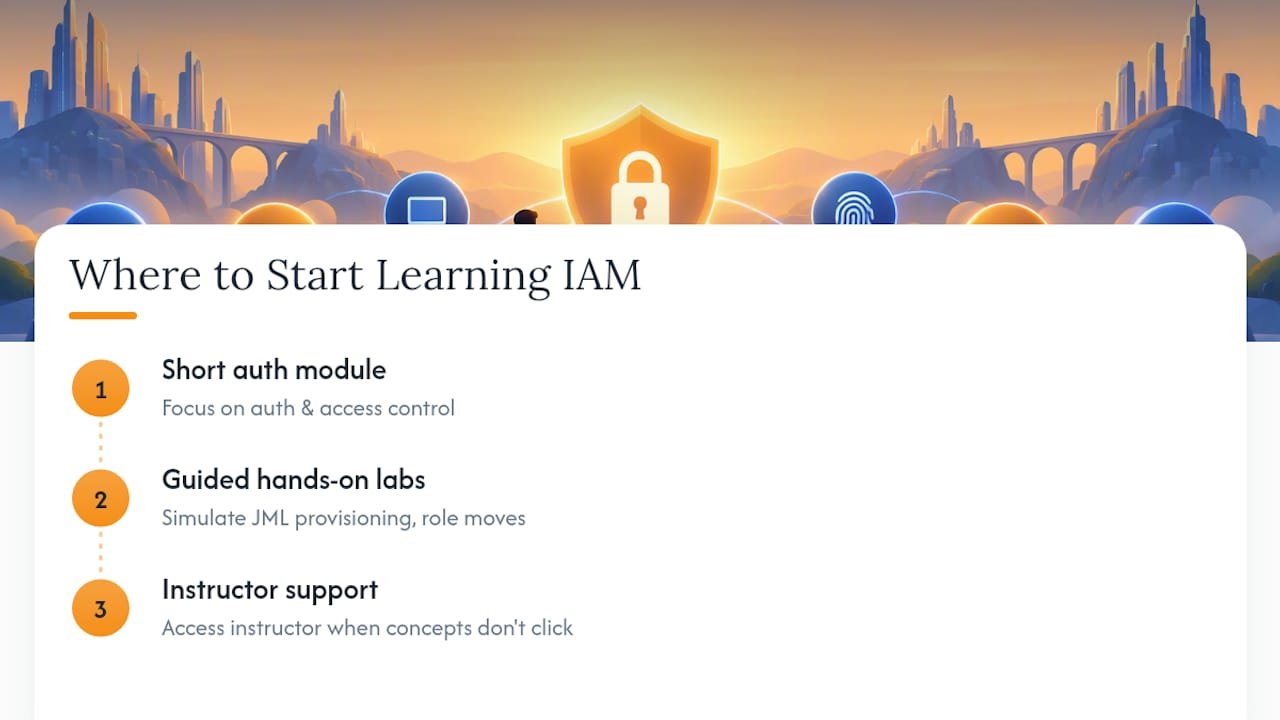
Reading about authentication and authorization only gets you so far. Hands-on labs that simulate real JML workflows, provisioning a user, moving them between roles, then deprovisioning them, build the kind of muscle memory that reading alone can’t. A solid entry course should include guided labs, not just slide decks, along with access to an instructor when a concept doesn’t click the first time.
If you’re picking a starting point, look for a short module focused specifically on authentication and access control before jumping into broader security certifications. Building that foundation first makes everything that follows, from cloud security to governance frameworks, click into place faster.
What I’ve Learned Teaching IAM to Beginners
Start with authentication and MFA, then move to lifecycle flows, then policies. That order works because people grasp “prove who you are” instantly, while access governance feels abstract until they’ve seen a JML exercise fail in a lab. The most common beginner mistake is memorizing acronyms without ever touching a policy editor. Pick one lab this week and actually break something in it.
— Alden
Build These Skills With Guided, Hands-On Training
Hands-on labs and instructor access provide learning experiences that reading articles alone can’t replace, reducing the trial-and-error most self-taught learners face. Where a textbook or free tutorial hands you theory and leaves you to figure out the rest, Total Cyber Academy’s course catalog pairs practical labs with live mentoring from working cybersecurity professionals, so you’re troubleshooting real identity scenarios instead of guessing.
If IAM fundamentals interest you, some courses cover authentication, access control, and identity governance in depth alongside exam preparation. Certain formats may offer flexible scheduling and instructor support tailored to veterans and career changers. For those ready to commit to a full career track, the program pathways bundle multiple certifications with structured mentorship. Browse the current course lineup and pick the module that matches where you are today.
Sources
NIST’s identity resources set the technical standards agencies and vendors build toward. CISA’s administrator guidance translates those standards into actionable steps. IBM’s IAM overview and Microsoft’s Zero Trust identity pillar each offer clear vendor-neutral and platform-specific explainers worth bookmarking.
- Identity and Access Management: Recommended Best Practices for Administrators | CISA
- Identity and access management | NIST
- What is Identity and Access Management (IAM)? | IBM
- Identity, the first pillar of a Zero Trust security architecture | Microsoft Learn
FAQ
What is the difference between IAM and cybersecurity?
IAM is one discipline within the broader cybersecurity field, focused specifically on verifying identities and controlling access to systems and data. Cybersecurity also covers network defense, endpoint protection, and incident response, areas IAM supports but doesn’t replace.
Is MFA enough to stop most account takeovers?
MFA blocks a large share of automated credential attacks, though phishing-resistant methods like hardware keys outperform SMS codes significantly. CISA recommends MFA as a top defense specifically because credential theft remains such a common entry point for attackers.
What’s the difference between RBAC and ABAC?
Role-based access control (RBAC) grants permissions based on a person’s job role, like “manager” or “analyst.” Attribute-based access control (ABAC) evaluates multiple attributes at once, such as department, device, and time of day, allowing more granular decisions than a role alone can capture.
Do I need to know coding to learn IAM basics?
No. Foundational IAM concepts, including authentication, authorization, and lifecycle management, are conceptual and procedural rather than code-heavy. Technical depth like scripting or policy JSON becomes relevant later, once you move into administering specific platforms like AWS or Entra ID.
How much does IAM-focused training cost?
Pricing varies by course depth and format. Totalcyber’s current course and program pricing is listed on its course catalog, where individual on-demand and live courses are priced separately from full career programs.