
If you already work in IT, follow a fast track and expect to spend one to two weeks preparing. If your background is IT-adjacent, plan for two to three weeks. If you’re new to cloud computing entirely, build in three to six weeks. Whichever track fits, don’t book the exam until you consistently score 80% or higher on the official Microsoft practice assessment and hold that same range on realistic full-length practice sets. Start with the Microsoft Learn AZ-900 learning paths, then move to scenario-based practice once the vocabulary sticks.
TL;DR:
- Experienced IT professionals can prepare for the AZ-900 exam in one to two weeks, focusing on cloud concepts, architecture, and governance.
- Study time for non-cloud IT professionals ranges from 10 to 25 hours over several weeks, with a balanced approach across all exam domains.
- Beginners should allocate four to six weeks, building foundational cloud knowledge with repeated review and hands-on sandbox exercises.
- Passing requires scoring at least 80% on official and third-party practice assessments, with emphasis on scenario reasoning for governance-related questions.
- Memorizing service names is less effective than understanding when and why to use specific Azure services, especially in management and governance areas.
Table of Contents
- Which Study Timeline Fits Your Background?
- What Does Each AZ-900 Domain Actually Require?
- Which Resources Should You Actually Use?
- How Should You Practice to Hit the 80% Benchmark?
- What Should You Know About Exam Day Logistics?
- What Mistakes Cost the Most Points on AZ-900?
- How Total Cyber Academy Approaches Hands-On AZ-900 Prep
- What the Research Actually Supports Here
- Ready to Move From Study Plan to Job-Ready Skills?
- Sources
- FAQ
Which Study Timeline Fits Your Background?
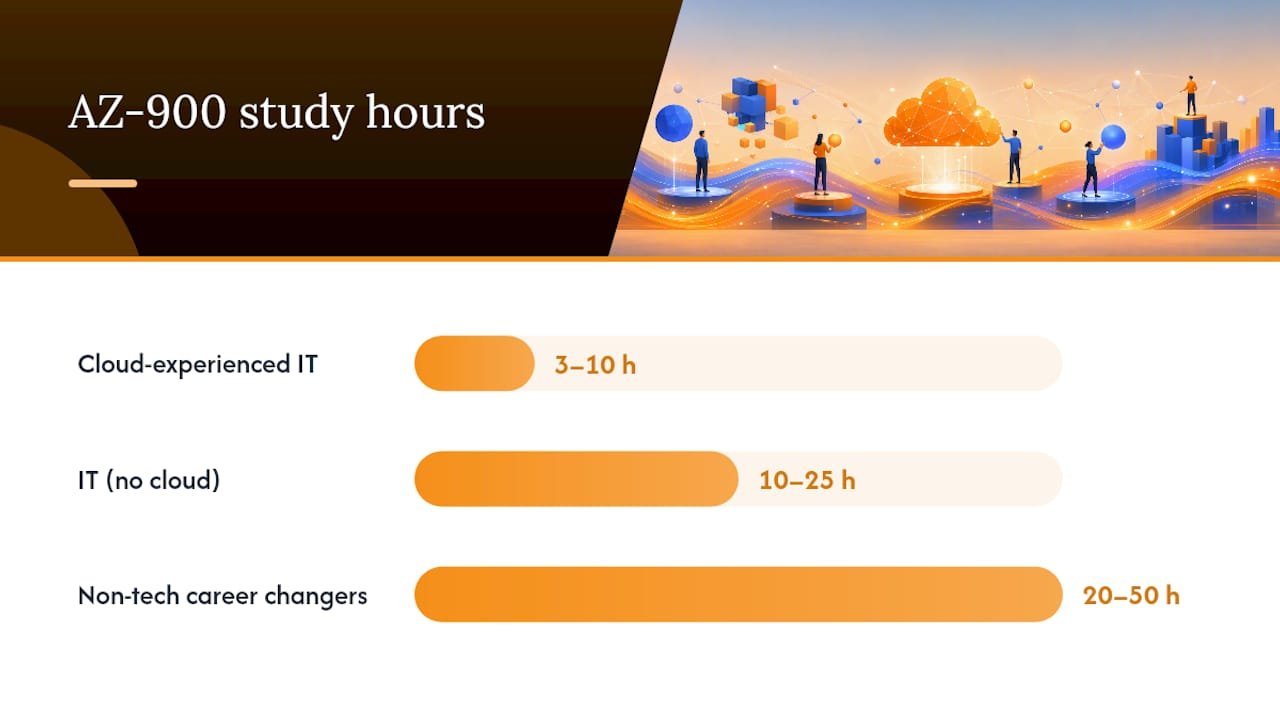
Study-hour ranges for AZ-900 vary sharply depending on prior exposure to cloud platforms. IT professionals with hands-on cloud experience often need 3 to 10 hours total, while IT professionals without cloud background typically need 10 to 25 hours. Non-technical candidates, including career changers coming from outside IT, commonly need 20 to 50 hours spread across several weeks. Pick the track below that matches your starting point, not the one that flatters your ego.
Fast track: 3 to 7 days for experienced IT professionals
This track works if you already understand networking, virtualization, or on-premises infrastructure and just need to translate that knowledge into Azure’s vocabulary.
- Day 1 to 2: Complete the Microsoft Learn module on cloud concepts (Domain 1) and skim the shared responsibility model, since this is the fastest domain to master for anyone with an IT background.
- Day 2 to 4: Work through Azure architecture and services (Domain 2) modules, focusing on compute options, storage tiers, and networking basics you haven’t touched before.
- Day 4 to 5: Dedicate a full session to management and governance (Domain 3). Even experienced IT pros underestimate this domain because Azure Policy, RBAC, and cost tools rarely map to prior experience.
- Day 5 to 6: Run one full-length timed practice set, review every wrong answer, then take the official practice assessment.
- Day 6 to 7: Retake weak-area questions, do a light final review, and book the exam once you’re consistently above 80%.
Standard track: 2 to 3 weeks for IT-adjacent learners
A three-week structure that allocates time proportional to Microsoft’s domain weights tends to outperform generic day-by-day cramming, according to a suggested study sequence from Azure Mastery. Here’s how that breaks down:
- Week 1: Cloud concepts (Domain 1) plus the first half of Azure architecture and services (Domain 2). This domain carries 35 to 40% of the exam weight, so give it real time rather than a quick skim.
- Week 2: Finish Domain 2, then move into a full week on management and governance (Domain 3). Spread Domain 3 across several sessions instead of cramming it into one night. This is where most standard-track learners lose points if they rush.
- Week 3: Run two to three full practice exams, review every incorrect answer line by line, and do a final pass through the official practice assessment. Avoid learning brand-new material in this last stretch.
Extended track: 4 to 6 weeks for beginners
If cloud computing is genuinely new territory, spaced repetition beats marathon study sessions almost every time. Spread each domain across multiple short sessions rather than single long blocks.
- Weeks 1 to 2: Build a foundation in cloud concepts, including cloud service models (IaaS, PaaS, SaaS) and deployment models. Revisit each concept two or three times across separate days.
- Weeks 2 to 4: Work through Azure architecture and services slowly, pairing each Microsoft Learn module with a hands-on sandbox exercise so the terminology sticks through use, not just reading.
- Weeks 4 to 5: Give management and governance a dedicated week of its own. Beginners tend to treat this domain as an afterthought, which is exactly backward given its exam weight.
- Week 6: Ramp up practice volume. Start with shorter 30 minute quizzes, then progress to full-length timed simulations. Retake the official practice assessment at least twice before your final week.
What Does Each AZ-900 Domain Actually Require?
Microsoft’s own study guide breaks the exam into three domains with specific weights: Describe cloud concepts (25 to 30%), Describe Azure architecture and services (35 to 40%), and Describe Azure management and governance (30 to 35%). Treat this list as a checklist you can physically tick off before you book anything.
Domain 1: Cloud concepts
- Explain the shared responsibility model and where Microsoft’s obligations end and yours begin.
- Compare IaaS, PaaS, and SaaS with a concrete example of each.
- Understand high availability versus fault tolerance versus disaster recovery, and how they differ in practice.
- Know the difference between capital expenditure and operational expenditure, and why cloud economics favor the latter.
- Describe economies of scale as they apply to cloud pricing.
Domain 2: Azure architecture and services
- Explain Azure regions, region pairs, and availability zones, and why they matter for resiliency planning.
- Compare compute options: virtual machines, containers, and serverless functions like Azure Functions.
- Know the storage tiers (hot, cool, archive) and when each makes financial sense.
- Understand core networking concepts, including virtual networks, VPN gateways, and ExpressRoute at a conceptual level.
- Describe Microsoft Entra ID (formerly Azure Active Directory) and its role in identity management.
- Recognize serverless examples and explain when a serverless approach beats a provisioned VM.
Domain 3: Azure management and governance
- Distinguish Azure Policy from role-based access control (RBAC). Policy governs what resources can do; RBAC governs who can do what.
- Understand cost management tools, including Azure Cost Management and pricing calculators.
- Know the monitoring stack at a conceptual level: Azure Monitor, Azure Advisor, and Service Health.
- Compare deployment and management interfaces: the Azure portal, Azure CLI, Azure PowerShell, and Azure Cloud Shell.
- Understand resource groups, management groups, and how governance scales across an organization.
Pro Tip: Domain 3 concentrates most of the exam’s multiple-response questions, and those are scored all-or-nothing. Practice this domain specifically with multiple-select questions rather than assuming your Domain 1 and 2 strength will carry you through.
Which Resources Should You Actually Use?
Start with the Microsoft Learn AZ-900 learning paths. They’re free, they include a built-in sandbox for hands-on practice, and they establish the exact vocabulary Microsoft uses on the exam itself. Treat these modules as your baseline checklist, not your final exam prep, because the embedded knowledge checks run noticeably easier than real exam items.
Once you’ve worked through the learning paths, cross-reference your progress against the official AZ-900 study guide, which lists every skill Microsoft expects you to know, organized by domain. Use it as a literal checklist. If you can’t explain a bullet point in your own words, that’s your next study session.
From there, layer in supplemental resources that fill gaps Microsoft Learn tends to leave open:
- Realistic question banks that mimic scenario-based exam phrasing, since Microsoft Learn’s built-in quizzes rarely match the difficulty of real exam items.
- Short concept videos focused specifically on architecture reasoning, particularly for compute and networking choices where “which service fits this scenario” trips up more candidates than raw memorization.
- A practice exam like the one from CompTIA Network+ if you want to build the habit of timed, mixed-topic testing before you sit for AZ-900 itself.
- Hands-on sandbox time inside Microsoft Learn’s free labs, which lets you click through the actual portal instead of memorizing screenshots.
A recommended sequence that many candidates find effective follows a simple loop: Learn the concept, explain your reasoning out loud, practice with realistic questions, then prove readiness through timed simulation. Repeat that loop per domain rather than reading everything once and hoping it sticks.
How Should You Practice to Hit the 80% Benchmark?
Aim for 80% or higher on the official Microsoft practice assessment before you book your exam date. That number isn’t arbitrary. It reflects a buffer against the natural drop in performance that comes from exam-day nerves, unfamiliar question phrasing, and the slightly harder scenario-based items that show up on the real test compared to most practice tools.
Build your practice routine around three repeatable habits:
- Daily mixed-topic drills. Run 30 to 60 minute timed sets that pull questions from all three domains at once, rather than studying one domain in isolation. Azure Fundamentals questions often blend concepts, so isolated practice creates a false sense of mastery.
- Weekly full-length simulations. Once you’ve covered every domain at least once, take a complete timed practice exam under real conditions, no notes, no pausing, phone away.
- Focused remediation sessions. After every practice set, don’t just note your score. Go back through every wrong answer and identify whether the miss was a knowledge gap, a misread question, or a rushed guess. Repeated errors in the same subtopic are your clearest signal for where to spend your next study session.
Readiness benchmark: Score consistently at 80% or above on the official practice assessment and on realistic third-party question banks before scheduling your exam. A single high score doesn’t count. Consistency across multiple attempts does.
Track your percentage correct over time, not just your latest attempt.
What Should You Know About Exam Day Logistics?
The AZ-900 exam typically runs about 45 minutes of seat time, with question counts commonly reported in the 33 to 60 range. Microsoft notes that exact question counts can vary by exam version, so treat that range as a planning guide rather than a fixed number.
- Delivery options: online proctored through OnVUE from home or office, or in person at a Pearson VUE test center.
- Before test day: run through the official exam sandbox at aka.ms/examdemo. Spending 10 to 15 minutes previewing the actual testing interface removes small first-minute friction that costs candidates time they didn’t budget for.
- ID and device checks: online proctoring requires a government-issued photo ID, a clear workspace, and a system check completed ahead of your scheduled time.
- Language and accommodation options: the exam is available in multiple languages, and Microsoft offers accommodations for candidates who need them, requested in advance through the scheduling portal.
- Retakes: if you don’t pass on the first attempt, Microsoft’s retake policy requires a waiting period before rescheduling, so treat your first attempt seriously rather than as a “test run.”
What Mistakes Cost the Most Points on AZ-900?
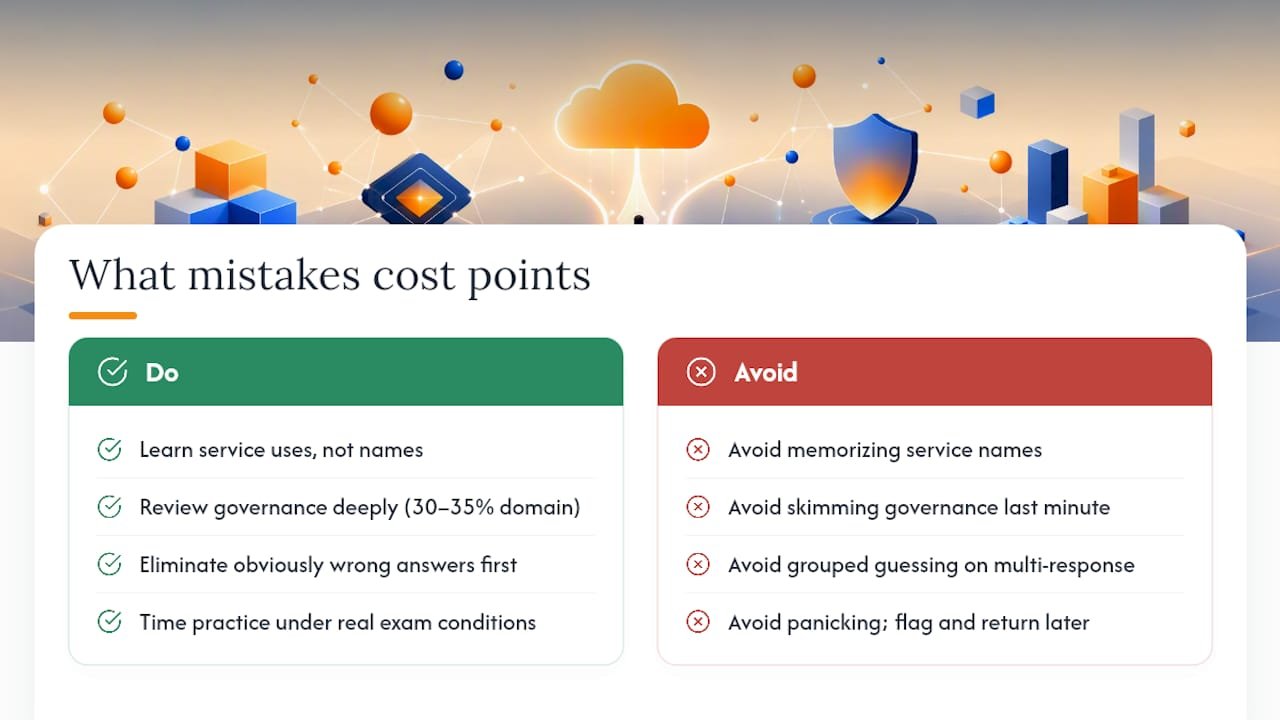
The single biggest mistake candidates make is memorizing service names instead of learning when to use each one. Azure Fundamentals questions frequently describe a business scenario and ask which service fits, not which service exists. If you can recite every compute option but can’t explain when a container beats a virtual machine, you’re not exam-ready yet.
The second mistake is treating governance as filler. Give Azure Policy versus RBAC, cost management tools, and the different deployment interfaces a full dedicated review session, not a five-minute skim the night before. This domain accounts for 30 to 35% of your score, and it’s where prepared candidates separate from unprepared ones.
On exam day itself, use elimination first: rule out obviously wrong answers before weighing what’s left. For multiple-response questions, evaluate each option independently, since these are scored all-or-nothing and grouped guessing rarely pays off. If a question feels ambiguous, flag it and move on. Coming back with fresh eyes after finishing easier questions often resolves confusion that panic created the first time through.
Pro Tip: Time yourself during practice sets exactly as you would on exam day. Candidates who train under artificial time pressure adapt far faster to real exam pacing than those who study without a clock running.
How Total Cyber Academy Approaches Hands-On AZ-900 Prep
Reading through learning paths only gets you so far. Some certification prep approaches lean on hands-on labs because scenario-based exams like AZ-900 reward decision-making, not recall. A learner who has actually provisioned a resource group, applied a policy, and watched RBAC deny an unauthorized action remembers that distinction far longer than one who only read about it.
Short, role-based prep windows, typically structured in multi-week blocks depending on background, can help close the gap between knowing a definition and applying it under exam pressure. A career changer starting from zero cloud exposure who works through structured labs alongside the Microsoft Learn material tends to reach that 80% practice benchmark faster than one relying on reading alone, simply because the concepts get reinforced through repetition and application rather than a single pass.
What the Research Actually Supports Here
Most AZ-900 advice online treats every candidate the same, recommending a flat two-week timeline regardless of background. That’s backward. The study-hour data shows a genuinely wide range, from roughly 3 hours for experienced cloud professionals to 50 hours for complete beginners, and pretending otherwise sets unrealistic expectations that lead to either wasted time or underprepared exam attempts.
The bigger gap in conventional advice is Domain 3. Most study guides mention governance and management almost as an afterthought, buried after flashier topics like compute and networking. That’s a mistake given its exam weight. If you take one thing from this plan, prioritize a dedicated governance review session over yet another pass through service names you’ve already memorized. Scenario reasoning, not vocabulary recall, is what separates a pass from a retake. Hands-on practice, whether through Microsoft’s own sandbox or structured lab work, builds that reasoning faster than reading ever will.
— Alden
Ready to Move From Study Plan to Job-Ready Skills?
A self-guided study plan gets you through AZ-900, but it stops at the certification. If your goal is an actual cloud career, not just a credential, Total Cyber Academy’s Cloud Engineer Program builds on that same skills-measured foundation with instructor-led guidance and hands-on labs that go past what any exam requires.

Where the study plan above gets you exam-ready, our programs are built to get you job-ready. Some training providers offer live mentorship from working cybersecurity and IT professionals paired with practical lab work, aiming to build skills that employers actually ask for. Our hands-on labs extend the sandbox habit you built studying for AZ-900 into real 30 to 90 day, role-based career paths. If you’re a veteran or career changer weighing your next move after certification, browse our full course catalog to see which on-demand or live course fits where you want to go next.
Sources
- Microsoft Certified: Azure Fundamentals – Certifications | Microsoft Learn
- Study guide for Exam AZ-900: Microsoft Azure Fundamentals | CertCompanion
- How to Pass AZ-900 on Your First Try | Azure Mastery
FAQ
How should I study for the AZ-900 exam?
Start with the Microsoft Learn AZ-900 learning paths to build vocabulary, then move to realistic scenario-based practice questions once the basics stick. Finish with timed full-length simulations and retake the official practice assessment until you consistently score 80% or higher.
How long does it take to study for Azure Fundamentals?
It depends heavily on your background: IT professionals with cloud experience often need 3 to 10 hours, IT professionals without cloud experience typically need 10 to 25 hours, and complete beginners commonly need 20 to 50 hours. Spread that time across one to six weeks depending on which range fits you.
Is AZ-900 difficult to pass?
AZ-900 is designed as an entry-level exam, and most candidates who follow a structured study plan and hit the 80% benchmark on practice tests pass on their first attempt. The exam trips people up most often when they memorize service names instead of learning when to apply each one, particularly in the management and governance domain.
Will AZ-900 increase your salary?
AZ-900 alone is unlikely to significantly move your salary since it’s an entry-level, foundational credential rather than a role-specific one. It works better as a stepping stone toward deeper cloud or cybersecurity training, such as Total Cyber Academy’s Cloud Engineer Program, which builds job-ready skills employers actively hire for.