
Complete beginners need 6 to 8 weeks of study at 1 to 2 hours a day; IT professionals can compress that to 3 to 4 weeks; cloud-adjacent candidates often need just 2 to 3 weeks. Every path funnels through the same starting point: create a free account on AWS Skill Builder and work through its Exam Prep Plan alongside the Official Practice Question Set. The target exam is AWS Certified Cloud Practitioner (CLF-C02), and the goal of any cloud practitioner study plan is consistent, verified readiness before you spend money on a registration fee.
TL;DR:
- Complete beginners should allocate 6 to 8 weeks, focusing on exam domains sequentially and with consistent review to build core understanding.
- IT professionals can prepare effectively in 3 to 4 weeks by mapping their existing knowledge to AWS terminology and focusing on key domains like security and billing.
- Cloud-adjacent candidates need only 2 to 3 weeks, emphasizing vocabulary mapping and targeted practice questions to identify gaps quickly.
- A balanced study session involves learning one goal, practicing 15 to 20 questions, and reviewing errors every few days to reinforce concepts and prevent recurring mistakes.
- Achieving two mock scores consistently above 85% in the final week indicates exam readiness, rather than relying on a single high mock result.
Table of Contents
- Which Cloud Practitioner Study Plan Timeline Fits Your Background?
- How Should You Structure Each Study Session?
- What Official AWS Resources Should You Use First?
- When Are You Actually Ready for the Exam?
- How Do You Book the Exam and What Happens on Test Day?
- What Should You Do After Getting Your Score Report?
- What Exam Topics Deserve the Most Study Time?
- What Mistakes Derail Cloud Practitioner Preparation?
- How Should You Study Based on Your Learning Style?
- Why This Study Plan Reflects How Total Cyber Academy Teaches
- Want Structured Instruction Instead of Studying Alone?
- Sources
- FAQ
Which Cloud Practitioner Study Plan Timeline Fits Your Background?
The right timeline depends less on how smart you are and more on how much AWS-specific vocabulary you’re carrying into week one. Study plans calibrated by experience level consistently outperform generic “study for a month” advice because they match effort to actual knowledge gaps rather than a fixed calendar.
Complete beginner: 6 to 8 weeks
If cloud computing is new territory, structure your weeks around exam domains rather than random topics.
- Weeks 1 to 2: Cloud Concepts and the shared responsibility model. Finish Cloud Practitioner Essentials on AWS Skill Builder.
- Weeks 3 to 5: Cloud Technology and Services. This is the largest domain, so give it the most calendar time. Build short notes on compute, storage, networking, and database services.
- Week 6: Security and Compliance, plus Billing, Pricing, and Support.
- Weeks 7 to 8: Full-length practice exams, error-log review, and targeted remediation.
IT professional: 3 to 4 weeks
If you already understand networking, operating systems, or general infrastructure, you’re translating existing knowledge into AWS terminology rather than learning concepts from scratch.
- Week 1: Cloud Concepts and service categorization (map what you know to AWS-specific names).
- Week 2: Security and Compliance, with focus on identity and access management.
- Week 3: Billing, Pricing, and Support, plus a first full mock exam.
- Week 4: Remediation and a second mock exam before booking.
Cloud-adjacent: 2 to 3 weeks
If you’ve touched Azure, Google Cloud, or general DevOps work, your compressed plan is mostly vocabulary mapping. Spend day one building a table that converts terms you already know into AWS equivalents, then move straight into practice questions to find gaps.
Whichever timeline you follow, build in buffer days. A missed session on a Tuesday shouldn’t derail the whole plan. Reserve one weekend day every two weeks purely for catch-up, and don’t add new material during that session. If you’ve used a similar experience-based pacing model before, the Azure Fundamentals study plan follows a comparable structure and can serve as a useful pacing reference.
How Should You Structure Each Study Session?
A good session has a repeatable shape, not a random scroll through notes. AWS itself recommends learning one objective, explaining it in your own words, then testing it with scenario questions before moving on.
Break each session into three blocks:
- 30 to 40 minutes: New material tied to one exam-guide objective.
- 20 to 30 minutes: Practice questions, ideally 15 to 20 per session, pulled from official or reputable third-party sets.
- 10 to 15 minutes: Review misses and log every guessed or wrong answer.
The error log is where most study plans quietly fall apart, because a high mock score can mask the same conceptual gap repeating five different ways. Classify every miss into one of five buckets: terminology confusion, service matching, shared responsibility misunderstanding, pricing model errors, or careless reading. A terminology miss means you reread the glossary term; a pricing miss means you rebuild the cost comparison table for that service family.
Pro Tip: Revisit your error log every three or four days instead of only at the end of the week. Spaced review catches the same mistake before it hardens into a habit.
What Official AWS Resources Should You Use First?
Four resources cover almost everything you need, and piling on more than that usually slows you down instead of speeding you up. AWS Skill Builder is the hub: it hosts a free Official Practice Question Set, a two-hour Exam Prep course, Cloud Practitioner Essentials, and Builder Labs.
- AWS Skill Builder — free registration, the central platform for everything below.
- Cloud Practitioner Essentials — the foundational course covering all four exam domains.
- Official Practice Question Set — a free 20-question set that mirrors real exam phrasing.
- Official Practice Exam — a paid, full-length 65-question mock that closely simulates test-day timing and difficulty.
- AWS Builder Labs — guided, sandboxed hands-on exercises that avoid the billing risk of an open AWS Free Tier account.
If you do use a personal AWS account for extra practice, set a billing alert immediately and delete every resource after each exercise. Save the paid Official Practice Exam for the final one to two weeks; treat a low score there as a map of remaining gaps, not a verdict on your readiness.
When Are You Actually Ready for the Exam?
Readiness isn’t a feeling. It’s a score pattern you can measure.
- Take your first full-length mock only after covering all four core domains, not before.
- In the final week, complete two full 65-question timed mocks under real exam conditions.
- Treat 85% or higher, consistently across mocks, as your minimum signal to book the exam.
- After each mock, pull the domain breakdown and identify your two weakest areas.
- Drill targeted question sets against those two domains specifically, rather than re-taking the same full mock repeatedly.
One strong mock score doesn’t mean you’re ready. Two consistent scores above 85%, with a shrinking error log, does.
How Do You Book the Exam and What Happens on Test Day?
The Cloud Practitioner exam runs 65 questions in 90 minutes, booked through Pearson VUE at a test center or through online proctoring. Confirm the current registration fee on AWS’s site before booking, since pricing changes periodically.
- Bring an acceptable government-issued photo ID; check Pearson VUE’s exact requirements before test day.
- Arrive early for a test center, or run the required system check well ahead of time for online proctoring.
- Review AWS’s testing policies on candidate conduct so nothing on test day surprises you.
- If you don’t pass, AWS requires a 14-calendar-day waiting period before retaking, and you’ll pay the full fee again.
Use the post-exam score report, whether you pass or fail, to guide exactly what comes next.
What Should You Do After Getting Your Score Report?
Passing and failing both come with a clear next move.
- If you pass: add the credential to your profile, pick a role-specific next certification, and build one or two small hands-on projects to lock in what you learned.
- If you fail: pull the domain breakdown from your score report and build a two-week remediation plan targeting only your weakest one or two domains before you retake.
- Either way: keep hands-on projects small and specific. A single guided lab reinforcing one service beats an open-ended project that racks up unexpected costs.
What Exam Topics Deserve the Most Study Time?
The CLF-C02 exam guide breaks the exam into four weighted domains, and those percentages should directly shape your calendar, not just your reading order.
Many beginners pour all their energy into memorizing service names and treat security as an afterthought, then get blind sided by shared responsibility questions on test day. For each service in scope, build a short note covering the problem it solves, its category, one common use case, a key security point, and a brief cost implication. That habit turns memorization into pattern recognition, which is what the exam is actually testing.
What Mistakes Derail Cloud Practitioner Preparation?
The biggest misconception is treating this as a technical exam about how to configure services. It’s closer to a business-and-concepts exam about knowing which service solves which problem and understanding AWS’s shared responsibility model. Candidates who spend weeks in the console tweaking EC2 settings often score worse than those who spent the same time building comparison notes and drilling scenario questions.
A second common trap is chasing a high score on the free 20-question Official Practice Question Set and assuming that means exam-ready. That set is a feedback tool meant to expose conceptual gaps through its explanations, not a predictor of your final score. Read every explanation, including on questions you got right, since the reasoning often reveals a service distinction you got lucky on rather than actually understood.
Resource sprawl is the third failure mode. Collecting five video courses, three question banks, and a dozen blog posts feels productive but fragments your attention. Protecting the final study stretch means narrowing down to one exam guide, one foundational course, the official question sets, your error log, and a small set of targeted labs. Everything else is noise competing for the same 1 to 2 hours a day.
Finally, don’t confuse familiarity with mastery. Recognizing a service name when you see it is different from correctly identifying it as the right answer among four plausible-sounding distractors, which is exactly how CLF-C02 questions are built.
How Should You Study Based on Your Learning Style?
Cloud Practitioner Essentials and Skill Builder’s video content work well if you absorb information best through watching and reading, but pairing that with active output matters more than the format itself.
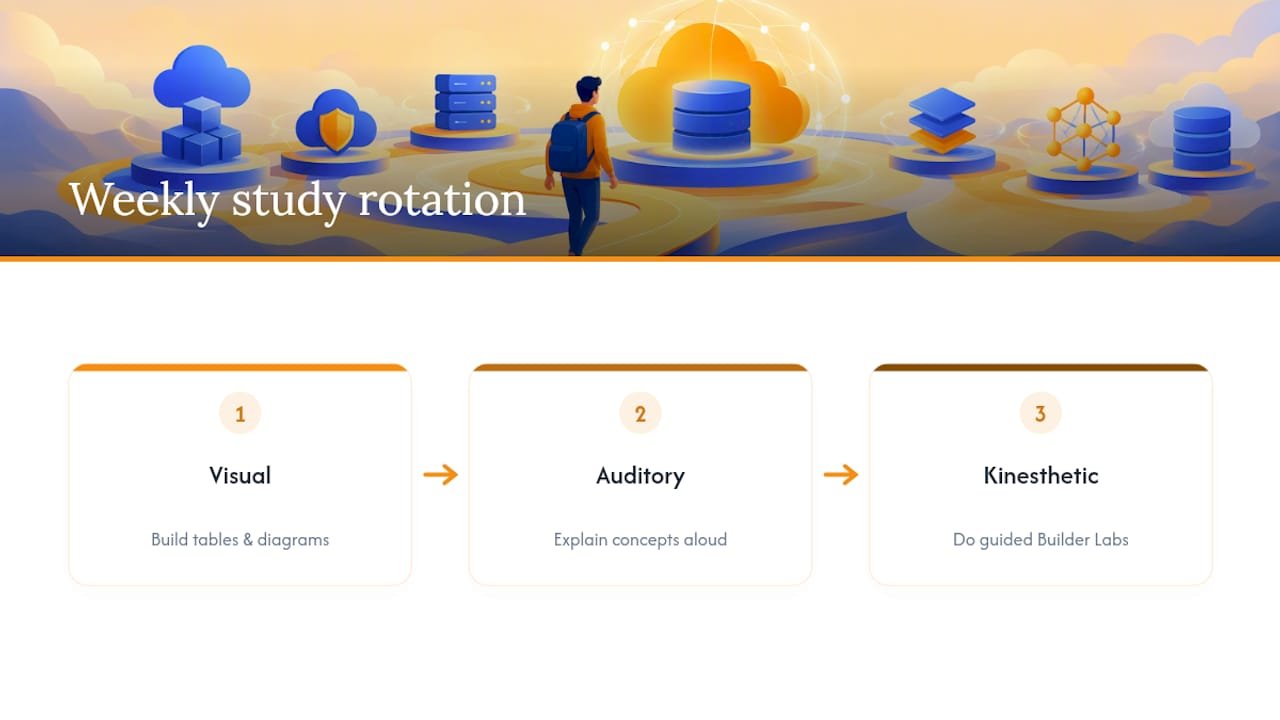
Visual learners benefit from building their own service-comparison tables and diagrams rather than only consuming pre-made ones. Sketch the shared responsibility model by hand, splitting it into what AWS manages versus what you manage. Redrawing it yourself cements the split far better than rereading someone else’s diagram.
Auditory learners get real value from talking through concepts out loud, not just listening to course narration. After finishing a lesson on IAM, explain the difference between a role and a policy out loud as if teaching someone else. If you stumble explaining it, that’s your error log flagging a gap before a practice question does.
Kinesthetic learners need Builder Labs more than anyone else in this list. Reading about S3 storage classes is abstract; actually creating a bucket, applying a lifecycle policy, and watching the console reflect that change makes the concept concrete. Guided labs work better here than open-ended Free Tier exploration, since they keep the hands-on time focused on exam-relevant tasks instead of unrelated troubleshooting.

Most candidates are some blend of all three, and the strongest cloud fundamentals study plan mixes all three modes across a single week rather than picking one and ignoring the rest.
Why This Study Plan Reflects How Total Cyber Academy Teaches
Some training organizations focus on hands-on labs and mentor support to complement video content in cybersecurity and IT certification prep. The structured session format and error-log habit outlined here mirror how our instructors already run cybersecurity and IT certification prep: fixed session blocks, guided labs instead of open-ended exploration, and direct feedback on the mistakes that actually predict exam failure.
— Alden
Want Structured Instruction Instead of Studying Alone?
Some programs offer a fixed schedule, live instructor feedback, and lab cleanup guidance as an alternative to self-guided study and fragmented resources.
The timelines above work well for disciplined self-study, but if you’d rather have a mentor answer questions the moment you hit a wall, our on-demand and live course formats follow the same structured-session philosophy: focused learning blocks, hands-on labs with proper cleanup guidance, and direct instructor feedback instead of guesswork. Whether you’re starting from zero or coming from an adjacent IT role, our course catalog covers certification prep across cybersecurity and cloud tracks, and our Cloud Engineer Program is built for readers who want a longer path beyond a single exam. Check the current course lineup and enroll when you’re ready to add live mentorship to your study plan.
FAQ
How long should a cloud practitioner study plan take?
It depends on your background: complete beginners typically need 6 to 8 weeks, IT professionals can often finish in 3 to 4 weeks, and cloud-adjacent candidates may need only 2 to 3 weeks. All three timelines assume roughly 1 to 2 hours of daily study.
What score should I hit on practice exams before booking?
A single high score isn’t a reliable signal; look for that result to repeat.
What happens if I fail the Cloud Practitioner exam?
AWS requires a 14 calendar day waiting period before you can retake the exam, and you’ll pay the full registration fee again for each attempt. Use your domain-level score breakdown to build a focused two-week remediation plan before scheduling the retake.
Do I need hands-on AWS console experience to pass?
Hands-on practice helps but isn’t the primary focus of this exam, since CLF-C02 tests concepts and service positioning more than configuration skills. Guided Builder Labs offer safer, more exam-relevant practice than open-ended exploration in a personal AWS account.
Which official AWS resource should I start with?
Start with AWS Skill Builder’s Exam Prep Plan, which bundles Cloud Practitioner Essentials, the Official Practice Question Set, and guided labs in one place. If you want an instructor-backed alternative that follows the same structure, Total Cyber Academy’s AWS Cloud Practitioner overview maps study plans to the same official objectives with added mentor support.